
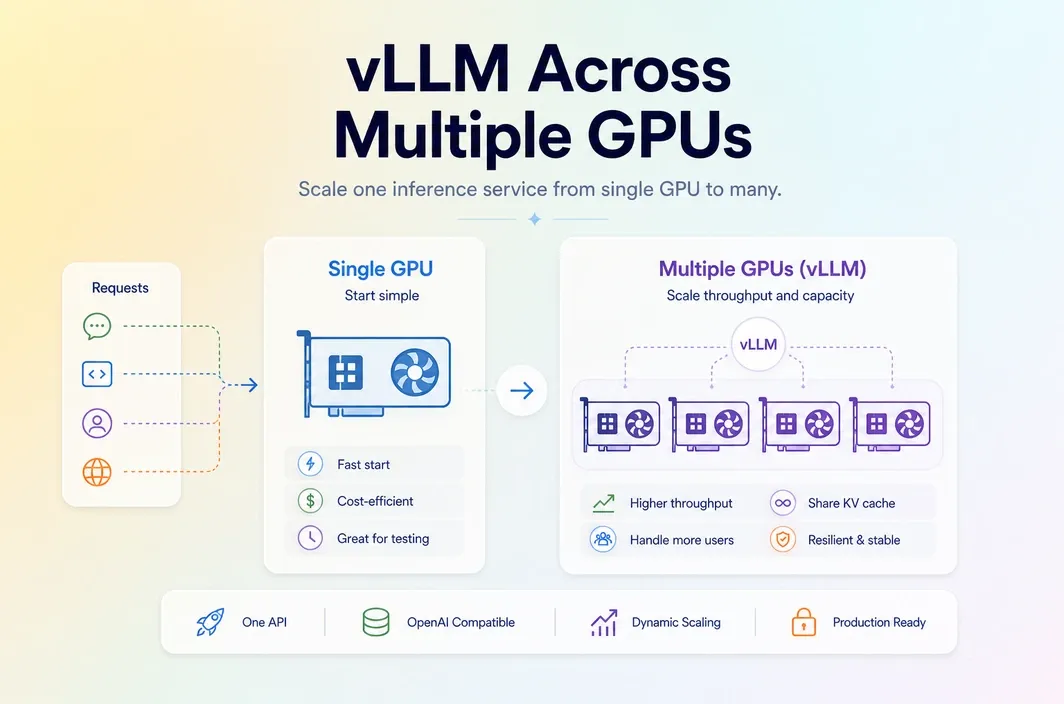
Key Takeaways
- Most teams searching
vLLM serve multiple GPUsare not only asking how to turn multi-GPU serving on. They are asking when multi-GPU serving is actually worth the added complexity. - The right time to scale beyond one GPU usually comes from model size, memory pressure, concurrency, or latency targets rather than a generic desire to “use more hardware.”
- A good deployment guide should explain both the scaling path and the failure modes, because multi-GPU serving can add orchestration cost without fixing the real bottleneck.
- RunC.ai is relevant when a team wants to move from one-GPU testing to a more repeatable multi-GPU pod workflow without rebuilding the entire serving environment.
Introduction
It is easy to treat vLLM serve multiple GPUs as a command-line question. In reality, it is usually a deployment decision. A team reaches this point because a single GPU is no longer enough for the model, the traffic pattern, or the latency goal. That difference matters. If the real bottleneck is not GPU count, multi-GPU serving can add coordination overhead while leaving the actual problem untouched. A larger single GPU, a different batching strategy, or a cleaner deployment model may solve more than simply spreading work across multiple devices.
So the better question is not just “how do I serve vLLM on multiple GPUs?” It is “what pressure are we solving, and what is the cleanest way to solve it?” That framing is important for search intent too. People do not usually search this keyword because they want abstract infrastructure theory. They search it because a service that worked in testing has reached a limit, and now they need a practical next step that does not create a new mess.
When Single-GPU vLLM Stops Being Enough
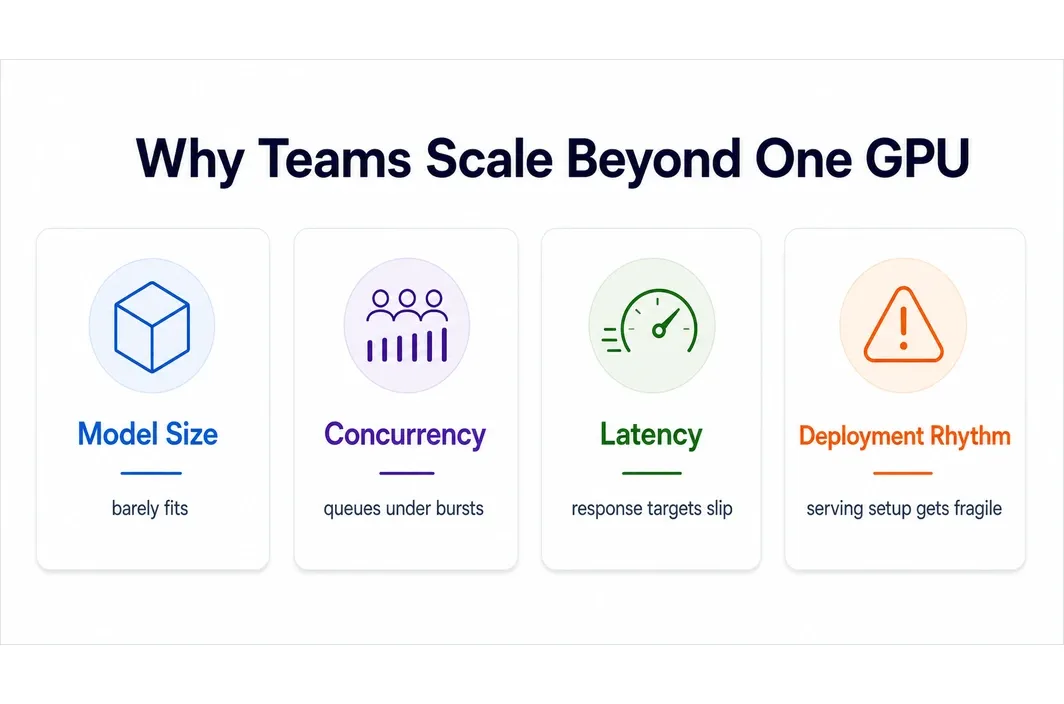
Single-GPU serving usually becomes limiting in four situations. The first is model size. If the model, context window, or runtime overhead no longer fits comfortably on one card, scale-up pressure becomes real. The second is concurrency. A service that was fine for testing may start to queue too much once real traffic arrives. The third pressure is latency. Some teams are not running out of memory but are missing response targets under heavier request bursts. The fourth is operational rhythm. Once the same inference service is becoming a real product surface, the team may need a more stable deployment pattern than an ad hoc single-instance setup.
That does not mean multi-GPU is always the answer. It means you should identify which of those four conditions is actually driving the change. This is also where teams should be careful not to confuse scale with maturity. A service can need more GPU headroom without yet needing the most complex serving topology. Sometimes the right next step is simply a better-fit GPU tier or a more disciplined persistent environment.
| Symptom | What it usually means |
|---|---|
| Model barely fits or does not fit | Memory pressure is the main issue |
| Requests queue during bursts | Throughput or concurrency is the issue |
| Latency degrades under load | Scheduling, batching, or scale design may need work |
| Serving setup keeps getting rebuilt manually | Deployment model is becoming the bottleneck |
| ## The Main Ways to Serve vLLM Across Multiple GPUs |
At a high level, multi-GPU vLLM serving usually means moving from a one-card environment into a multi-device serving layout where the model and workload can use more aggregate hardware. The exact runtime approach should be verified against the official vLLM documentation at draft-finalization time, because serving patterns and supported flags can evolve. For the article, the more useful explanation is operational. Multi-GPU serving is not just “add another card.” It usually changes:
- model placement
- container design
- deployment reproducibility
- observability needs
- failure handling That is why many teams hit a second problem immediately after solving the first one. They get more hardware headroom, but also a more fragile serving stack. For a production-facing article, this section should eventually include one concise official-doc-backed explanation of the current multi-GPU serving path in vLLM, but it should still stay readable. The goal is not to reproduce documentation. It is to help the reader understand what changes operationally when serving grows beyond one GPU.
What Breaks First in Multi-GPU vLLM Deployments
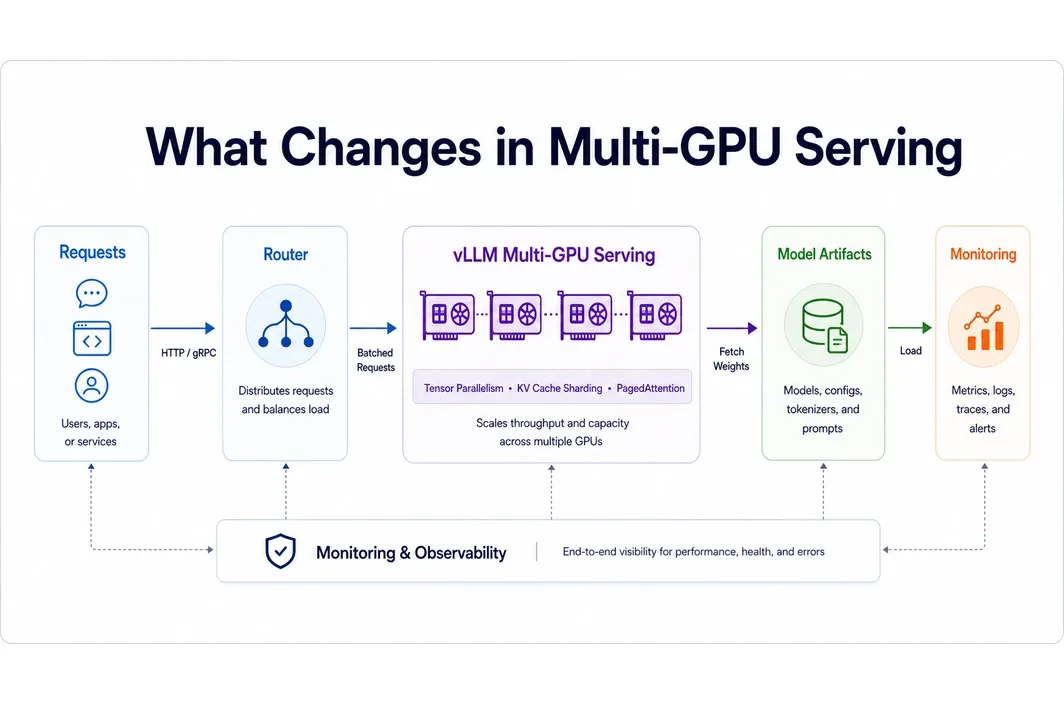
The first thing that often breaks is not raw serving. It is clarity. Teams add GPUs, but they do not always know whether the service was memory-bound, throughput-bound, or simply under-observed. The second issue is startup and artifact handling. Large model weights, container images, and environment rebuilds become more painful as the setup grows. That makes persistence and shared storage more important than they looked in the single-GPU phase.
The third issue is operational asymmetry. Once several GPUs are involved, debugging gets harder, rollout confidence matters more, and one-off manual fixes become less sustainable. Another issue is that parallel serving can hide inefficiency for a while. More GPUs may restore headroom, but they can also hide suboptimal batching, weak observability, or a deployment pattern that would have benefited from cleanup before scale-out. That is one more reason the article should keep steering the reader toward diagnosis first.
This is where a lot of technically correct tutorials stop short. They explain how to scale, but not when the serving architecture itself needs to become more disciplined.
When a Multi-GPU Pod Is Better Than Ad Hoc VM Assembly
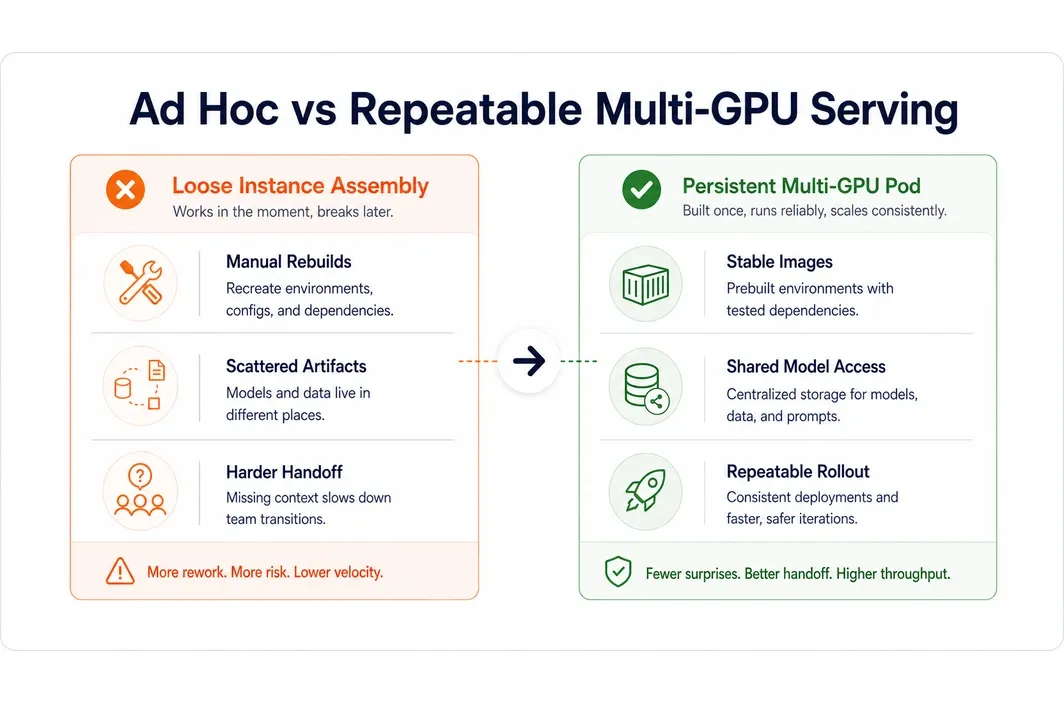
Once vLLM serving becomes repeatable team infrastructure, a persistent multi-GPU pod is often cleaner than assembling the environment in a loose VM-by-VM style every time. The reason is not abstract elegance. It is operational reuse. A pod-based setup helps when the same service needs stable images, persistent artifacts, consistent model access, and easier handoff between developers. It also makes it easier to think of serving as a maintained product surface instead of a clever one-machine setup that only one person fully understands.
This is especially relevant for teams that are between experimentation and full platform engineering maturity. They need more stability than ad hoc infrastructure, but not necessarily the heaviest enterprise stack. In other words, the real upgrade is not just “more GPUs.” It is “more repeatable serving.” That is a much better way to frame the infrastructure decision for teams that are moving from experimentation into actual product operations.
How RunC.ai Fits vLLM Scale-Up Workflows
RunC.ai fits naturally when the team wants to move from one-GPU vLLM testing into a steadier multi-GPU serving path. GPU Pods are the clearest product angle here because they align with persistent inference environments, repeated deployment, and shared model artifacts. The platform story gets stronger when the workflow depends on reusable images, storage consistency, or moving across different GPU tiers while testing where the bottleneck really is. Shared Network Volumes matter because model weights and supporting assets are part of the serving workflow, not a side detail.
This is a better integration point than a generic “RunC supports AI inference” paragraph. The real value is in helping teams scale serving without turning every infrastructure change into a fresh rebuild. That recommendation is also much more believable to a technical reader. It respects the fact that the user is not buying “AI cloud” in the abstract. They are trying to keep a serving stack stable while changing its scale characteristics.
For this keyword, that is the real commercial handoff. Once multi-GPU serving becomes a recurring operational pattern, the buyer stops thinking in isolated commands and starts thinking in maintained environments. That is where infrastructure fit matters much more than one clever launch configuration.
FAQ
- Do I need multiple GPUs for vLLM or just a larger single GPU?
If the main issue is model fit, a larger single GPU may be the simpler answer. If the problem is concurrency or larger serving scale, multi-GPU architecture may be more appropriate.
- What is the first bottleneck to check before scaling vLLM across GPUs?
Check whether the service is memory-bound, throughput-bound, or latency-bound. Without that diagnosis, more GPUs can add complexity without solving the right problem.
- How do I know whether my workload is memory-bound or throughput-bound?
If the model barely fits or context size is the core issue, memory is likely the driver. If the model fits but request traffic overwhelms the service, throughput is usually the better lens.
- When is a multi-GPU pod more practical than stitching together separate instances?
It becomes more practical when the same serving environment is being reused by a team, not just tested once. At that point, persistence and reproducibility matter more.
Conclusion
Scaling vLLM across multiple GPUs should be the result of a clear serving pressure, not a default optimization reflex. Start by identifying whether the service is blocked by model size, concurrency, or deployment instability. Then choose the lightest infrastructure step that removes that bottleneck cleanly. If your team is moving from single-GPU testing to a more durable inference workflow, that is where a repeatable RunC.ai GPU Pod environment becomes much more useful than an ad hoc scale-up approach.

Member discussion: