
Key Takeaways
- The best GPU cloud for Stable Diffusion is usually the setup that balances VRAM, hourly cost, storage, and launch speed, not simply the most expensive GPU available.
- For many SDXL, Flux-style, LoRA, and ComfyUI workflows, an RTX 4090 cloud pod is the practical default because 24GB VRAM covers many serious image-generation tasks at a lower cost than data center GPUs.
- A100 and H100 instances make more sense when your workflow is memory-bound, batch-heavy, training-focused, or tied to production throughput requirements.
- Cloud GPUs are often easier than local hardware when your Stable Diffusion work is bursty, experimental, client-based, or project-driven.
- RunC.ai is a strong option for cost-conscious Stable Diffusion users because it combines RTX 4090 GPU Pods, pay-as-you-go billing, ComfyUI and SD-webUI image signals, Network Volumes, and global GPU infrastructure.
Stable Diffusion can run on a local machine, a hosted creative tool, or a dedicated cloud GPU. The hard part is not finding a GPU. The hard part is choosing a setup that fits your workflow without burning money on idle hardware, oversized instances, or repeated environment setup.
That is why the search for gpu cloud for stable diffusion usually comes down to a practical infrastructure question: how much GPU power do you need, how often do you need it, and how much control do you want over models, nodes, storage, and runtime?
For many creators, developers, and AI teams, the answer is not a premium data center GPU on day one. It is a reliable RTX 4090 cloud pod that can run SDXL, ComfyUI, LoRA experiments, and many image-generation workflows with enough VRAM and a more manageable hourly cost.
What Stable Diffusion Needs From a Cloud GPU
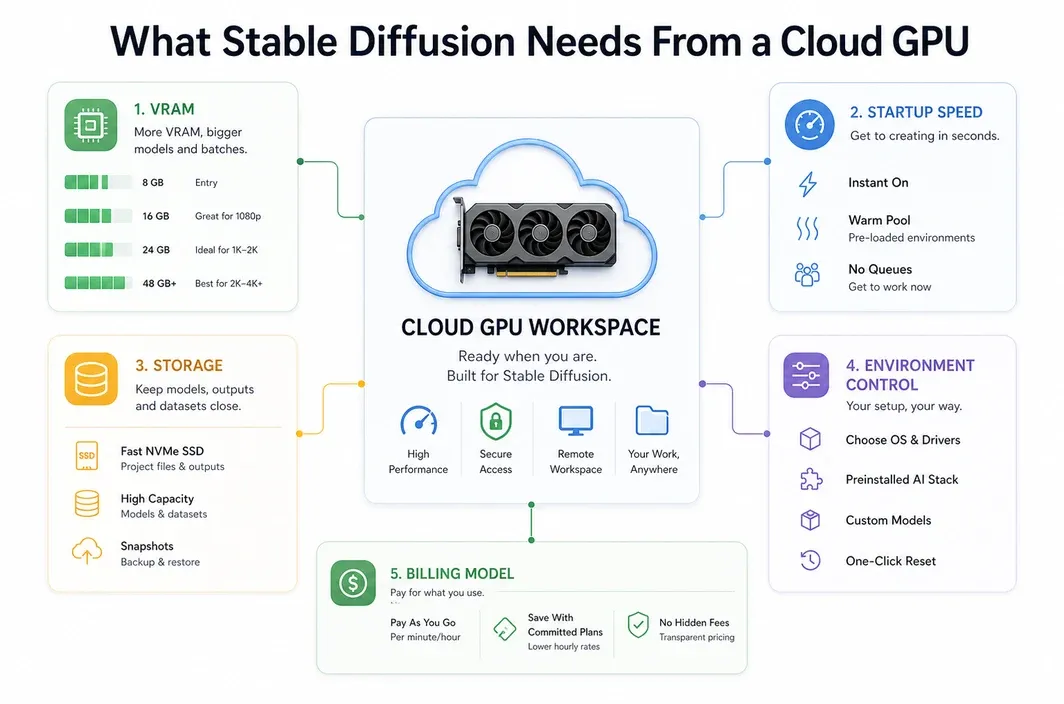
Stable Diffusion performance depends on more than raw GPU speed. A useful cloud setup needs enough VRAM, a clean CUDA environment, enough disk space for checkpoints and LoRAs, and a way to keep your workflow stable across sessions.
The exact requirements change depending on what you run. A simple SD 1.5 workflow is much lighter than an SDXL pipeline with ControlNet, upscalers, custom nodes, and multiple loaded models. Flux-style and video-adjacent workflows can push memory and storage even harder.
| Requirement | Why It Matters for Stable Diffusion |
|---|---|
| VRAM | Determines whether larger models, higher resolutions, ControlNet, batching, and complex workflows can run smoothly. |
| Storage | Checkpoints, LoRAs, VAEs, embeddings, and custom nodes can quickly consume tens or hundreds of GB. |
| Startup speed | Fast instance startup helps when you rent GPUs only for active generation sessions. |
| Environment control | ComfyUI, SD-webUI, extensions, and custom dependencies often need a reproducible runtime. |
| Billing model | Hourly or pay-as-you-go billing matters when workloads are intermittent rather than constant. |
| Region and latency | Browser-based UIs and team workflows feel better when the GPU is closer to the user or production system. |
This is also why a basic hosted image generator is not the same as a GPU cloud pod. Hosted tools are convenient, but they may limit model choice, custom node installation, storage control, automation, or workflow portability. For a broader market-pattern reference, see this Stable Diffusion GPU cloud guide. A GPU pod gives you more responsibility, but also more room to tune the stack.
If you are only generating occasional images from a web UI, a managed creative platform may be enough. If you are building repeatable ComfyUI workflows, testing LoRAs, running client projects, or automating generation pipelines, a dedicated GPU cloud for Stable Diffusion becomes much more attractive; related ComfyUI users can also compare options in our best cloud GPU for ComfyUI guide.
Why RTX 4090 Is the Practical Default for Stable Diffusion
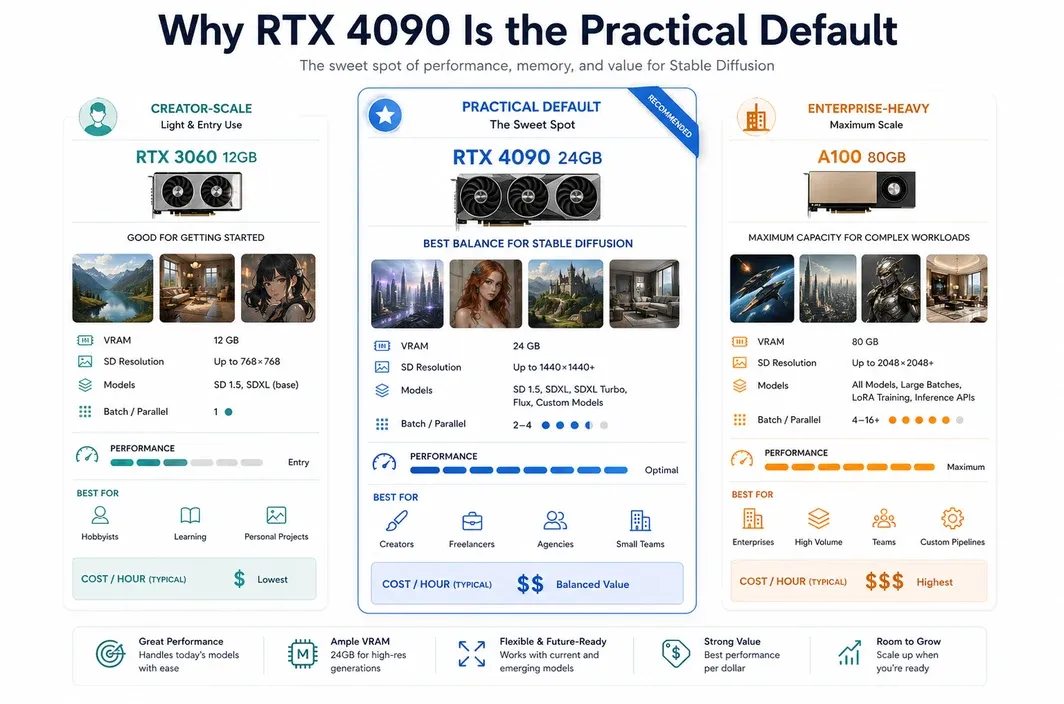
For most serious Stable Diffusion users, the RTX 4090 is the most practical starting point in the cloud. It gives you 24GB of VRAM, strong image-generation performance, and a cost profile that is usually easier to justify than jumping directly into A100 or H100 pricing.
The key point is not that the RTX 4090 is the biggest GPU. It is that many Stable Diffusion workloads do not need the biggest GPU. They need enough VRAM to avoid constant out-of-memory issues, enough speed to keep iteration fluid, and low enough cost that experimentation still feels affordable.
RunC.ai's own RTX 4090 and ComfyUI materials position the RTX 4090 as a strong fit for AIGC workloads, including Stable Diffusion 1.5, SDXL, Flux Kontext, and other creator-oriented model types. RunC's public homepage also shows RTX 4090 pricing at $0.42/hr, with GPU Pods designed for persistent workloads and iterative development.
| Workload | Practical GPU Direction | Reason |
|---|---|---|
| SDXL image generation | RTX 4090 cloud pod | 24GB VRAM is a strong fit for many high-resolution image workflows. |
| ComfyUI with custom nodes | RTX 4090 cloud pod | Good balance of VRAM, speed, and environment control. |
| LoRA experimentation | RTX 4090 cloud pod first | Often enough for creator-scale training and testing before moving to larger GPUs. |
| Flux-style image workflows | RTX 4090 cloud pod, then upgrade if memory-bound | Fits many workflows, but heavier pipelines may need more VRAM. |
| Large batch production | A100 or H100 when justified | More useful when throughput, memory, or production economics demand it. |
This makes the RTX 4090 a good default recommendation for cost-aware users. It is powerful enough to avoid the limitations of small local GPUs, but it does not force you into the cost tier of enterprise training hardware.
For RunC.ai specifically, the RTX 4090 angle also fits the product shape. GPU Pods are designed for dedicated resources and iterative workloads. That matters for Stable Diffusion because image generation is rarely just one command. It is usually a cycle of model loading, prompt testing, node tuning, batch generation, and revision.
When A100 or H100 Makes Sense Instead
A100 and H100 GPUs are powerful, but they are not automatically the best choice for Stable Diffusion. For many image-generation workflows, they are more GPU than the job needs. The upgrade starts to make sense when your bottleneck is memory, scale, or production throughput rather than normal prompt iteration.
Choose a higher-memory GPU when your workflow repeatedly hits VRAM limits, uses larger model stacks, runs large batches, or combines image generation with heavier training or inference tasks. This is common in teams that are building internal generation systems, automated content pipelines, or more complex multimodal workflows.
| Scenario | Why A100 or H100 May Make Sense |
|---|---|
| Very large batches | Higher-memory GPUs can support larger batch sizes and heavier concurrent workloads. |
| Memory-bound pipelines | More VRAM helps when model combinations exceed the comfortable range of a 24GB GPU. |
| Training-heavy workflows | Fine-tuning, larger LoRA runs, or adjacent model work may justify data center GPUs. |
| Production throughput | If the GPU is kept busy and output volume matters, higher hourly cost can be rational. |
| Mixed AI workloads | Teams that also run LLM or multimodal workloads may need A100 or H100 flexibility. |
The safer way to frame the decision is simple: start with the GPU that clears your current bottleneck. If the bottleneck is cost and setup friction, RTX 4090 is often the right cloud starting point. If the bottleneck is memory or sustained production throughput, A100 or H100 may be worth evaluating.
RunC.ai's public pricing signals show a clear spread between RTX 4090, A100 80GB, and H100 80GB options. That spread is useful for planning because it turns the GPU decision into an economic question, not a spec-sheet contest.
Cloud GPU vs Local GPU for Stable Diffusion
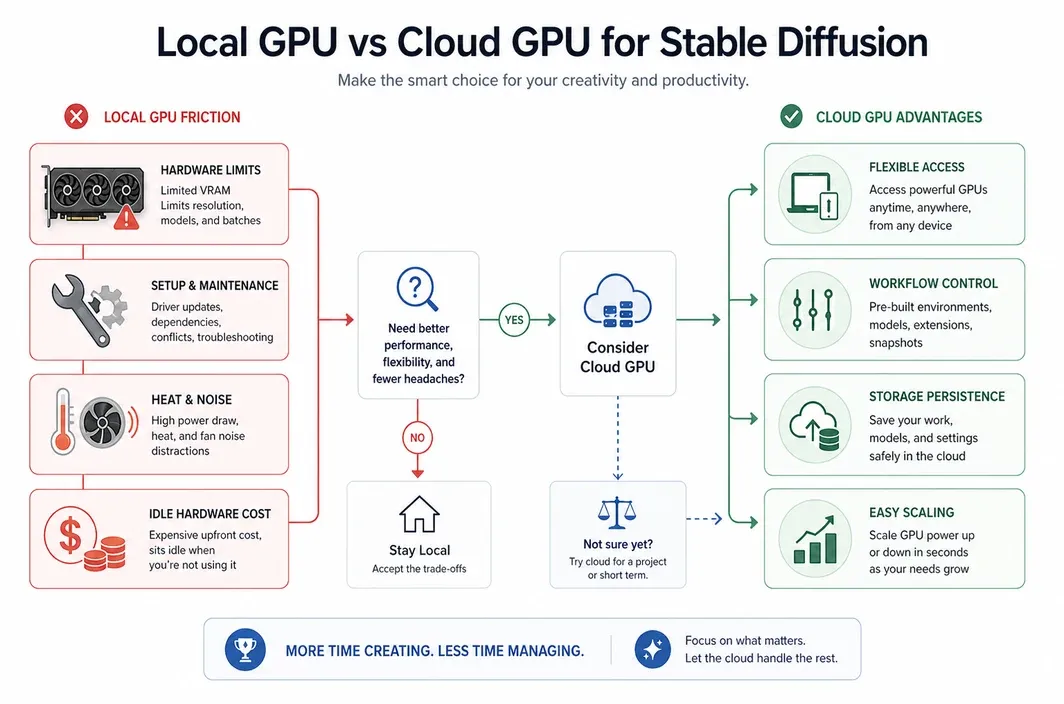
Local hardware can be excellent if you generate images every day, need offline control, and are comfortable maintaining a workstation. You own the machine, keep the data close, and avoid hourly rental costs once the hardware is paid for.
But local hardware also has hidden costs. A serious Stable Diffusion workstation needs a high-end GPU, strong power delivery, cooling, enough RAM, fast storage, maintenance time, and a room where heat and noise are acceptable. If you only generate in bursts, the GPU can sit idle for long periods while its purchase cost remains fixed.
Cloud GPU access changes that equation. You pay for active work, scale up when a project needs more power, and avoid owning hardware that may not match your next workflow. This is especially useful for creators and small teams that alternate between experimentation, client work, and quiet periods.
| Situation | Better Fit | Why |
|---|---|---|
| Occasional image generation | Cloud GPU | Avoids buying expensive hardware for intermittent use. |
| Client-based creative projects | Cloud GPU | Rent more power during project windows, then stop paying when done. |
| Daily offline generation | Local GPU | Ownership can make sense when utilization is high and privacy needs are strict. |
| Team workflows | Cloud GPU | Easier to share infrastructure, standardize environments, and access GPUs remotely. |
| Fast experimentation | Cloud GPU | Try stronger GPUs without committing to a workstation build. |
For many users, the real question is not "cloud or local forever?" It is "which option matches this stage of my workload?" You might use cloud GPUs while learning, testing, or scaling a project, then decide later whether local hardware is worth owning.
Why RunC.ai Fits Cost-Conscious Stable Diffusion Workflows
RunC.ai is most relevant in this article when your Stable Diffusion workflow has already outgrown a simple hosted app, but you still do not want the friction of owning and maintaining local hardware.
The practical fit is not just "RunC has these features." It is that the platform lines up with the exact failure points many Stable Diffusion users hit after the first few experiments. Checkpoints get large, ComfyUI environments become messy, LoRA and model files need to persist, and bursty generation sessions make idle hardware feel wasteful.
That is where the product fit becomes more concrete:
- A dedicated RTX 4090 GPU Pod is a strong match when you want SDXL-class performance without jumping straight to data-center GPU pricing.
- Network Volumes make more sense once you are reusing model files, workflows, and assets across sessions instead of rebuilding the same workspace each time.
- Template and image support matter when your goal is to get into ComfyUI or SD-webUI faster, not spend half the session reconstructing the environment.
- Usage-based billing matters when generation work is project-driven, client-driven, or intermittent rather than constant.
So the strongest case for RunC.ai is not "here is a generic GPU vendor for AI." The stronger case is narrower: it is a good fit for creators, freelancers, and small teams that want a repeatable Stable Diffusion workspace with RTX 4090-class performance, persistent assets, and less local-machine overhead.
If that is the workflow you are trying to build, the next useful step is to deploy a GPU Pod and choose the GPU, storage, and environment around the actual generation pipeline you plan to reuse.
How to Choose Your Stable Diffusion Cloud Setup
The best GPU cloud for Stable Diffusion depends on workflow shape. A beginner testing prompts, a ComfyUI creator managing custom nodes, and a team building a production image pipeline should not choose infrastructure in the same way.
Use the decision table below as a starting point.
| User Scenario | Recommended Setup | Why |
|---|---|---|
| Learning Stable Diffusion | Managed app or simple GPU pod | Keep setup friction low while you learn models and prompts. |
| Serious ComfyUI creator | RTX 4090 GPU Pod | Balances VRAM, speed, custom nodes, and cost control. |
| SDXL or Flux-style image workflow | RTX 4090 GPU Pod | Strong default for many 24GB-compatible image pipelines. |
| LoRA testing and creator-scale training | RTX 4090 first, upgrade if memory-bound | Start cost-effectively before paying for larger GPUs. |
| Production batch generation | A100 or H100 if utilization supports it | Higher cost can make sense when throughput drives revenue. |
| Team or agency workflow | Cloud GPU with persistent storage | Easier to standardize environments and avoid local hardware bottlenecks. |
The most common mistake is choosing hardware by prestige. Stable Diffusion rewards practical matching. If your bottleneck is setup time, choose a template-friendly environment. If your bottleneck is repeated downloads, prioritize persistent storage. If your bottleneck is VRAM, upgrade the GPU. If your bottleneck is cost, avoid paying for idle hardware.
For many users, that path starts with an RTX 4090 cloud pod and only moves upward when the workload proves it needs more.
FAQ
What is the best GPU cloud for Stable Diffusion?
The best GPU cloud for Stable Diffusion is the one that gives you enough VRAM, reliable storage, reasonable pricing, and control over your workflow. For many SDXL, ComfyUI, and Flux-style users, an RTX 4090 cloud pod is the practical default.
Is RTX 4090 enough for Stable Diffusion?
Yes, RTX 4090 is enough for many Stable Diffusion workflows because its 24GB VRAM can support a wide range of SDXL, ComfyUI, and creator-scale image-generation pipelines. Heavier workflows may still need A100 or H100, especially when memory or production throughput becomes the bottleneck.
Should I use A100 or H100 for Stable Diffusion?
Use A100 or H100 when your Stable Diffusion workflow is memory-bound, batch-heavy, training-focused, or part of a larger production system. For normal image generation and prompt iteration, these GPUs can be more expensive than necessary.
Is cloud GPU cheaper than buying a GPU for Stable Diffusion?
Cloud GPU can be cheaper when your workload is intermittent, project-based, or experimental because you avoid paying for idle local hardware. Buying a local GPU can make sense when you generate heavily every day, need offline control, and are ready to manage power, cooling, storage, and maintenance.
Can I run ComfyUI for Stable Diffusion on a cloud GPU?
Yes. ComfyUI is one of the most common reasons to use a cloud GPU for Stable Diffusion. A dedicated GPU pod gives you more control over custom nodes, model files, workflows, and storage than many closed hosted tools.
Conclusion
Choosing a GPU cloud for Stable Diffusion is really about matching infrastructure to the way you create. If you are experimenting, building ComfyUI workflows, testing LoRAs, or running SDXL-style image generation, an RTX 4090 cloud pod is often the most practical starting point.
A100 and H100 are still valuable, but they should be treated as upgrade paths for heavier workloads, not default choices for every Stable Diffusion user. Start with the GPU that solves your actual bottleneck, then scale when the workload proves it needs more.
For cost-conscious creators and AI teams, RunC.ai is worth evaluating when the goal is a reusable Stable Diffusion workspace rather than a generic rented GPU. If you want cloud GPU power without maintaining a local workstation, start with the workflow you actually need to preserve, then choose the pod, storage, and runtime that support it.

Member discussion: