
Key Takeaways
- For most ComfyUI image workflows, the best cloud GPU for ComfyUI is usually an
RTX 4090because it offers strong performance without pushing you into data center GPU pricing. - Managed ComfyUI cloud platforms are easier to start with, but dedicated GPU pods usually give you more control over custom nodes, models, storage, and workflow tuning.
A100andH100make more sense when you need more VRAM, heavier video pipelines, larger checkpoints, or more room for complex multi-stage workflows.- RunC.ai is a strong option for cost-conscious ComfyUI users because it combines RTX 4090 Pods, pay-as-you-go billing, ComfyUI template signals, Network Volumes, and Image Pre-warming.
If you are looking for the best cloud GPU for ComfyUI, the right answer depends less on hype and more on workflow shape. A lightweight SDXL image pipeline, a LoRA-heavy workflow, and a longer video generation stack do not need the same kind of GPU.
That is why the real choice is not just which GPU is fastest. It is which cloud setup gives you enough VRAM, enough flexibility, and a reasonable cost per run. For many creators and AI teams, that points to an RTX 4090 cloud pod first, then A100 or H100 only when the workload truly demands it.
What Makes a Cloud GPU Good for ComfyUI?
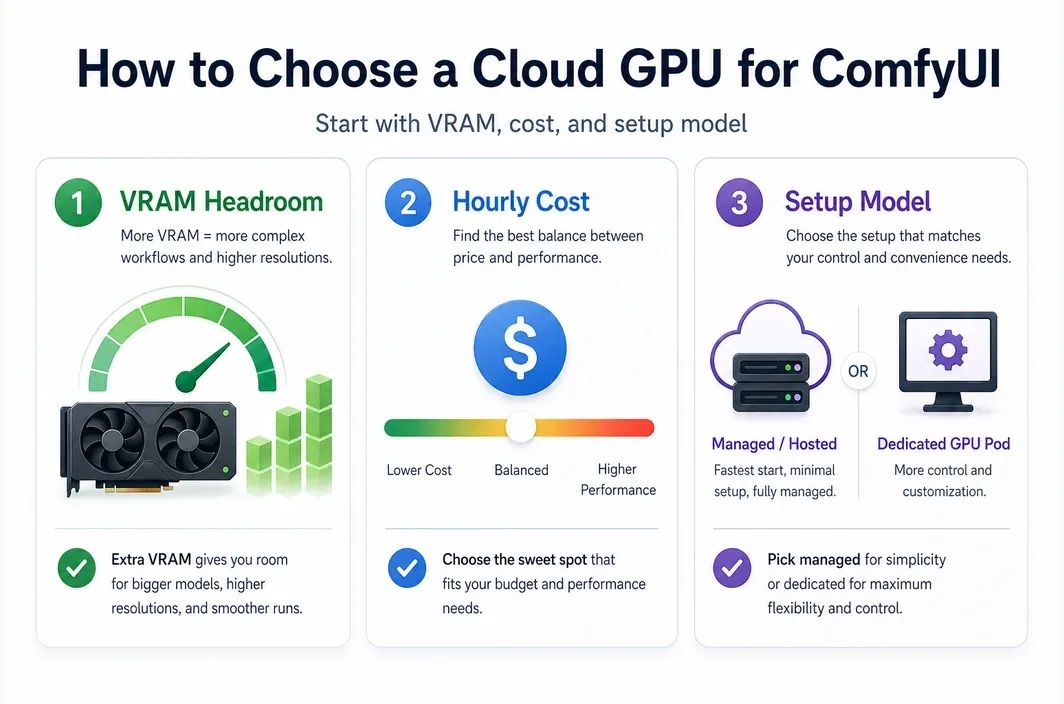
Choosing the best cloud GPU for ComfyUI starts with the practical bottlenecks that slow real workflows down. In most cases, those bottlenecks are VRAM, model management, node compatibility, queue time, and the cost of keeping the environment available long enough to iterate.
ComfyUI users also tend to care about control. A hosted interface may be easier to start with, but a GPU pod can be better if you want to manage your own models, test custom nodes more freely, or keep a repeatable environment for daily production work.
| Decision Factor | Why It Matters for ComfyUI |
|---|---|
| VRAM | Larger workflows, video pipelines, and multiple loaded models can quickly outgrow consumer cards with limited headroom. |
| GPU hourly cost | A lower hourly rate matters when you iterate often, render in batches, or keep a pod running for long sessions. |
| Setup model | Some users want zero setup, while others need full control over packages, nodes, and workflow files. |
| Storage behavior | Persistent shared storage makes it easier to reuse models, LoRAs, and datasets without repeated downloads. |
| Startup speed | Fast startup matters when you launch short-lived sessions or frequently redeploy customized environments. |
| Workflow flexibility | The more custom your ComfyUI stack is, the more important environment control becomes. |
For pure convenience, an official hosted ComfyUI environment can be the easiest starting point. For repeat users who care about tuning, cost efficiency, and custom stack control, dedicated cloud GPUs often become the better long-term fit.
RTX 4090 vs A100 vs H100 for ComfyUI
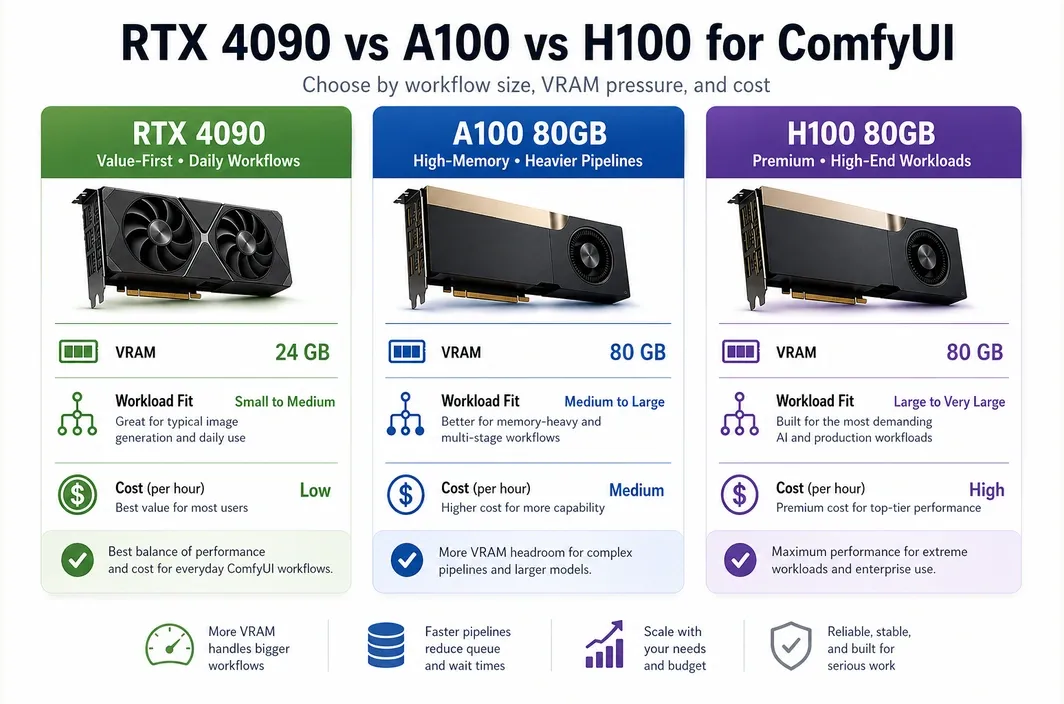
Most ComfyUI users do not need to begin with an A100 or H100. Those GPUs are powerful, but they also tend to be unnecessary for standard image generation, prompt iteration, and many day-to-day creative pipelines.
The best first choice is usually the GPU that clears your VRAM needs without overpaying. That is why the RTX 4090 is often the most practical cloud option for ComfyUI users who want strong speed and a more manageable budget.
| GPU | VRAM | Best For | Pricing Signal | Main Tradeoff |
|---|---|---|---|---|
| RTX 4090 | 24GB | SDXL, Flux-style image workflows, many daily ComfyUI pipelines, cost-aware creators | RunC.ai pricing signal starts at $0.42/hr | Less headroom for very large or memory-heavy pipelines |
| A100 80GB | 80GB | Heavier pipelines, larger model memory needs, more demanding video or multi-model workflows | RunC.ai pricing signal starts at $1.60/hr | Much higher cost than a 4090 |
| H100 80GB | 80GB | High-end training or premium inference workloads that go beyond typical ComfyUI usage | RunC.ai pricing signal starts at $2.56/hr | Often overkill for mainstream ComfyUI users |
The RTX 4090 still has a compelling case because 24GB VRAM is enough for many serious image workflows, and RunC.ai's own ComfyUI-focused blog continues to position the card as a strong fit for AIGC and ComfyUI workloads. If your goal is image generation, style iteration, and faster turnaround without jumping straight to data center pricing, a 4090 usually gives you the best value band.
Move to A100 when your workflow is memory-bound rather than simply slow. Move to H100 only if your pipeline is so demanding that the performance uplift justifies a large cost increase. For many ComfyUI readers searching this keyword, that threshold never arrives.
Managed ComfyUI Cloud vs Dedicated GPU Pods
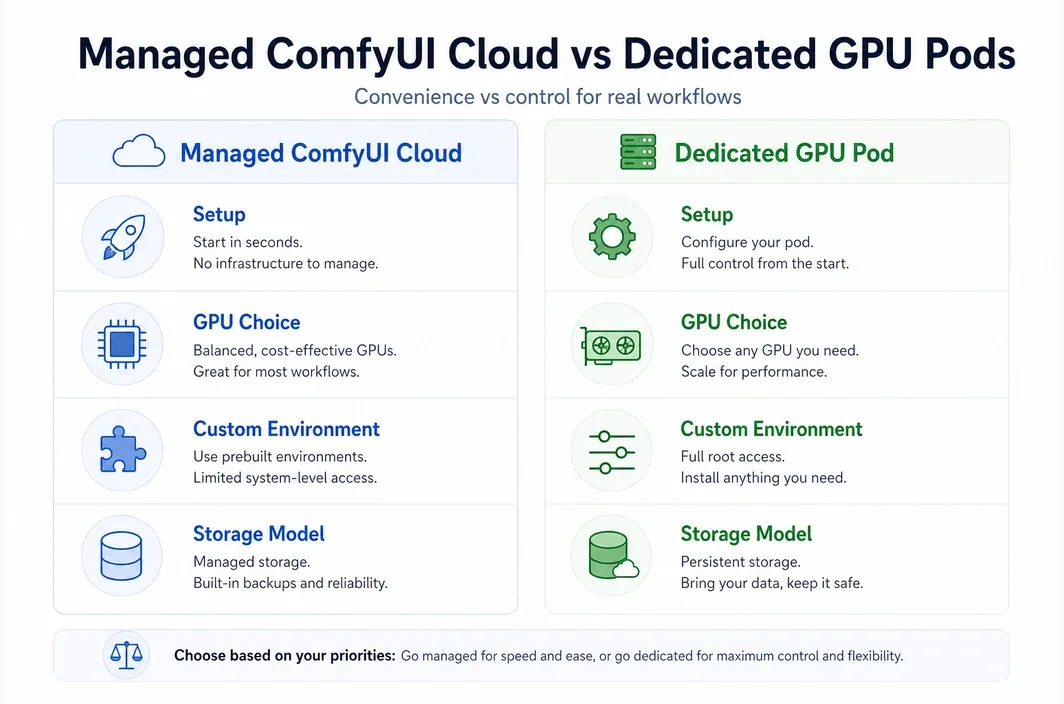
This is where the search intent behind best cloud gpu for comfyui becomes more specific. Some readers really mean, "Which GPU should I rent?" Others mean, "Should I use a hosted ComfyUI product or my own GPU instance?"
Comfy Cloud currently positions itself as the official hosted ComfyUI option powered by RTX 6000 Pro GPUs, with zero setup, pre-installed models, and a browser-based workflow. That is attractive if you want to get running fast and avoid installation work.
At the same time, a dedicated GPU pod is often better for users who want more freedom over their runtime, storage, and deployment pattern.
| Category | Managed ComfyUI Cloud | Dedicated GPU Pod |
|---|---|---|
| Setup | Fastest path to first run | Requires more setup, but gives more control |
| GPU choice | Platform-defined | You choose the GPU model |
| Custom environment | Limited by provider support | High flexibility for packages, nodes, and images |
| Storage model | Convenient, but provider-shaped | Easier to build your own persistent workflow setup |
| Workflow duration | May include platform limits | Better for longer persistent sessions |
| Best for | Beginners, light operations, teams that value simplicity | Power users, repeat operators, cost-aware creators, custom stacks |
Comfy Cloud's current pricing page says users are charged only for active GPU time while a workflow is running, and it highlights 96GB RTX 6000 Pro hardware, pre-installed models, and a supported set of custom nodes. That makes it very strong on convenience.
But convenience is not the same as control. If you want to decide which GPU to use, keep your own environment stable across sessions, or optimize around price-to-performance, a GPU pod can be the better ComfyUI setup.
Why RunC.ai Fits Cost-Conscious ComfyUI Users
For a ComfyUI user deciding between convenience and control, RunC.ai makes the most sense as a dedicated GPU pod option. The practical case is straightforward: you can start on an RTX 4090 tier, keep your environment under your own control, and avoid jumping straight to more expensive data center GPUs unless your workflow actually needs the extra VRAM.
RunC.ai's current public materials still show several concrete signals that matter for this use case:
- RTX 4090 pricing starting at
$0.42/hr - A100 80GB pricing starting at
$1.60/hr - H100 80GB pricing starting at
$2.56/hr ComfyUI Standardtemplate availability signal on the main site- billing accurate to the second in the official pricing guide
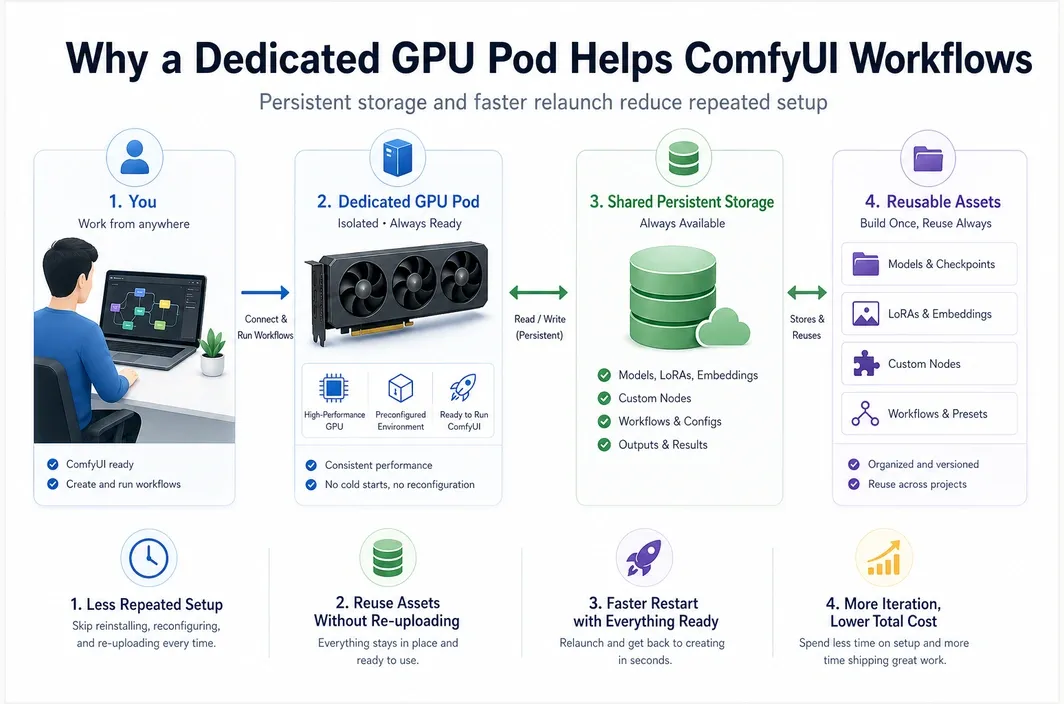
Network Volumesupport for persistent storageImage Pre-warmingto reduce startup friction for large custom images
That matters because ComfyUI workflows usually depend on more than raw GPU speed alone. Model reuse, custom nodes, and repeat launches often have as much impact on day-to-day productivity as the GPU model itself.
If your current workflow already outgrows a lightweight hosted setup, RunC.ai is a practical next step because it combines pay-as-you-go GPU Pods, an official ComfyUI template signal, and persistent storage features that are better aligned with repeat generation work than a disposable notebook-style environment.
The storage angle is especially practical. RunC.ai's source material and docs point to Network Volume support, which matters when you want to reuse checkpoints, LoRAs, and workflow assets across sessions instead of rebuilding the environment every time. Its homepage also highlights Image Pre-warming, which is relevant when you are deploying customized images and want shorter boot times.
If you want to test this setup without overcommitting, the cleanest path is to start with an RTX 4090 Pod on RunC.ai, keep your models on shared storage, and only move up to A100 when your workflow consistently runs into VRAM limits.
How to Choose the Best Cloud GPU for Your ComfyUI Workflow
The easiest way to choose is to map the GPU and platform type to your actual workflow, not your aspirational one. Many people search for the most powerful option when they really need the most practical one.
Start with the cheapest GPU that can reliably handle your current pipeline. Then move up only when your workflow repeatedly hits memory or runtime limits.
| Use Case | Best Choice | Why |
|---|---|---|
| Learning ComfyUI or running simple templates | Managed ComfyUI cloud | Fast onboarding, minimal setup, lower technical friction |
| Daily image generation with custom control | RTX 4090 cloud pod | Best balance of cost, speed, and flexibility for many users |
| LoRA-heavy or memory-sensitive pipelines | A100 80GB | More VRAM headroom when 24GB becomes restrictive |
| Very heavy video or large multi-stage pipelines | A100 or H100 depending on budget | More room for larger jobs, but at much higher cost |
| Repeat professional workflows with persistent assets | Dedicated GPU pod with shared storage | Better environment control and easier model reuse |
That is also why the phrase "best cloud GPU for ComfyUI" should not automatically be read as "most expensive GPU available." In practice, the best option is the one that keeps your workflow stable, your iteration cycle fast, and your cost predictable.
FAQ
What is the best cloud GPU for ComfyUI?
For many users, the best cloud GPU for ComfyUI is an RTX 4090 because it offers a strong mix of VRAM, speed, and lower hourly cost than higher-end data center GPUs. If your workflows are much heavier or more memory-sensitive, an A100 can make more sense.
Is RTX 4090 enough for ComfyUI?
Yes, RTX 4090 is enough for many ComfyUI image generation workflows, including plenty of serious day-to-day use cases. The limit usually appears when your pipeline becomes more VRAM-heavy, more video-focused, or more complex across multiple loaded models.
When should you choose A100 or H100 for ComfyUI?
Choose A100 or H100 when you repeatedly run into memory limits, need more headroom for larger workflows, or handle heavier production-style jobs. For standard image generation and many custom workflows, they are often more expensive than necessary.
Is managed ComfyUI cloud better than renting a GPU pod?
It is better for convenience, but not always better overall. Managed ComfyUI cloud is easier to start with, while a GPU pod is usually better for users who want stronger control over GPU selection, environment setup, storage, and long-term price efficiency.
How much does it cost to run ComfyUI in the cloud?
It depends on the provider, GPU model, and pricing method. As of April 20, 2026, RunC.ai publicly shows RTX 4090 from $0.42/hr, while Comfy Cloud uses an active-GPU-time credit model rather than a simple hourly pod rate.
Conclusion
The best cloud GPU for ComfyUI is usually the cheapest option that keeps your workflow stable without creating avoidable VRAM bottlenecks.
For many teams and creators, that means starting with an RTX 4090 tier first. If you want a browser-first experience, a managed ComfyUI cloud can still be the easiest entry point. If you want more control over nodes, storage, and repeat deployment, start with an RTX 4090 Pod on RunC.ai and move up only when your workflow proves it needs more headroom.

Member discussion: