

Key Takeaways
- A CUDA out of memory error is a VRAM-allocation failure, not proof that the GPU is too slow or automatically too small.
- Start with a clean process list and a measured peak. Then reduce the demand that actually caused the failure: microbatch size, precision, saved activations, context length, or concurrent requests.
- Move to a larger-VRAM GPU when the required workload still cannot run at a usable batch, context, or concurrency level after those changes—not simply because an OOM appeared once.
- Treat 24GB and 80GB as capacity tiers. The right tier depends on the model, precision, runtime, batch shape, and service target.
Introduction
A CUDA out of memory cloud GPU failure usually arrives at the worst point: after model loading, partway through a training run, or when traffic pushes a serving stack past its memory budget. The error tells you that a new allocation could not be satisfied. It does not identify whether the cause is a live tensor, a too-large batch, a long context window, another process, fragmentation, or a workload that genuinely exceeds the card.
The quickest reliable response is to measure first and reduce demand second. If a CUDA out of memory cloud GPU error persists at the minimum settings that still meet the job's requirements, then larger VRAM becomes an engineering decision rather than a guess.
What “CUDA out of memory” usually means
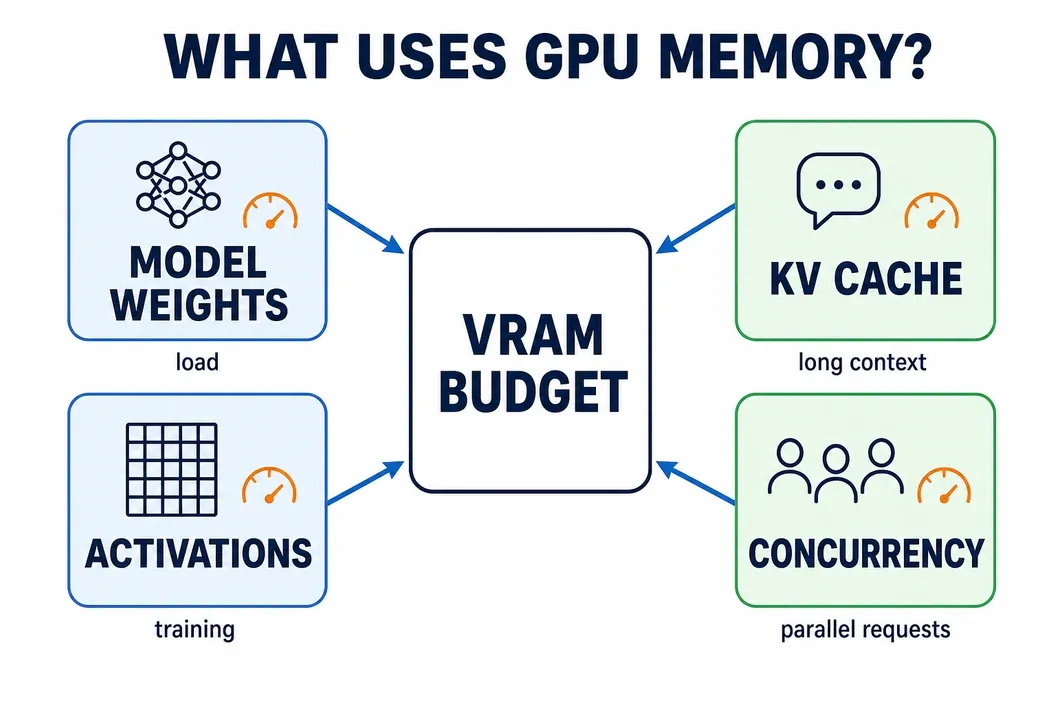
GPU memory is finite, but an OOM does not map to a single line item. In training, the working set can include model weights, optimizer state, gradients, saved activations, temporary tensors, and data-transfer buffers. In inference, the model weights share space with runtime overhead, the KV cache, request context, generated tokens, and concurrent sequences.
First separate a capacity failure from an observation problem. Check whether another process is occupying the GPU, record the model/runtime configuration, and capture the point at which memory peaks. PyTorch provides memory snapshots for examining allocator state; pair that evidence with the batch size, precision, sequence length, and number of active requests that produced the failure.
Use the symptom to narrow the cause:
| Failure pattern | Likely pressure point | What to collect before changing hardware |
| Fails while loading the model | weight footprint or another resident process | available VRAM, precision/quantization, process list |
| Fails during backward pass | activations, gradients, optimizer state | peak allocated/reserved memory, microbatch, input shape |
| Fails only with long prompts or parallel requests | KV cache and concurrency | context limit, output limit, active sequences |
| Fails irregularly after prior runs | stale process, transient spike, allocator state | clean restart result, memory snapshot, reproducible steps |
torch.cuda.memory.empty_cache() is often misunderstood. PyTorch documents that it releases unoccupied cached memory; it does not free memory held by live tensors or make an oversized model fit. Use it after releasing objects when allocator cleanup is relevant, not as a substitute for diagnosis.
The fastest fixes before renting a bigger GPU
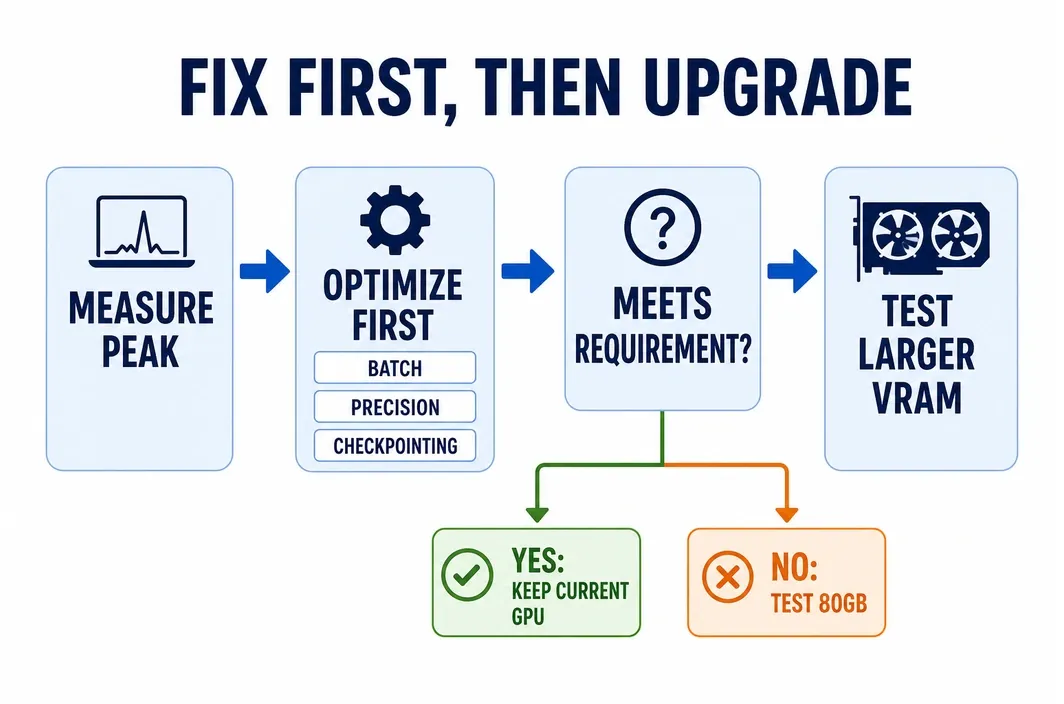
Work through the following order. Change one variable at a time and record whether the run now meets the original quality, throughput, and completion-time requirement. A run that only succeeds after making the workload unusable is evidence for an upgrade, not a solved incident.
- Start clean and rule out contention. Inspect GPU processes, stop unintended jobs you control, and rerun from a known state. A second notebook kernel or service worker can consume the headroom that a new job expects.
- Reduce batch size or microbatch first. Batch-driven activation memory is a common training trigger. If the global batch matters, use gradient accumulation to recover the effective batch only after confirming the added steps and wall-clock time are acceptable.
- Use AMP only after validation. Automatic mixed precision can reduce memory demand for supported operations, but it changes numerical behavior. Validate loss behavior, output quality, and stability for the model and task rather than treating lower precision as free memory.
- Checkpoint activations when training can afford recomputation. PyTorch activation checkpointing saves memory by recomputing parts of the forward pass during backward propagation. It is useful when saved activations are the blocker; it is not a cure for weights that cannot load or a no-cost speed optimization.
- Bound context and concurrency for serving. An inference process may start successfully and later OOM under longer prompts or more simultaneous requests. Set explicit test limits for input/output length and concurrent sequences, then measure the impact on latency and throughput before calling the setting production-ready.
- Use allocator tools as evidence, not folklore. If a clean rerun succeeds while a long-lived process fails, inspect the snapshot and allocator statistics. A restart may remove a transient state; repeated failure at the same measured peak is stronger capacity evidence.
For a CUDA out of memory cloud GPU issue, this sequence is deliberately cheaper than a hardware move. It also prevents a larger card from hiding a leak, an unbounded request policy, or a service configuration that will consume the new headroom later.
When optimization is enough — and when it is not
Optimization is enough when it preserves the workload's real requirements. That means the model trains at an acceptable effective batch and duration, or the service meets its required context, concurrency, and latency target. The fact that a process launches is not enough.
Use this decision matrix after collecting a baseline run:
| Situation | Optimize first | Evidence of a real VRAM ceiling | Next move |
| Training activation peak | lower microbatch; validate AMP; checkpoint activations | the smallest practical microbatch still OOMs, or recomputation makes the run unacceptable | test a larger-VRAM tier |
| Inference KV-cache pressure | reduce permitted context or active sequences | required context/concurrency still fails in a bounded load test | test larger VRAM or redesign serving topology |
| Fragmentation or transient state | clean restart; inspect processes and memory snapshot | failure remains reproducible near the same peak after cleanup | plan for capacity instead of a one-off fix |
| Model/runtime footprint | use a supported lower-memory representation if it meets the requirement | weights plus operational headroom cannot load | select larger VRAM or a verified multi-GPU design |
The critical distinction is between a compromise and a requirement. If halving context, dropping batch size, or moving work to CPU defeats the reason for running the job, those are diagnostic results. They show that the working set needs more VRAM or a different design.
Avoid turning allocator numbers into a universal rule. allocated, reserved, and free-memory readings need the context of the runtime and workload. Use a repeatable test: start clean, run the target configuration, note the peak, apply one change, and compare both memory and the output that matters to the team.
Local 24GB vs cloud 80GB: where the real line is
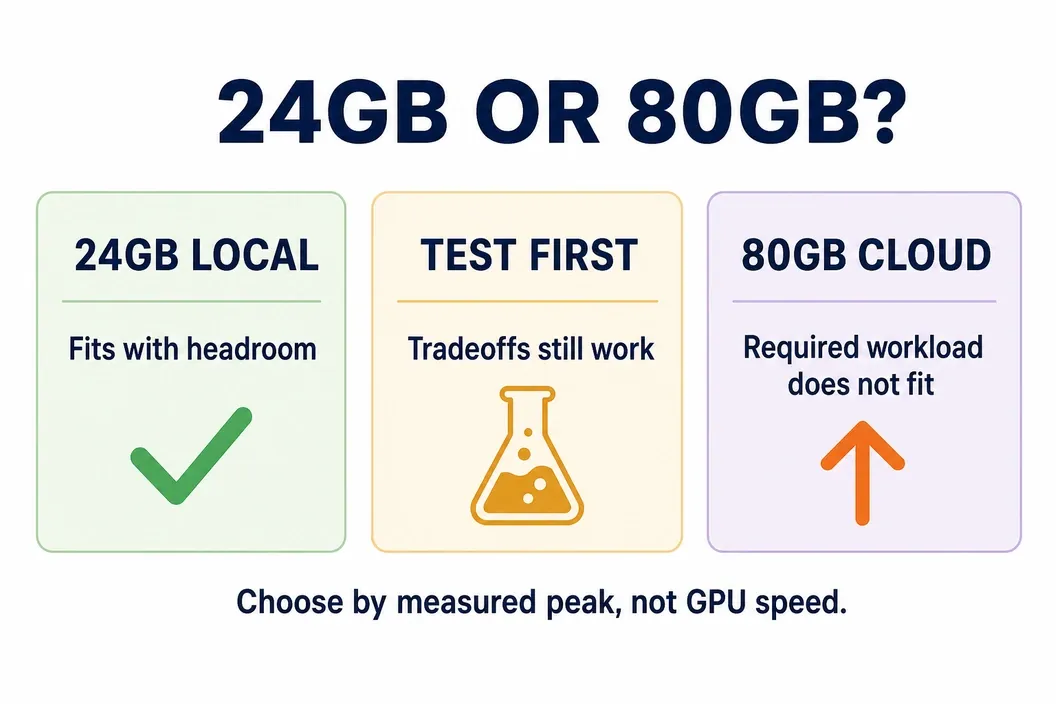
Twenty-four gigabytes can be enough for many validated experiments, image-generation workflows, and smaller inference jobs. It is not an all-purpose ceiling, just as 80GB is not a guarantee that every training or high-concurrency serving workload will fit. The important question is how much headroom remains at the setting the work actually requires.
| Workload condition | Practical starting point | Why | Verify before committing |
| Fits on a local 24GB-class GPU with room at the target setting | keep the current GPU | avoids moving a healthy workload | peak memory, repeatability, and idle-process contention |
| Fits only after a material tradeoff | optimize, then run a short 80GB validation | exposes whether the compromise is acceptable | quality, runtime, cost, and reproducibility |
| Cannot run at a minimum usable batch, context, or precision | evaluate an 80GB-class cloud GPU | the constraint is memory capacity, not raw FLOPS | exact runtime, data location, availability, and budget |
| Needs more than one GPU | verify a distributed path before committing | memory may be split, but setup and communication behavior change | framework support and provider topology |
An 80GB test is most useful when it is bounded. Launch the exact model and runtime, use the required input shape or service limits, run long enough to observe the peak, and compare results against the smaller-card baseline. That comparison is more useful than assuming bigger hardware is better.
Moving from OOM-prone local setups to RunC A100
Once the measured workload has a real capacity ceiling, RunC.ai referred to below as RunC, GPU Pods offer a way to test an 80GB tier without treating it as a permanent commitment.
Apply the same test conditions in the cloud:
1.Choose an available Pod, GPU, and region that match the validation target.
2.Select an image or template only if it is currently listed for the required framework; otherwise use a verified compatible environment.
3.Attach a Network Volume only when weight or dataset reuse matters. Network Volume documentation limits mounting to Pod instances, and the usage guide requires the volume and instance to be in the same region.
4.Run the bounded workload that failed locally, including the intended batch, context, or concurrency. Record peak memory, completion time, and output checks.
5.Stop compute when the test is complete. Keep important data backed up elsewhere: Network Volume is not positioned as a long-term backup service.
Before selecting A100 or H100, verify the current SKU, region availability, image/template support, storage charges, egress policy, GPU form factor/topology, and measured workload performance. The two cards may both have 80GB listed, but card choice should follow the actual runtime and cost test—not an assumption that one automatically eliminates every OOM.
Decision table
Use this table for the final action. It maps the observed failure to a next step while keeping “move to bigger VRAM” as a conditional outcome.
| What you observe | Do next | Do not assume |
| New OOM with no memory record | capture process and peak-memory evidence; apply the quick-fix sequence | the GPU is inherently too small |
| OOM disappears after a clean restart | inspect contention and allocator behavior; reproduce the workload | a hardware upgrade is required |
| Training fails at the smallest usable microbatch | validate AMP/checkpointing tradeoffs, then test 80GB if they fail the job requirements | a smaller batch is automatically acceptable |
| Serving fails at required context/concurrency | bound and measure KV-cache pressure, then test a larger tier if targets still fail | model weights are the only memory consumer |
| Repeated, measured capacity ceiling | run a short 80GB cloud validation with the same workload | A100/H100 inventory, topology, or cost outcome is guaranteed |
FAQ
Does `empty_cache()` fix CUDA out of memory?
No. It releases unoccupied cached blocks, not memory held by live tensors. It can be useful after objects are released, but a persistent peak caused by weights, activations, or KV cache needs a workload change or more capacity.
Should I reduce batch size or move to a bigger GPU?
Reduce batch or microbatch first if the resulting run still meets the training objective and elapsed-time target. Move to a bigger VRAM tier when the minimum usable setting continues to fail or the workaround makes the job impractical.
Why does inference OOM after the model has loaded?
Model weights are only part of the memory budget. Longer context, generated tokens, and more active sequences can increase KV-cache demand after startup, so test serving under the intended request profile.
Is 80GB always enough?
No. Required memory depends on the model, precision, runtime, context, batch shape, and concurrency. Validate the precise workload instead of relying on a generic VRAM threshold.
Conclusion
CUDA out of memory is worth treating as a measured capacity problem, not an automatic reason to buy a bigger GPU. Start with a clean baseline, identify what drives the peak, and keep the configuration changes that still meet the workload’s real requirements.
When those fixes no longer preserve the batch size, context, concurrency, or completion time you need, validate the same workload on a larger-VRAM tier. RunC.ai GPU Pods can be a practical path for that short validation: choose the available GPU and region, test the exact workload, and compare peak memory, output quality, and cost before committing. Recheck current pricing and availability at that point, because both can change.

Member discussion: