
Key Takeaways
- GPU clusters often lose useful compute time because datasets, checkpoints, and model artifacts move too slowly through the storage path.
- Local NVMe, shared file volumes, object storage, and parallel file systems solve different jobs. Treating them as one generic "fast storage" layer creates hidden bottlenecks.
- The best storage choice depends on cluster scale, access pattern, checkpoint frequency, and artifact reuse.
- RunC.ai fits the persistent-environment branch, where GPU Pods and Shared Network Volumes keep reusable assets close to repeatable GPU workflows.
- Low-latency storage for GPU cluster deployments is not a glossary problem. A cluster can have enough GPUs, enough VRAM, and enough network bandwidth, yet still waste hours because data loaders stall, checkpoints block training, or every new run downloads the same model weights again.
The practical question is which storage layer keeps GPUs fed without adding more complexity than the team can operate. A single-node experiment, a repeated LoRA fine-tuning workflow, a multi-node training job, and an artifact-heavy inference pipeline do not need the same architecture.
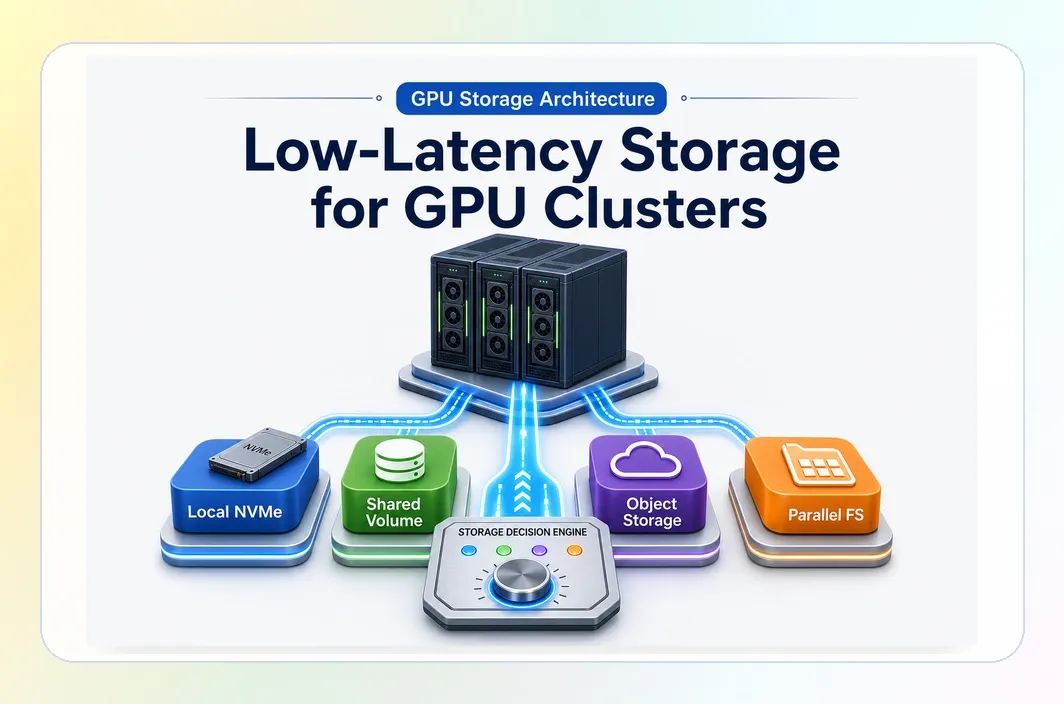
The right design usually combines layers: local NVMe for hot scratch, shared file volumes for reusable working assets, object storage for durable retention, and parallel file systems when distributed jobs need coordinated high-throughput I/O.
Why GPUs Go Idle Even When the Cluster Looks Provisioned Correctly
GPU utilization drops when compute waits for storage. That wait can appear before training starts, during each epoch, while writing checkpoints, or during recovery after a failed run.
The common pattern is quiet. A team provisions a costly cluster, starts a job, and sees utilization dip while workers wait for data. The storage system is technically online, but the workload spends too much time reading, staging, writing, or rebuilding artifacts.
The main delay points are dataset reads, shuffle and cache behavior, checkpoint writes, recovery reads, and repeated model movement. Low latency matters most when storage sits on the critical path. A slow archive tier is acceptable for completed artifacts; it becomes a bottleneck if every GPU worker reads from it during training.
Where Low-Latency Storage Actually Matters in GPU Workflows
Before choosing a storage technology, map the workflow into hot data, reusable artifacts, durable storage, and recovery paths.
| Workflow point | Storage job | Common failure |
|---|---|---|
| Dataset staging | move large datasets close to the GPU job | startup time grows before compute begins |
| Training reads | feed workers with predictable read performance | GPUs idle while data loaders wait |
| Shuffle and cache | support repeated or random access | preprocessing becomes the bottleneck |
| Checkpoint writes | save large model states without blocking the run | checkpoint cadence becomes too slow |
| Recovery reads | restore after interruption | restarts become manual and slow |
| Artifact reuse | keep weights, adapters, and outputs available across runs | each job repeats the same downloads |
Raw throughput numbers are not enough. Local NVMe may win for hot scratch. A shared mounted volume may win when the same checkpoint needs to survive across environments. Object storage may win for durable retention. A parallel file system may win when many nodes need shared access.
Local NVMe, Shared File Volumes, Object Storage, and Parallel File Systems Do Different Jobs
The safest choice starts with separating storage roles.
| Storage option | Best fit | Strength | Weak point |
|---|---|---|---|
| Local NVMe | hot scratch, local cache, single-node jobs | very low latency close to the GPU host | weak persistence and weak sharing |
| Shared file volumes | reusable datasets, checkpoints, model weights, team workflows | stable mounted assets across environments | not always enough for heavy multi-node I/O |
| Object storage | durable datasets, exported checkpoints, backups, archives | scalable source-of-truth storage | usually too indirect for hot training without staging |
| Parallel file systems | multi-node training and coordinated shared I/O | high-throughput shared access across a cluster | more setup, tuning, and monitoring |
Local NVMe is often the fastest place to run a contained job. Use it when the working set fits on the node and persistence is not the main issue. It is a strong scratch tier, not a complete artifact strategy.
Shared file volumes become valuable when the same files need to stay available across runs. Datasets, model weights, LoRA adapters, checkpoints, logs, and evaluation outputs all benefit from a stable mounted path.
Object storage is usually the durable tier. It is the right place for source datasets, exported checkpoints, completed artifacts, and backups. It should usually be paired with caching, prefetching, or local staging for hot execution.
Parallel file systems belong in the demanding branch. When many nodes need shared high-throughput access and frequent checkpoint writes, systems such as Lustre-style or BeeGFS-style architectures can make sense. They also add operational burden, so workload scale should justify them.
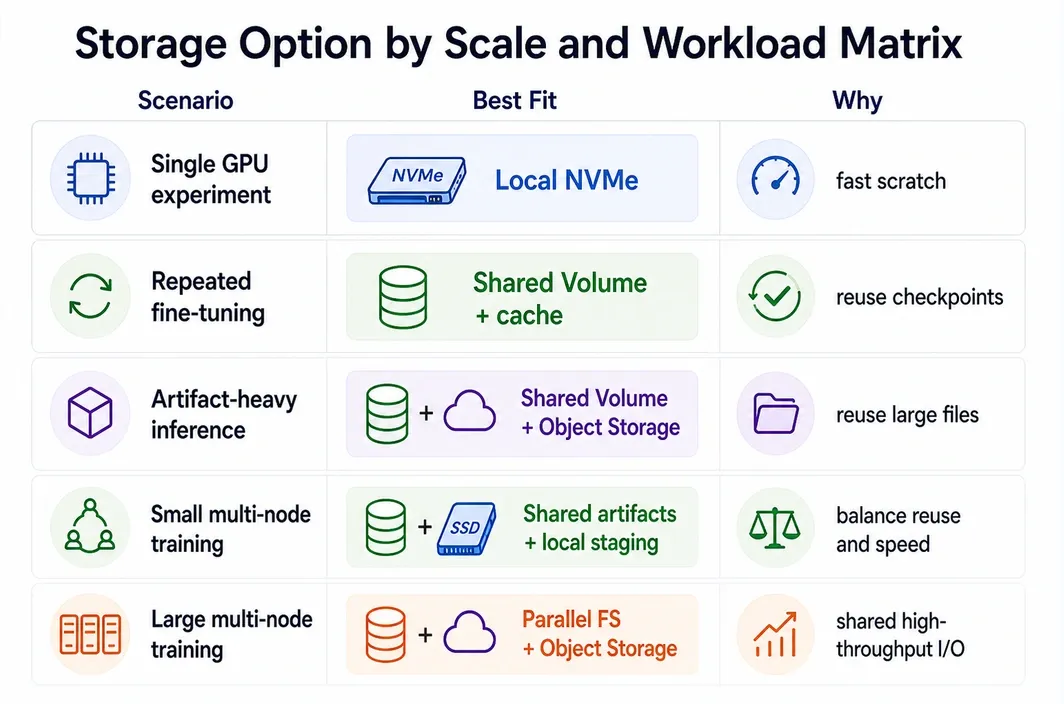
Storage Option by Scale and Workload Matrix
The fastest decision path is to choose storage by scale and workload, not by a single "best storage" label.
| Scale and workload | Best first fit | Why it fits | Watch out for |
|---|---|---|---|
| Single GPU experiment | Local NVMe | simple hot scratch path | artifacts may need manual export |
| Multi-GPU single-node training | Local NVMe plus object storage export | keeps hot data close and preserves outputs | checkpoint movement can become manual |
| Repeated team fine-tuning | Shared file volume plus local cache | keeps datasets, weights, adapters, and checkpoints reusable | volume performance must match checkpoint size |
| Artifact-heavy inference testing | Shared file volume plus object storage | durable source of truth plus reusable mounted assets | object storage alone can slow restaging |
| Small multi-node training | shared volume for artifacts, local staging for hot data | balances reuse and speed before a full parallel file system | weak if all nodes need heavy shared writes |
| Large multi-node training | parallel file system plus object storage tier | supports coordinated shared I/O and heavier checkpoint traffic | higher setup and tuning burden |
| Persistent development environment | shared file volume mounted into GPU environments | keeps the working set available across sessions | needs naming and cleanup discipline |
For low-latency storage for GPU cluster deployments, the first decision is usually whether the workload is scratch-heavy, reuse-heavy, or distributed-I/O-heavy. Scratch-heavy work starts with local NVMe. Reuse-heavy work starts with shared mounted storage. Distributed-I/O-heavy work pushes toward a parallel file system.
The RunC Decision Point
RunC.ai becomes relevant when the storage problem is really an environment-reuse problem. If a team keeps rebuilding GPU environments, re-downloading model weights, copying checkpoints, and moving datasets between runs, the bottleneck is not only storage speed. It is the lack of a persistent working environment with reusable mounted assets.
With RunC.ai GPU Pods, teams can run dedicated GPU workloads in persistent GPU containers. Shared Network Volumes can keep datasets and model weights available across Pods, helping repeated fine-tuning, inference testing, and iterative development loops avoid unnecessary restaging. SSH and JupyterLab-style access also make the environment easier to inspect during development.
That does not make RunC.ai a replacement for every storage layer. Local NVMe still fits hot scratch. Object storage still fits durable retention. Parallel file systems still fit large multi-node shared I/O. RunC.ai fits the branch where developer-friendly GPU infrastructure, persistent environments, and shared volumes solve the local workflow problem.
Artifact Locality, Environment Reuse, and Why Ad Hoc Storage Breaks Down
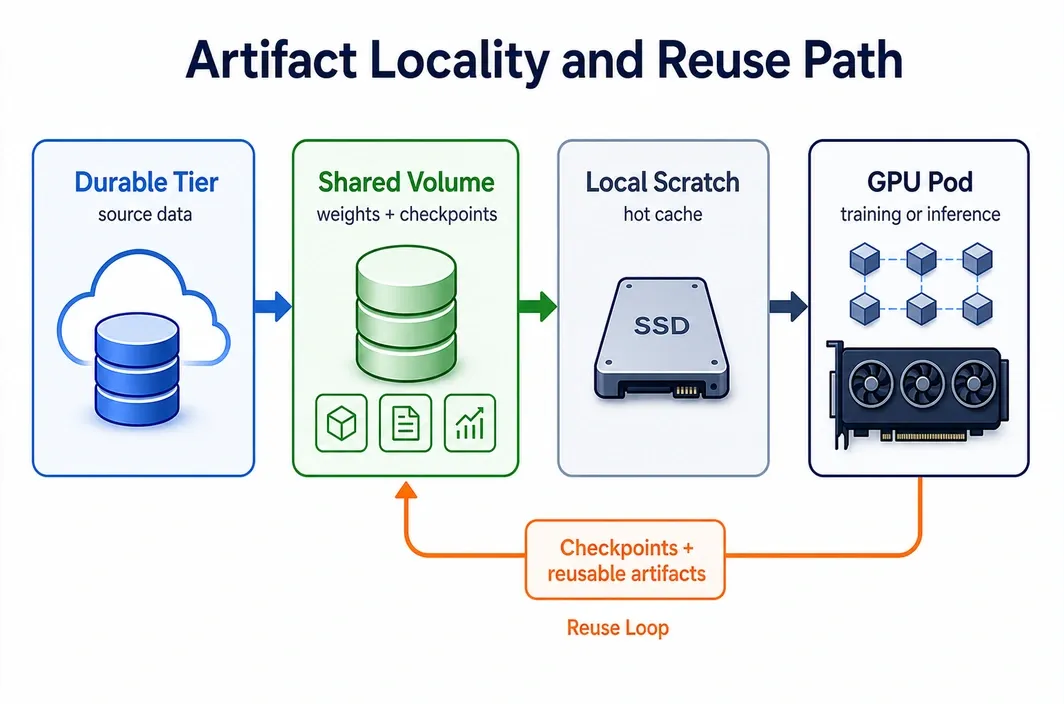
Artifact locality means the files needed for the next GPU step are already close to compute: datasets, base weights, adapters, checkpoints, tokenizer files, configuration, logs, and evaluation outputs.
Ad hoc storage works for small workflows. A developer can download a model, run an experiment, export the result, and delete the instance. The problems start when the same pattern repeats across many runs or several people.
Without a reusable storage path, teams pay three costs. Startup cost comes from repeated downloads. Recovery cost comes from manual checkpoint hunting. Collaboration cost comes from each person copying the same assets into a different environment.
A persistent environment changes the loop. Stable assets stay mounted, runs resume from known paths, and hot scratch stays separate from durable artifacts. For training, this shortens iteration. For inference testing, it reduces the repeated weight movement that can dominate startup time.
Failure Modes That Reveal a Bad Storage Design Too Late
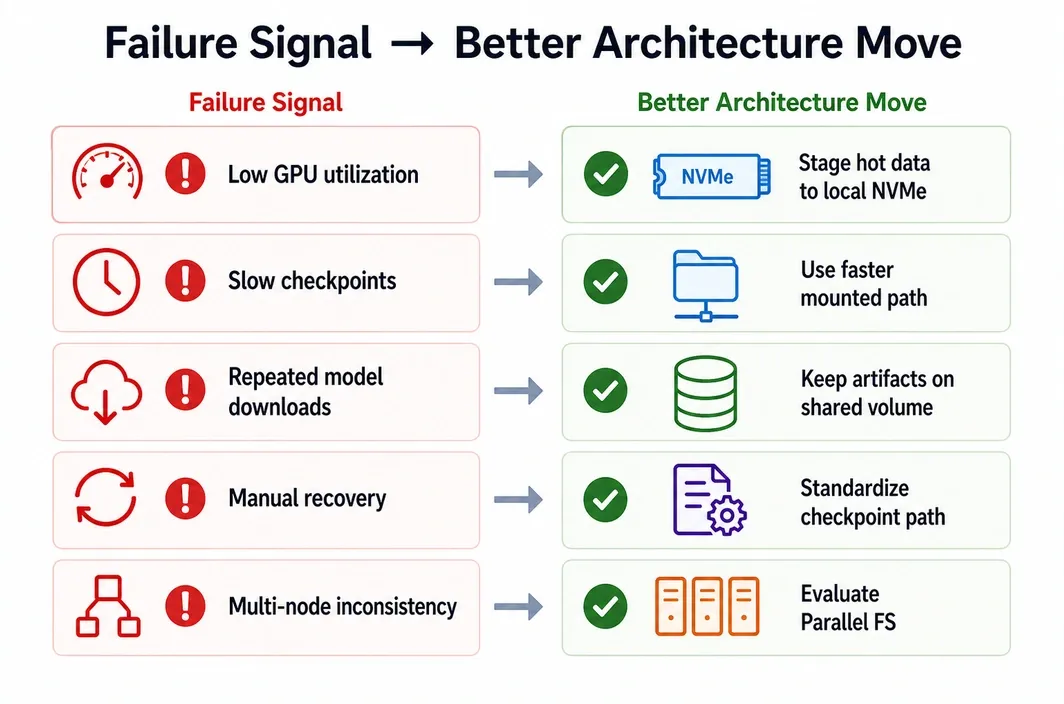
Storage mistakes often look like low utilization, training instability, or slow engineering cadence. Check these failure modes before scaling the cluster.
| Failure mode | What it usually means | Better architecture move |
|---|---|---|
| GPUs sit below expected utilization during data loading | workers are waiting on reads or cache misses | stage hot data to local NVMe or improve cache locality |
| Checkpoints disrupt training cadence | checkpoint path is not sized for model state and frequency | use a faster mounted path or stronger shared I/O |
| Every run starts with large model downloads | artifacts are not local to the working environment | keep reusable weights and adapters on a shared volume |
| Recovery requires manual file hunting | checkpoints and logs are not organized in a persistent path | standardize checkpoint directories and export rules |
| Multi-node jobs behave inconsistently | shared data access was not designed for distributed reads and writes | evaluate a parallel file system or staged data layout |
| Object storage reads slow hot execution | durable storage is being used as the training scratch path | pair object storage with local staging or a mounted working volume |
| Team members duplicate datasets across environments | no shared source for reusable assets | use shared file volumes with clear ownership rules |
The most expensive failure is discovering the problem after the cluster grows. Storage fixes are easier when the team still has one or two workloads to reason about.
When Not to Overbuild the Storage Layer Yet
Not every GPU workload needs a parallel file system, a complex tiering strategy, or a multi-layer storage architecture.
Stay simple when the working set fits on one node, checkpoint frequency is low, runs are short-lived, and artifacts do not need to survive across many environments. Local NVMe plus a disciplined export path may be enough.
Add shared file volumes when the same assets are reused across runs or people. Add a parallel file system when multi-node shared I/O becomes a real bottleneck. Keep object storage as the durable tier for source datasets, completed artifacts, and backups.
The principle is to move one step at a time: local scratch, reusable shared assets, durable artifact tier, then parallel shared I/O when scale proves the need.
A Practical RunC Path for Reusable GPU Storage Workflows
For teams whose main pain is repeated setup, persistent assets, and GPU workflow reuse, RunC.ai offers a practical path: run the workload in GPU Pods, mount Shared Network Volumes for reusable assets, and keep the working set close to the environment that needs it.
A simple path looks like this:
- Put source datasets and completed artifacts in a durable tier.
- Mount the active dataset slice, base model, adapters, and checkpoints into the GPU environment.
- Use local NVMe or instance storage for hot scratch and temporary cache.
- Write checkpoints and reusable outputs to the shared mounted path.
- Export final artifacts back to the durable tier when the run is complete.
This keeps each layer honest. Local storage handles hot temporary work. Shared volumes handle reuse and continuity. Object storage handles durability. More advanced shared file systems are reserved for workloads that prove they need distributed I/O.
FAQ
Is object storage low-latency enough for GPU training?
Usually not by itself for hot training paths. Object storage is better as a durable source-of-truth layer for datasets, checkpoints, and completed artifacts. For active training, pair it with local staging, caching, a shared volume, or a parallel file system depending on scale.
When is local NVMe the best option?
Local NVMe is best for hot scratch, local cache, temporary preprocessing output, and single-node workloads where the working set fits on the machine. It is less suitable when assets need to persist across environments or be shared by multiple nodes.
When does a GPU cluster need a parallel file system?
A parallel file system becomes more attractive when multi-node jobs need coordinated high-throughput shared reads and writes. Frequent large checkpoints, many workers reading from shared datasets, and distributed recovery needs are stronger signals than cluster size alone.
How do shared file volumes help with model artifacts?
Shared file volumes keep reusable assets in a mounted path instead of forcing every run to download or copy them again. That can help with base models, LoRA adapters, checkpoints, datasets, tokenizer files, logs, and evaluation outputs.
Where does RunC.ai fit in a storage architecture?
RunC.ai fits the persistent-environment and shared-volume branch. GPU Pods provide dedicated GPU environments, while Shared Network Volumes help keep reusable datasets and model weights available across runs. It should complement local scratch, object storage, and parallel file systems rather than replace every layer.
Conclusion
The best low-latency storage for GPU cluster deployments is the storage architecture that matches the workload's real data path. Start with the files that block GPU work: datasets, caches, checkpoints, model weights, and recovery artifacts. Then choose the smallest storage design that keeps those files close enough to compute.
Use local NVMe for hot scratch, shared file volumes for reusable assets, object storage for durable retention, and parallel file systems when distributed I/O justifies the complexity. If persistent GPU environments and shared model artifacts are the bottleneck, RunC.ai can help teams keep reusable assets close to GPU Pods without rebuilding the working environment for every run.

Member discussion: