
Key Takeaways
- Train a LoRA when you need a reusable subject, style, character, product look, or brand visual pattern that prompting alone cannot keep consistent.
- Do not train yet if your images are too few, noisy, duplicated, legally unclear, or impossible to evaluate with fixed sample prompts.
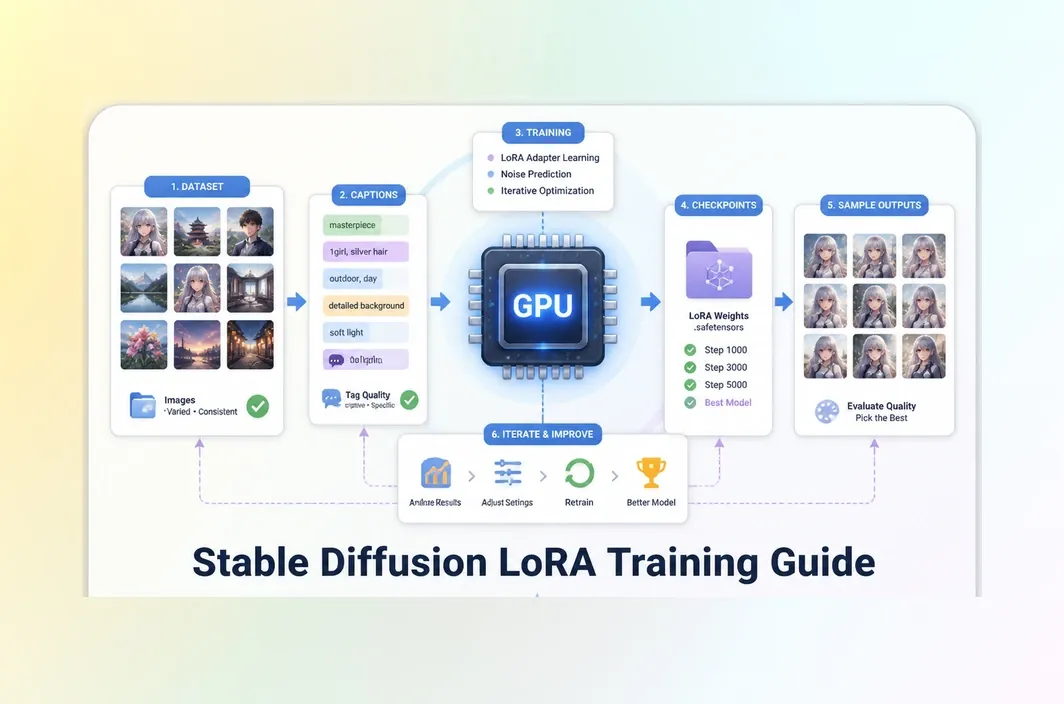
- The most important training work happens before the first GPU run: asset selection, captions, base model choice, and evaluation prompts.
- A repeatable GPU environment matters because Stable Diffusion LoRA training usually needs reruns, saved checkpoints, and sample comparison.
Introduction
Before training a Stable Diffusion LoRA, make the first decision simple: do you need one finished image, or a visual pattern that can be reused across prompts and production runs? If a single strong output is enough, prompting, inpainting, ControlNet, IP-Adapter, or a reference-image workflow is usually the faster path.
LoRA training becomes worth the setup when the same subject, character, product look, brand style, or visual treatment needs to survive across many prompts and production runs. That decision should happen before parameter tuning, because weak assets, vague captions, or the wrong base model will produce a weak LoRA no matter how carefully the training command is written.
Before the first GPU run, lock the training inputs: select images that teach one clear concept, write captions that separate the trigger token from incidental details, choose a base model close to the final output style, and prepare fixed evaluation prompts and seeds. Those choices make the later training loop measurable instead of subjective.
Decide whether your Stable Diffusion goal is actually a LoRA training task
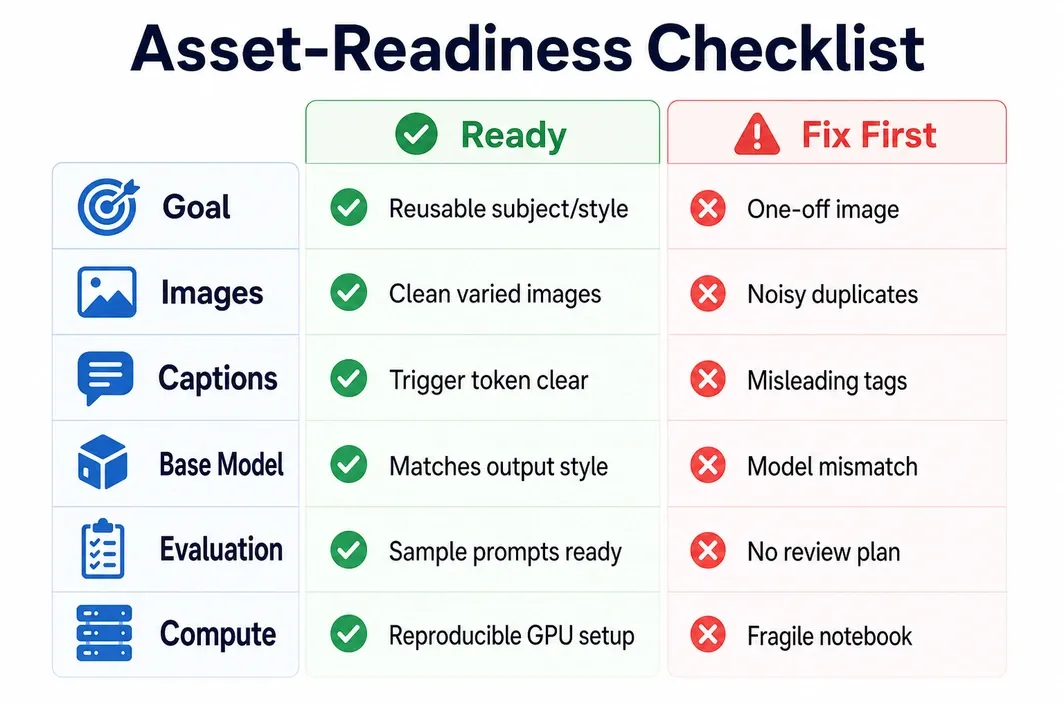
Start with the output you need to repeat. A LoRA is worth training when the same visual concept must survive across different prompts, scenes, or production runs. That concept might be a person, fictional character, product angle, brand illustration style, clothing design, object type, or visual treatment.
If the goal is one image, do not train yet. If the goal is a broad mood such as "cinematic," "luxury," or "anime style," do not train until prompting and reference workflows have failed. LoRA training adds setup cost, evaluation cost, and rerun cost. It pays off only when reuse matters.
Use this fit split before you open a training tool:
| Decision | Train a Stable Diffusion LoRA | Do not train yet |
|---|---|---|
| Goal | Reusable subject, style, character, product look, or brand visual pattern | One-off image, loose mood, or broad visual direction |
| Prompting | Prompting cannot hold identity, style, or product details consistently | Prompting, inpainting, or reference-image workflows already solve it |
| Asset set | You have enough clean images to show the target pattern | Images are few, duplicated, blurry, watermarked, or inconsistent |
| Evaluation | You can compare sample grids against fixed prompts and seeds | You do not know how you will judge improvement |
| Workflow value | The LoRA will be reused across projects, campaigns, or batches | The LoRA will be used once and then discarded |
The core decision is simple: train a LoRA only when reuse and consistency are more valuable than the setup effort.
Prepare the dataset, captions, and evaluation prompts before opening a training tool
Most failed LoRAs are not failed because the learning rate was mysterious. They fail because the training images do not say one clean thing. A dataset with weak signal will push the model toward noise, accidental backgrounds, repeated poses, incorrect colors, or captions that teach the wrong concept.
Before training, build an asset set that makes the target obvious. For a subject LoRA, use clear views with useful variation in pose, angle, lighting, and crop. For a style LoRA, use examples that share the style but vary the subject matter enough that the model learns the style rather than memorizing one scene. For a product LoRA, keep the product visually consistent while varying context only when you want the LoRA to generalize.
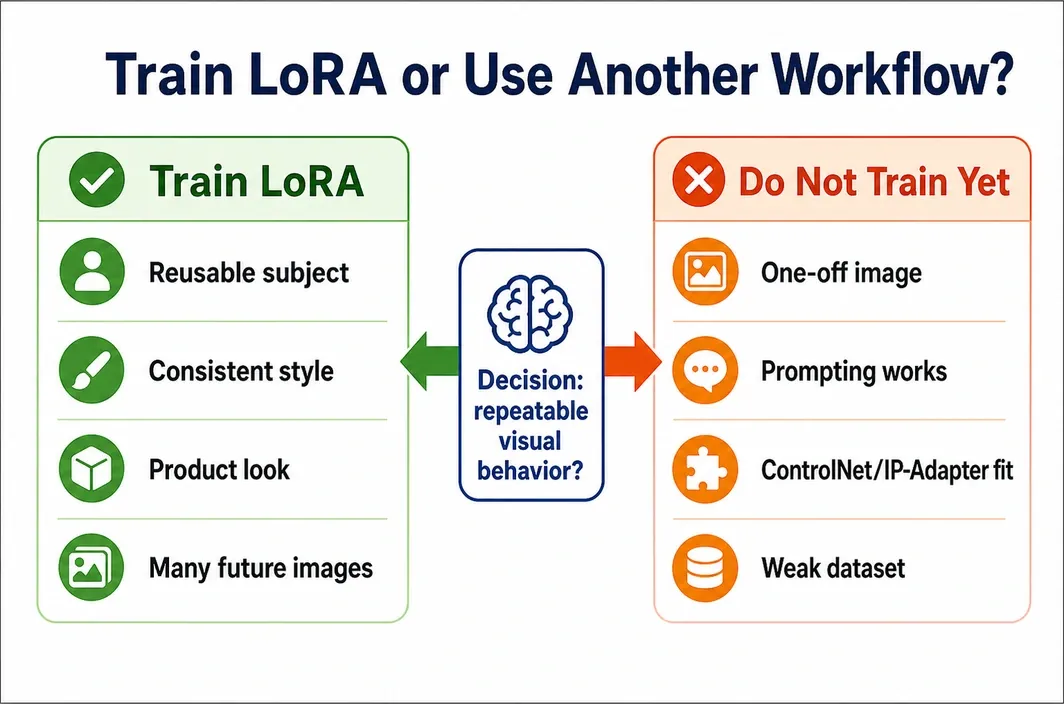
Use this asset-readiness checklist:
| Area | Ready for training | Fix before training |
|---|---|---|
| Images | Clean, relevant, non-duplicated, and consistent with the target concept | Blurry, compressed, duplicated, watermarked, or visually contradictory |
| Variety | Enough angle, pose, lighting, or composition variation for the desired generalization | Same crop or pose repeated so the LoRA memorizes one view |
| Captions | Trigger token and tags separate the target concept from incidental details | Captions hide the target, repeat wrong details, or describe background as the subject |
| Base model | Matches the final output style and quality target | Base model fights the dataset, forcing the LoRA to correct too much |
| Evaluation | Fixed sample prompts, seeds, and comparison criteria are prepared | No sample plan, so every output review becomes subjective |
| Compute | Environment, model files, dataset, and checkpoints can be recreated | Notebook state or local setup is fragile and hard to rerun |
Captions deserve special attention. A trigger token should identify the concept you want to activate. Supporting tags should describe the useful details without teaching the model that every incidental background, camera angle, or lighting condition is part of the concept.
Prepare evaluation prompts before training. Use a few prompts that test the target directly, plus a few prompts that test generalization. Keep seeds stable for comparison. Without a fixed review plan, you will not know whether the next checkpoint is better or merely different.
Choose the training environment and GPU before you tune parameters
Stable Diffusion LoRA training is not only a parameter problem. It is an environment problem. You need model files, dataset storage, training dependencies, checkpoint saves, sample output folders, and enough GPU memory to run the workflow without constant resets.
Local training can work if you already have a capable GPU, stable drivers, enough storage, and time to maintain the environment. A local RTX 3090 or RTX 4090 class 24GB GPU is credible for many image LoRA workflows. Smaller local GPUs may still work with careful settings, but they can force trade-offs in resolution, batch size, or training speed.
Teams that do not want to tie LoRA training to one local workstation can use RunC.ai referred to below as RunC, at this stage. RunC GPU Pods can provide rented GPU capacity, persistent development environments, SSH or JupyterLab-style access, and storage paths for datasets, checkpoints, and generated samples. The useful claim is not that RunC makes a bad dataset better. The useful claim is that a repeatable GPU environment makes the training loop easier to rerun and organize, whether you are maintaining the stack yourself with PyTorch or using a packaged image-generation workflow.
Choose the environment by the work you expect:
| Environment choice | Best fit | Main caveat |
|---|---|---|
| Local GPU | Small experiments when you already own suitable hardware | Driver, storage, heat, and workstation availability become your problem |
| Temporary notebook | One-off tests and learning the tool flow | Session resets and dependency drift can make reruns messy |
| Rented GPU Pod | Repeatable LoRA training, saved checkpoints, team workflows, and later deployment path | You still need clean data, good captions, and clear evaluation prompts |
A 24GB RTX 3090 or RTX 4090 class GPU is a practical starting point for many Stable Diffusion LoRA runs. Larger GPUs become more relevant when you use heavier base models, run larger batches, or train multiple variants.
Set practical LoRA parameters and run the first controlled training pass
There is no universal preset that saves a weak dataset. Parameters should control a specific decision: how much the LoRA learns, how fast it learns, how often you save checkpoints, and how quickly you can catch failure.
Start with a controlled first pass. Use the base model you actually plan to generate with. Keep sample prompts stable. Save checkpoints often enough to compare progress. Do not change five variables after the first bad sample. Change one or two things that match the failure signal.
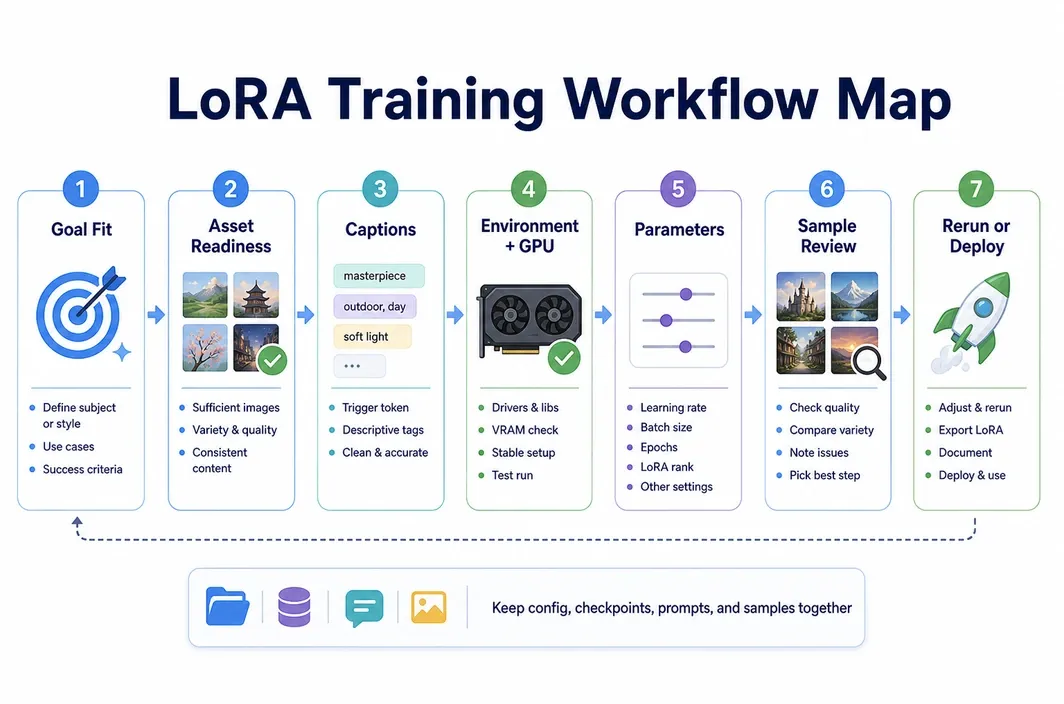
The workflow should look like this:
Goal fit
-> asset-readiness checklist
-> dataset cleanup and captions
-> base model and tool choice
-> environment/GPU choice
-> parameter plan
-> first training run
-> sample grid review
-> rerun, stop, or deploy
Use this parameter planning table as a drafting baseline:
| Parameter area | What it controls | Practical note |
|---|---|---|
| Base model | The visual world the LoRA adapts | Choose a model close to the final output style |
| Resolution / buckets | How images are resized and grouped | Match the expected generation workflow when possible |
| Repeats / epochs / steps | How often the model sees the dataset | Too low can undertrain, too high can overfit |
| Learning rate | How aggressively the LoRA learns | Higher is faster but can damage style or identity |
| Rank / alpha | Adapter capacity and influence | More capacity is not always better for small datasets |
| Batch size | Training stability and GPU memory use | Lower it when VRAM is tight; use accumulation if needed |
| Optimizer | How updates are applied | Keep it consistent while testing data and step changes |
| Save interval | How often checkpoints are kept | Save enough checkpoints to catch the best point before degradation |
| Sample interval | How often visual outputs are generated | Sample with fixed prompts so comparisons are meaningful |
If you are training for production use, archive the config with the LoRA: dataset version, caption style, base model, parameter choices, sample prompts, and checkpoint notes.
Review samples, troubleshoot failure modes, and decide whether to rerun or deploy
Training is not complete when the command stops. It is complete when the samples show the LoRA does what it was trained to do without damaging the rest of the image.
Review samples in a grid. Use the same prompts and seeds across checkpoints. Include direct target prompts and stress prompts that change pose, setting, lighting, or composition. If the LoRA only works in the exact training view, it may be memorizing rather than generalizing.
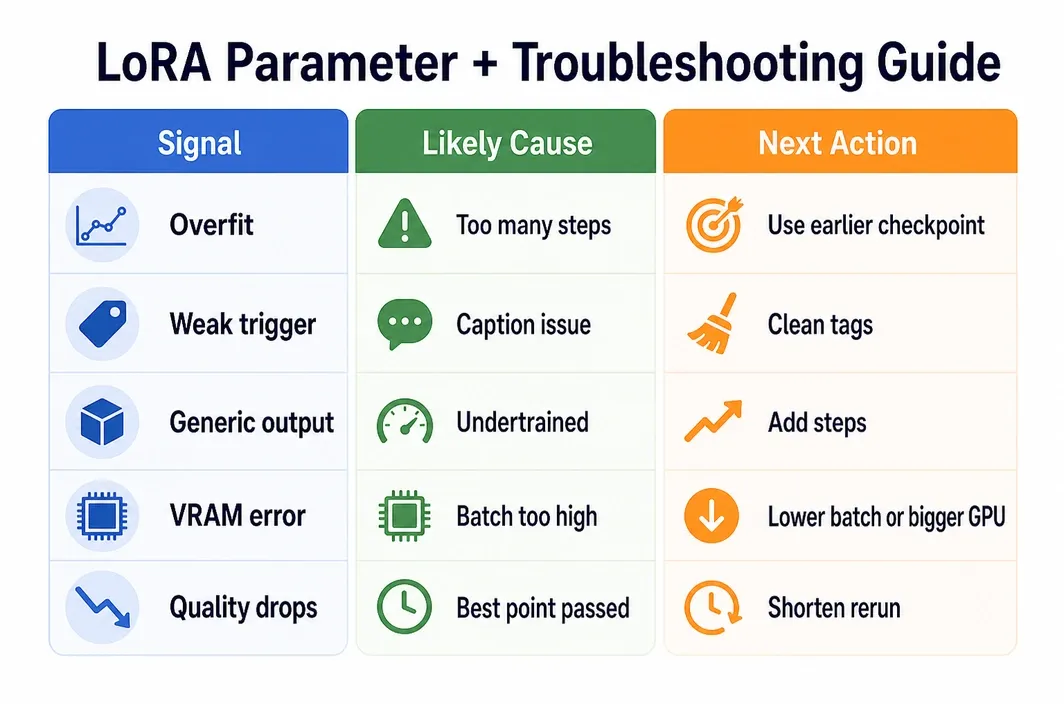
Use this troubleshooting table to choose the next action:
| Failure signal | Likely cause | Next action |
|---|---|---|
| Identity or style is too strong and stiff | Overtraining or low dataset variety | Compare earlier checkpoints, reduce steps, improve variation |
| Trigger token barely works | Weak captions, undertraining, or inconsistent dataset | Clean captions, increase signal, test more steps |
| Background details keep appearing | Caption leakage or repeated incidental details | Remove misleading tags and diversify backgrounds |
| Samples look generic | Undertraining or base model mismatch | Increase steps carefully or choose a closer base model |
| Quality improves then degrades | Best checkpoint happened earlier | Keep the earlier checkpoint and shorten the next run |
| VRAM errors | Batch, resolution, or model size too high for the GPU | Lower batch size or resolution, or move to a larger GPU |
| Results vary too much between sessions | Environment or file paths are not reproducible | Keep dataset, config, checkpoints, and samples in one stable workspace |
RunC can help most at this stage when the project needs repeated experiments. A GPU Pod can keep model files, datasets, checkpoints, configs, and sample outputs in a consistent workspace while you compare runs. That is useful when a creative team, ML engineer, or production workflow needs to move from a rough LoRA to a reusable asset.
The final decision should be explicit:
- Keep the LoRA if it preserves the target concept across different prompts without dragging unwanted training details into outputs.
- Rerun if the failure signal points to a clear fix, such as captions, steps, learning rate, dataset variety, or GPU memory.
- Stop and use another workflow if the goal is one-off, the data is too weak, or the LoRA keeps fighting the base model.
- Deploy or archive the LoRA when the checkpoint, config, prompts, and sample evidence are organized enough for reuse.
FAQ
How many images do I need to train a Stable Diffusion LoRA?
There is no perfect number, but the images must show a clear and repeated target concept with enough variety to avoid memorizing one view. A small clean dataset usually beats a larger noisy one. If you cannot explain what every image teaches, clean the dataset before training.
Is a 24GB GPU enough for LoRA training?
For many Stable Diffusion LoRA workflows, an RTX 3090 or RTX 4090 class 24GB GPU is a practical starting point. The exact fit depends on base model, resolution, batch size, optimizer, and how many experiments you run. If VRAM errors keep shaping the workflow, move to a larger GPU rather than weakening the training plan.
Should I train a LoRA or use ControlNet or IP-Adapter instead?
Use LoRA when you need a reusable learned subject, style, character, or product look. Use ControlNet, IP-Adapter, inpainting, or reference-image workflows when the problem is composition, pose, reference guidance, or a one-off output. Training is worthwhile only when repeated reuse justifies the setup.
How do I know if my LoRA is overfit?
An overfit LoRA often reproduces training poses, backgrounds, lighting, or facial details too rigidly. It may look strong in familiar prompts but fail when the scene changes. Compare earlier checkpoints and test prompts that deliberately vary the context.
Can I deploy or reuse the trained LoRA after training?
Yes, but only if you keep the checkpoint, base model reference, config, trigger token, sample prompts, and usage notes together. For a repeatable workflow, store the LoRA with its training evidence and use a stable environment for future generation or deployment work.
Conclusion
A useful lora training guide stable diffusion workflow should not start with parameters. It should start with fit, assets, captions, evaluation prompts, and a training environment you can reproduce.
If your goal is reusable visual consistency, LoRA is worth considering. If your dataset is weak or your need is one-off, do not train yet. When the data is ready, choose a GPU setup that can preserve checkpoints, sample outputs, and rerun history. RunC.ai fits that step for teams that need repeatable Stable Diffusion training and a path from trained assets into later generation or deployment workflows.

Member discussion: