
Key Takeaways
- H100 is worth the premium when a matched training run finishes enough sooner to lower total run cost or when faster iteration has real schedule value.
- A100 80GB remains a strong choice when the workload fits in 80GB, the stack does not benefit from a validated Hopper precision path, and a lower hourly rate matters more than elapsed time.
- Equal 80GB capacity does not mean equal training behavior: memory generation, bandwidth, supported precision, GPU form factor, and multi-GPU topology all matter.
- Compare cost to the same target metric, not peak TFLOPS or a provider's hourly price alone.
Introduction
Choosing between H100 and A100 for AI training is rarely a question of whether the H100 is faster. It is. The practical question is whether that speed changes the cost, delivery date, or feasibility of a particular run.
Both cards are commonly available with 80GB of memory, so capacity alone may not settle the choice. Training also holds activations, gradients, optimizer states, and temporary buffers; then it adds pressure from sequence length, batch size, data loading, and—in distributed jobs—communication. A workload can fit on both GPUs yet still produce very different wall-clock time and spend.
Use the comparison below as a decision path. Start with the training job, test the exact stack where possible, and treat every provider price as a dated input rather than a permanent hardware verdict.
The short answer
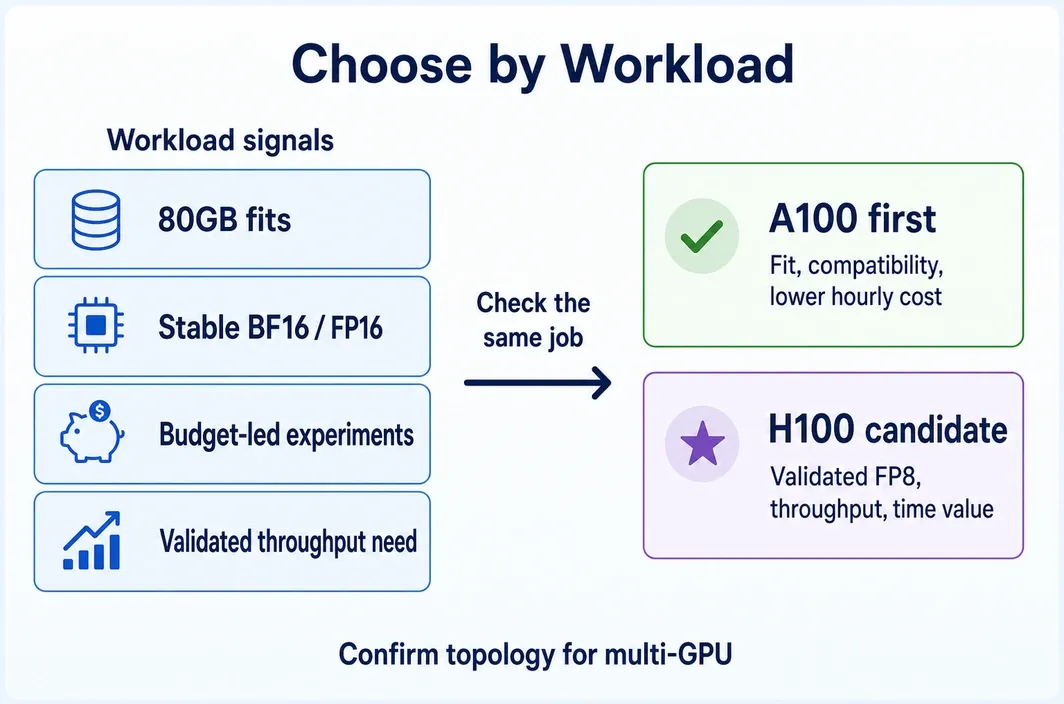
Choose an A100 80GB when it comfortably runs the target training job and you have not demonstrated that H100 shortens the run enough to offset its higher hourly price. Choose an H100 when the same job benefits from a supported Hopper-aware training path, is limited by throughput rather than data or host bottlenecks, or has an iteration deadline that makes earlier completion valuable.
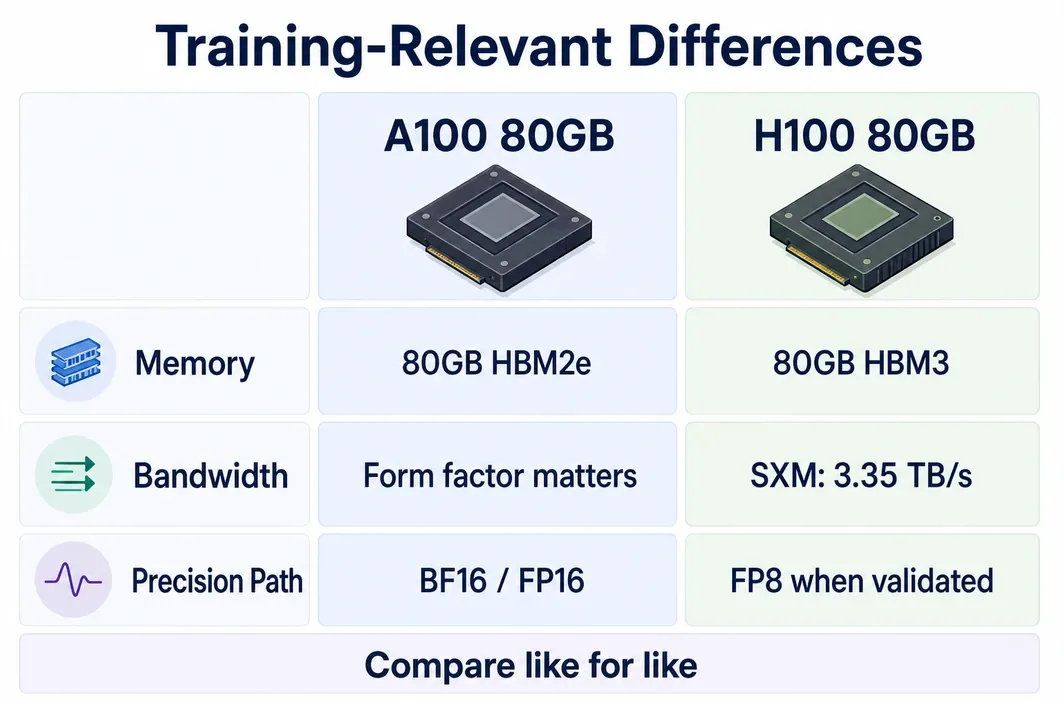
The important qualifier is “the same job.” H100 and A100 can both expose 80GB, but H100 SXM uses HBM3 and NVIDIA lists 3.35 TB/s of memory bandwidth for that configuration; A100 80GB uses HBM2e, with PCIe and SXM bandwidth figures that differ. Those facts create potential, not an automatic result. A rental listing that says only “H100 80GB” does not reveal the form factor or interconnect.
For many fine-tuning and research workloads, A100 is still the disciplined default: it has enough memory, established software support, and a lower starting price. For throughput-sensitive transformer training with a validated lower-precision path, H100 can repay the premium through shorter time to target. Neither conclusion follows from a spec-sheet column by itself.
Architecture differences that matter for training
Memory capacity decides whether a configuration can fit; bandwidth and compute influence how fast it runs once it does. Software and topology decide whether the theoretical advantage is usable. Keep those layers separate.
| Training factor | A100 80GB | H100 80GB | What to verify before deciding |
|---|---|---|---|
| Memory capacity | 80GB HBM2e on NVIDIA's listed 80GB variants | 80GB HBM3 on the NVIDIA H100 SXM specification | Peak allocated memory, activation checkpointing, sequence length, batch size, and optimizer state |
| Memory bandwidth | NVIDIA lists 1,935 GB/s for PCIe and 2,039 GB/s for SXM | NVIDIA lists 3.35 TB/s for H100 SXM | Compare the actual offered form factors; do not mix PCIe and SXM rows casually |
| Transformer-focused precision | BF16/FP16/TF32 paths are mature | Hopper adds Transformer Engine and FP8 capability | Framework, kernels, loss behavior, convergence, and output-quality validation |
| GPU-to-GPU communication | Depends on the system configuration | Depends on the system configuration; H100 SXM product specs list 900 GB/s NVLink | Provider topology, GPU count, node boundary, and distributed-training stack |
| Cost signal | Lower hourly starting price in the checked provider snapshot | Higher hourly starting price in the checked provider snapshot | Cost to the same training target, not price per hour |
NVIDIA describes the H100 Transformer Engine as a combined hardware-and-software feature that manages precision choices for transformer layers. That matters only when the training stack can use it safely. If the code path stays in the same precision mode as A100, or if data loading leaves the GPU idle, the gap can be much smaller than a peak-throughput comparison suggests.
Multi-GPU training deserves extra caution. Aggregate VRAM is useful for fitting a sharded model, but it does not guarantee efficient training. All-reduce behavior, model partitioning, network design, and the framework's distributed configuration can dominate the outcome. Verify the actual system topology before choosing a multi-GPU plan; do not infer it from a card name or a public price row.
Where H100 really wins
H100 earns attention when the job is both large enough and well enough optimized to use more throughput. Transformer-heavy training is the clearest example: a supported precision strategy, enough arithmetic work per step, and a stable numerical result can make H100's higher bandwidth and Hopper features operationally meaningful.
Use H100 as the leading candidate when these conditions are true:
- profiling shows the job is compute- or memory-bandwidth-bound rather than bottlenecked on storage, preprocessing, or CPU work;
- the framework and kernels support the intended Hopper precision path, and a short validation run preserves the target quality/convergence behavior;
- a matched pilot cuts time-to-target enough to clear the cost break-even or the saved calendar time has a defined business value;
- a multi-GPU run has confirmed node and interconnect details, not only a requested GPU count.
Where A100 is still the smarter buy
A100 is not a fallback for failed H100 budgets. It is often the lower-risk choice for a compatible 80GB workload when the faster card has no proven path to a lower completed-job cost.
This commonly includes parameter-efficient fine-tuning, controlled experiments, and batch work where the run can take longer without blocking a decision. A100 may also be the better starting point when the team has a BF16/FP16 workflow that is already stable and does not want the added validation work of changing precision or kernels. The lower hourly rate makes underutilization less expensive while the team is still learning the real memory and throughput profile.
Choose A100 first when the following is true:
- the model, context length, and effective batch fit with reliable memory headroom;
- profiling does not show a bottleneck that an H100-specific optimization is likely to remove;
- the training job is exploratory or interruption-tolerant enough that wall-clock time has limited value;
- compatibility, reproducibility, and a lower initial spend matter more than the shortest possible run;
- the provider cannot document the H100 configuration needed for a planned multi-GPU design.
The 80GB comparison still has limits. A model may technically fit while leaving too little room for activations or optimizer state at the desired sequence length and batch. In that case, moving from A100 to H100 does not add capacity if both offers are 80GB; it may improve throughput, but it is not a memory-capacity fix. Revisit the training configuration or consider a different memory tier rather than assuming H100 solves every out-of-memory problem.
Training cost per useful output
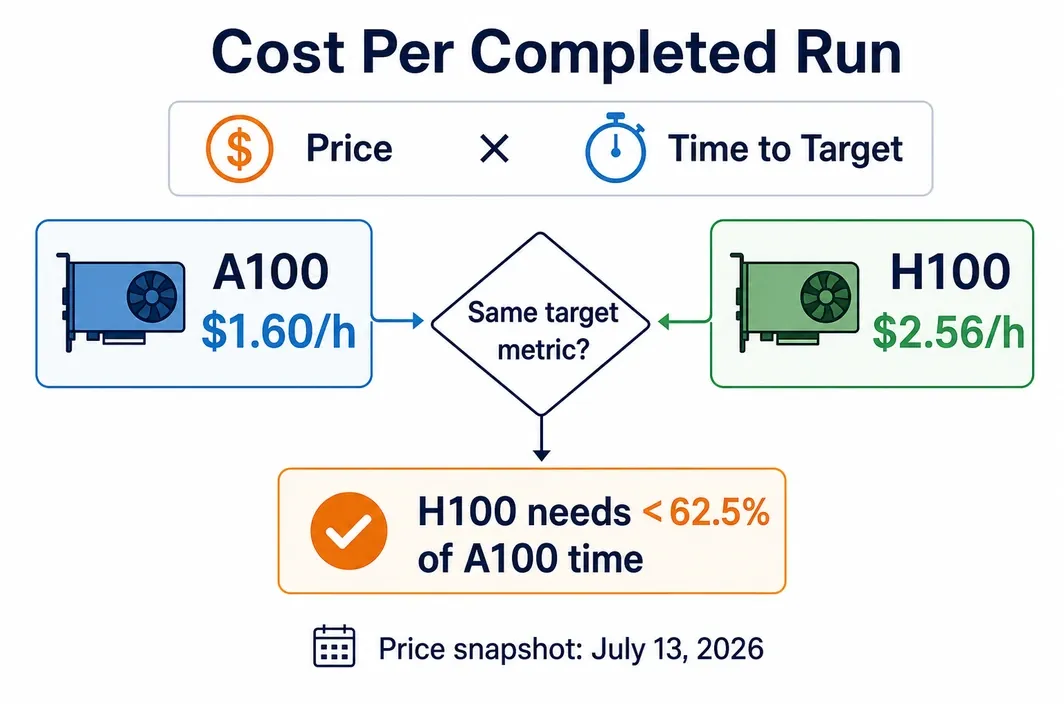
Hourly pricing is useful only after it is connected to a completed run. The simplest calculation is:
direct training cost = hourly GPU price × measured hours to the same target metric
For a clean comparison, hold the model, dataset, sequence length, batch strategy, code version, GPU count, precision policy, and stopping criterion constant. If H100 uses an FP8-oriented path while A100 uses BF16, validate the quality target before comparing spend; a cheaper run that misses the target is not useful output.
| Decision input | A100 80GB | H100 80GB | How to use it |
|---|---|---|---|
| Public starting price, checked July 14, 2026 | $1.60/h |
$2.56/h |
A dated, single-provider input—not a market average |
| Direct cost to target | 1.60 × A100 hours |
2.56 × H100 hours |
Calculate from the same job and the same success criterion |
| Direct-rental break-even | — | H100 must finish in under about 62.5% of the A100 time |
Derived from the checked price ratio; it is not a speed claim |
| Time value | Lower urgency may favor A100 | Faster iteration may justify H100 | Record release, researcher, or queue time explicitly |
| Hidden risk | Wrong memory estimate or idle GPU time | Unsupported precision path or unproven topology | Profile before committing to a long run |
For example, if an A100 run reaches the agreed validation metric in 20 hours, its direct GPU cost at the checked price is $32. If the comparable H100 run takes 12 hours, its direct GPU cost is $30.72 and it finishes eight hours earlier. If the H100 run instead takes 14 hours, it costs $35.84; use it only when the two-hour time saving is worth the difference.
Those figures show price math, not expected performance. Run a small representative pilot: log time per training step, peak memory, data-loader utilization, validation metric, and restart behavior. Then estimate the full run from observed data rather than extrapolating from a theoretical FLOPS ratio.
Renting H100 or A100 on RunC
Once the GPU tier is chosen, RunC.ai (referred to below as RunC) offers a short, comparable rental path rather than forcing a hardware purchase decision.
Run the same container, code revision, data slice, training configuration, and validation target on each selected tier. Stop after enough steps to capture peak memory, throughput, validation behavior, and setup overhead. That produces the inputs needed for the cost table above and avoids paying for a long run based on a generic benchmark.
The public price rows confirm listed VRAM and price signals only. They do not establish whether a given A100 or H100 offer is SXM or PCIe, nor do they document NVLink, NVSwitch, InfiniBand, multi-node bandwidth, regional availability, SLA, compliance, or a guaranteed workload speedup. Confirm those details directly before planning a distributed training job.
FAQ
Is H100 always faster than A100 for training?
H100 has newer hardware features and higher listed bandwidth in NVIDIA's SXM specification, but a training job can be limited by data input, CPU work, software, or a precision mode that does not use Hopper-specific features. Treat the expected speedup as a measured property of the exact workload.
If both GPUs have 80GB, why would H100 help?
Equal VRAM decides capacity, not throughput. H100 can improve the time to train when memory bandwidth, compute, and a supported precision path are the limiting factors; it does not add memory capacity to an 80GB-versus-80GB comparison.
Is FP8 enough reason to choose H100?
No. FP8 must be supported by the framework and kernels, then validated for numerical behavior and the target quality. Use it as a candidate optimization, not as a blanket hardware recommendation.
Should a multi-GPU training plan default to H100?
No. A multi-GPU decision needs documented form factor, interconnect, node layout, distributed-training software, and communication behavior. Select the system configuration after those details are known.
In Conclusion
Start with the GPU that fits the workload's memory and compatibility requirements, then upgrade only when a matched pilot proves that throughput, validated precision, or time-to-result justifies the premium. If you need to run that comparison, use RunC to test the same workload on the available configuration and recheck the current public price before reserving a longer training run.
Member discussion: