
Key Takeaways
- GPU cloud computing for deep learning is most useful when local hardware creates a bottleneck: not enough VRAM, slow experiments, long procurement cycles, or idle GPUs between training bursts.
- Start with the workload, not the provider. RTX 4090-class GPUs fit prototyping and smaller jobs, A100 80GB-class GPUs fit memory-heavy fine-tuning, and H100 80GB-class GPUs fit high-throughput training bursts.
- The platform decision should compare GPU availability, price visibility, storage persistence, setup burden, region needs, governance, and topology requirements.
- Public hourly prices are only the first layer of cost. Storage, failed runs, idle instances, data movement, and provider-specific limits can change the real budget.
- For multi-GPU or production-sensitive deep learning, verify topology, region, compliance, and support details directly with the provider before committing.
Introduction
GPU cloud computing for deep learning lets teams rent GPU-backed compute instead of buying every card they might need. That sounds simple, but the real decision is not just "cloud or local." The harder question is which GPU tier, platform style, and operating workflow fit the model, budget, and team.
A notebook test, a 7B LoRA fine-tune, a vision training run, and a high-throughput H100 job should not use the same infrastructure plan. The wrong choice can waste money even when the hourly price looks attractive. A GPU that is too small fails or forces tiny batches. A GPU that is too large burns budget before the code and data pipeline are ready.
The practical path is to define the workload first, map it to a GPU tier, choose a platform style, and then estimate cost with dated prices and clear caveats.
What GPU Cloud Computing Means for Deep Learning
GPU cloud computing means renting remote GPU instances or containers from a cloud provider and using them for compute-heavy jobs. For deep learning, that usually means training, fine-tuning, inference testing, image or video generation, embedding jobs, or model evaluation.
Deep learning workloads need GPUs because neural networks rely heavily on parallel tensor operations. The GPU tier matters because memory is often the first blocker. If the model, batch size, sequence length, optimizer state, or image/video pipeline does not fit in VRAM, the run either fails or needs a different setup.
Cloud GPUs are useful because capacity can change with the job. A team can validate code on a lower-cost GPU, move to an A100 80GB-class card when memory becomes the constraint, and reserve H100-class capacity for jobs where speed or throughput justifies the premium.
This is an infrastructure decision, not a model-quality shortcut. Better GPU access can help a team run the right experiments faster and avoid local hardware bottlenecks, but it does not make a model better by itself. Data quality, architecture, training setup, evaluation, and iteration still determine the result.
When Cloud GPUs Beat Local Hardware
Cloud GPUs usually win when demand is uneven. Deep learning work often happens in bursts: data prep, a small test, several failed runs, a larger fine-tune, evaluation, then days of code changes. Buying a GPU only makes sense when the card stays busy enough to justify purchase cost, power, maintenance, and depreciation.
Use cloud GPU capacity when the workload has one of these patterns:
- The model does not fit on local VRAM.
- Experiments need different GPU tiers over time.
- Procurement would slow the project more than the hourly cloud cost.
- The team needs a clean environment that can be reused across runs.
- The job is time-sensitive, but not continuous enough to justify owning hardware.
- Local hardware would sit idle between training cycles.
Owned hardware can still be the right choice for a stable workload with high utilization. If one known model runs on the same card for months, a workstation or internal cluster can be economical. The break point depends on purchase price, electricity, staffing, downtime, upgrade cycle, and how often the workload changes.
The common failure mode is buying too early. A team may purchase a card before knowing whether the bottleneck is VRAM, storage, data loading, model code, or training schedule. Cloud capacity lets the team learn the workload profile before locking into a fixed configuration.
How to Choose a GPU Cloud Platform
Choose the platform after the GPU tier is clear. The provider decision should focus on the work around the GPU: getting an instance, preparing the environment, keeping data and checkpoints, controlling cost, and meeting team requirements.
Start with these checks:
- GPU fit: Does the provider offer the GPU class and VRAM your workload needs?
- Availability: Can you actually get that GPU when the run must happen?
- Pricing visibility: Can you estimate compute and storage before launch?
- Setup burden: Do you need to build images, install drivers, or configure frameworks yourself?
- Persistence: Can datasets, model weights, and checkpoints survive after compute stops?
- Operations: Does the team need regions, governance, support, or procurement controls?
- Scale checks: Does a multi-GPU job need verified interconnect or topology details?
| Provider style / example | Best fit | Pricing visibility | Setup burden | Caveat |
| Managed GPU cloud: RunC.ai, RunPod, Lambda | Teams that want public GPU options, faster setup, and a GPU-focused workflow | Public pages can be checked, but availability can change | Lower than raw cloud setup for many teams | Maturity, regions, support depth, and exact availability differ |
| Marketplace GPU rental | Cost-focused users willing to compare many hosts | Varies by host and time | Medium to high | Consistency, persistence, and support need closer review |
| Hyperscalers: AWS, Google Cloud, Azure | Enterprise contracts, governance, adjacent cloud services, and large cluster needs | Official pricing exists, but total cost can be complex | Higher if starting from scratch | Quotas, region capacity, storage, and networking can shape the final cost |
| Local or internal GPUs | Stable high-utilization workloads | Clear capital cost | High up front, lower once built | Harder to adapt when model size or GPU needs change |
Which GPU Tier Fits Each Deep-Learning Task
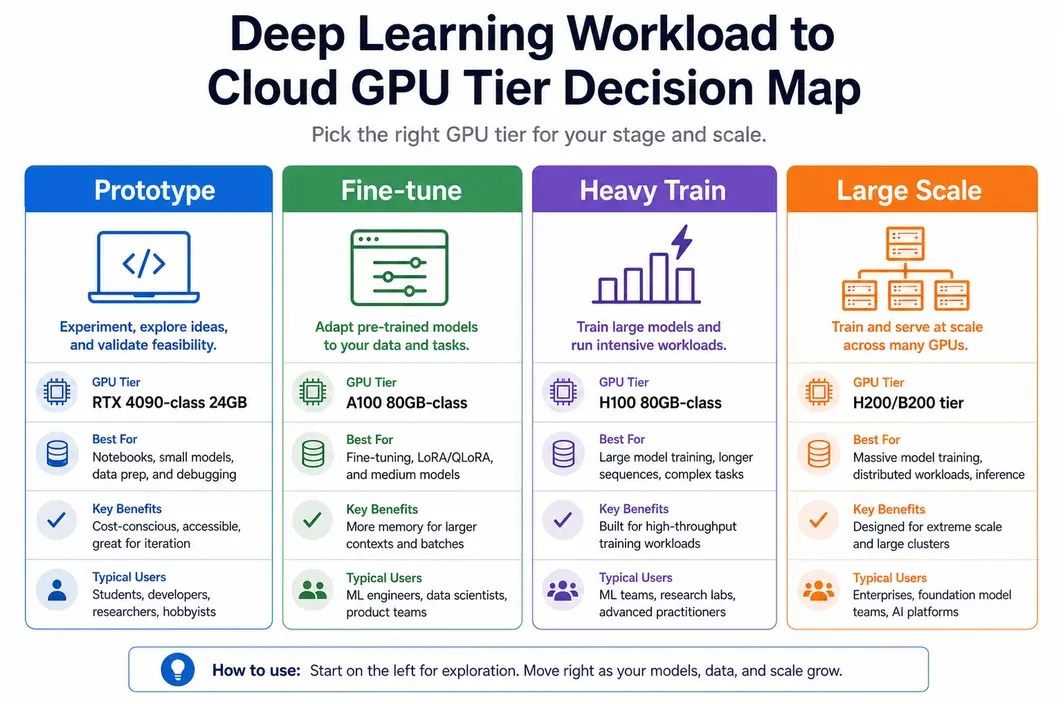
The right GPU tier depends on model size, VRAM, precision, batch size, context length, and throughput target. Hourly price matters, but a low hourly rate is not useful if the run fails or takes too long to iterate.
Use the matrix below as a starting point. It is not a benchmark table. Treat it as a practical shortlist before running a validation job.
| Workload | Starting GPU tier | Why it fits | Watch-out |
| Notebooks, prototypes, small CNNs, small transformer tests | RTX 4090-class, 24GB | Low-cost acceleration for code checks and early experiments | VRAM ceiling arrives quickly on larger models or longer contexts |
| Image generation, video experiments, smaller vision fine-tunes | RTX 4090-class or A100 80GB-class | 4090 keeps iteration cost low; A100 adds memory headroom | Pipeline memory varies by resolution, batch size, and model stack |
| 7B-13B adapter or LoRA fine-tunes | A100 80GB-class | 80GB VRAM gives more room for context, optimizer choices, and batch size | Exact fit depends on quantization, framework, and training recipe |
| Larger-context inference tests or heavier fine-tuning | A100 80GB or H100 80GB-class | More memory and higher throughput reduce bottlenecks | Validate the run before budgeting a long job |
| High-throughput training burst | H100 80GB or newer large-memory tier | Strong fit when throughput, schedule pressure, or modern Tensor Core paths matter | Multi-GPU jobs require topology, quota, and support checks |
RTX 4090-class GPUs are often enough for early validation, image workflows, smaller model experiments, and budget-sensitive iteration. A100 80GB-class GPUs are a safer fit when memory is the main constraint. H100 80GB-class GPUs become easier to justify when faster completion changes the project timeline or when the workload can use the hardware well.
For distributed or tightly coupled jobs, the GPU name is only part of the decision. Interconnect, form factor, networking, storage throughput, framework configuration, and provider support all matter. Do not assume that a multi-GPU price row means the setup is suitable for your training architecture.
For RunC.ai, the current cloud GPU rental options are RTX 4090 and A100; H100 is referenced here only as part of the broader training decision framework.
A Practical Workflow From Data to Trained Model
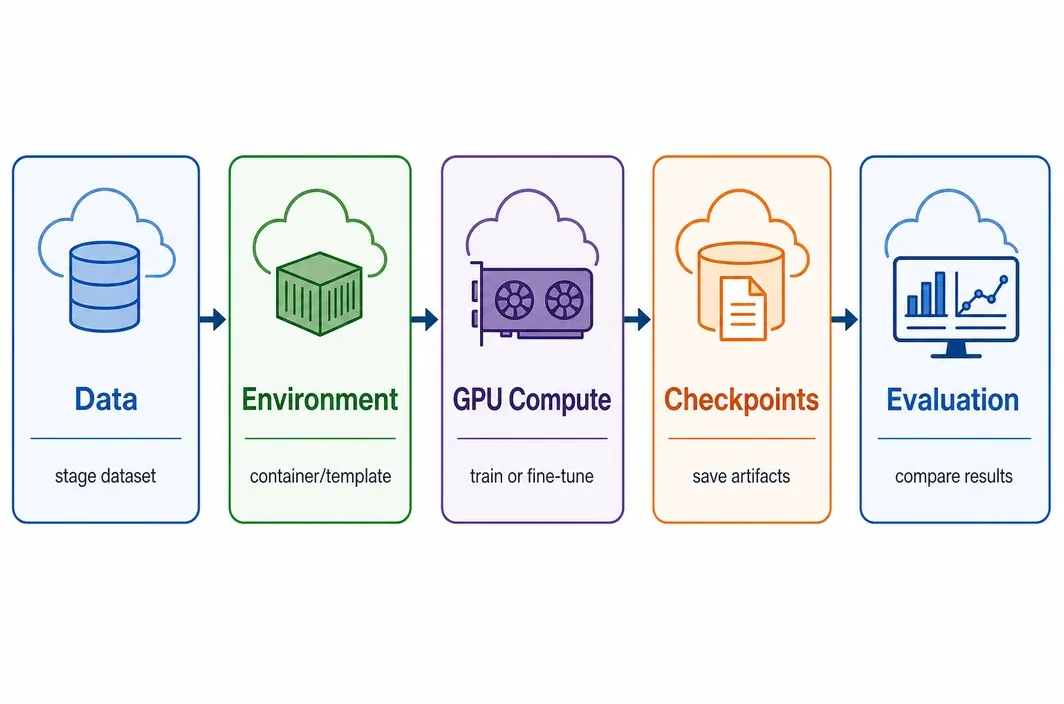
A good cloud GPU workflow keeps expensive compute focused on training, not setup mistakes. The first run should prove that code, data, dependencies, storage, and checkpointing work before the team pays for a long job.
Use this sequence:
- Define the run target. Decide whether the job is a smoke test, fine-tune, full training run, inference benchmark, or evaluation job.
- Estimate memory. Start from model size, context length, batch size, precision, optimizer state, and framework behavior.
- Choose the environment. Use a known container, framework image, notebook setup, or template that matches CUDA, PyTorch, and dependency needs.
- Stage a small dataset first. Validate data paths and preprocessing before uploading everything.
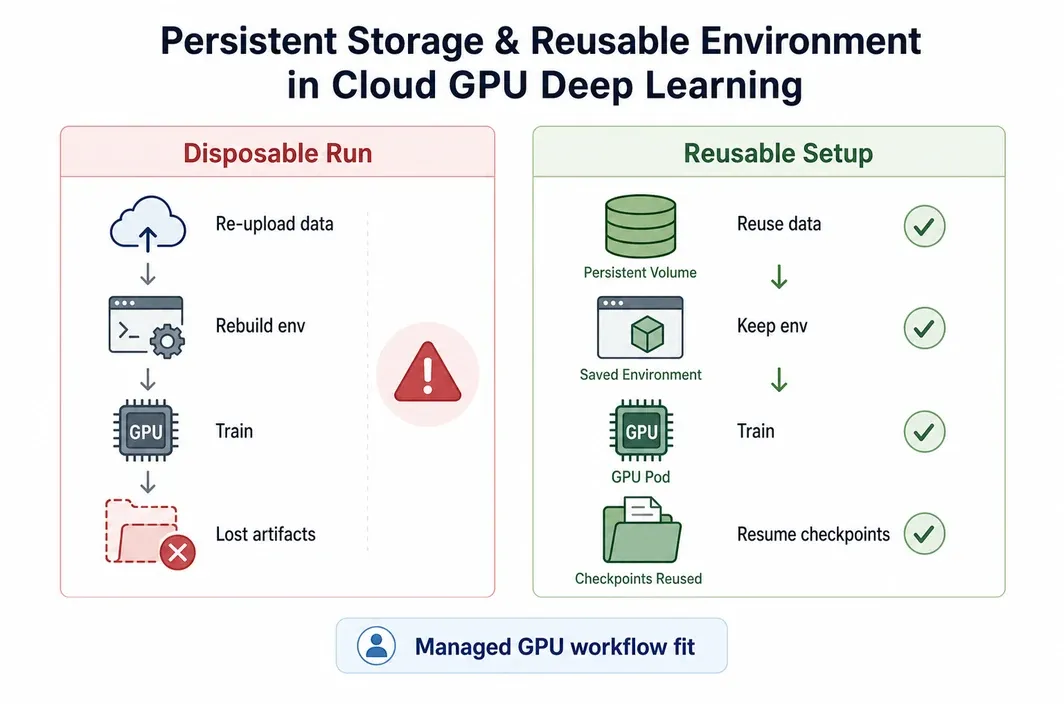
- Attach persistent storage if needed. Keep datasets, checkpoints, and model weights separate from short-lived compute.
- Run a short validation job. Confirm logging, loss curves, checkpoint save paths, and GPU memory behavior.
- Launch the full run. Watch throughput, memory use, failed batches, and storage behavior.
- Save outputs. Store checkpoints, tokenizer files, configs, logs, and evaluation results in a persistent location.
- Stop compute. Keep only the storage that must persist, and shut down idle GPU resources.
This workflow matters because setup errors can be more expensive than the training run itself. A broken dependency, wrong data path, or missing checkpoint rule can waste hours on a premium GPU. A short validation run reduces that risk.
Running Deep Learning on RunC
Once the workload, GPU tier, and platform criteria are clear, RunC.ai fits the shortlist as a managed GPU cloud for teams that want public GPU pricing, repeatable environments, and storage continuity without building directly on raw infrastructure.
The first question is GPU tier coverage.
RunC.ai lists 1x RTX 4090 at \$0.42/h, 1x A100 80GB at \$1.60/h, and 1x H100 80GB at \$2.56/h. That lines up with the tiers most teams use for prototyping, memory-heavy fine-tuning, and higher-throughput training bursts.
The second question is workflow setup.
RunC.ai is a better fit when the team wants a managed GPU workflow rather than raw hyperscaler provisioning. That usually matters for notebook validation, container-based fine-tunes, and repeated training reruns where rebuilding the environment every time would waste GPU hours.
The third question is storage and environment reuse.
RunC.ai lists Network Volume pricing at \$0.002/GB/day. That matters when datasets, checkpoints, and model files need to survive after compute stops, because workflow continuity often saves more time than a small difference in hourly GPU price.
The fourth question is billing clarity.
RunC.ai describes on-demand billing as calculated from instance unit price, billing duration, and number of cards, with billing duration accurate to the second and settled hourly. That does not remove the need to model storage and failed runs, but it gives the team a visible compute baseline before launch.
What Cloud GPU Costs Look Like
Hourly GPU prices are easy to compare, but they do not equal the full bill. A realistic estimate includes runtime, failed attempts, idle time, persistent storage, data movement, and any provider-specific account rules.
The examples below use RunC public pricing checked on 2026-06-26. Re-check before purchase because GPU cloud pricing and availability can change.
| Scenario | GPU class | Dated source example | Compute-only estimate | Caveat |
| Short validation run | RunC 1x RTX 4090 at \$0.42/h | RunC pricing checked 2026-06-26 | 5h = \$2.10 | Good for early checks; memory may limit model size |
| Fine-tune cycle | RunC 1x A100 80GB at \$1.60/h | RunC pricing checked 2026-06-26 | 20h = \$32.00 | Storage, failed runs, and retries are extra |
Use these as scenario examples, not promises about final spend. If the first three hours are spent fixing dependencies, that cost is still real. If checkpoints require persistent storage for weeks, storage becomes part of the budget. If a job needs a specific region or large multi-GPU shape, availability can matter more than the listed hourly rate.
For competitor platforms, use the same discipline. Compare current official pricing, storage, regions, and availability at the time of purchase. Do not compare only the headline GPU rate unless the workload has no meaningful storage, transfer, support, or setup cost.
FAQ
How much GPU memory do I need for deep learning?
Small prototypes and image workflows can often start on 24GB GPUs, but larger fine-tunes and longer contexts often need 80GB-class cards. The real requirement depends on model size, precision, batch size, sequence length, optimizer state, and framework behavior. If unsure, run a short validation job before committing to a long run.
Is cloud GPU cheaper than buying a workstation?
Cloud GPU is usually more practical when usage is bursty, uncertain, or spread across different GPU tiers. Buying can make sense when one known workload keeps the same GPU busy for a long period. The comparison should include purchase price, power, maintenance, downtime, depreciation, and the cost of being stuck on the wrong GPU.
Do I need an H100 for deep learning?
Not always. H100-class GPUs are useful when throughput, time-to-result, or specific modern acceleration paths justify the higher hourly price. Many prototypes, smaller fine-tunes, and image workflows can start on 4090-class or A100 80GB-class GPUs.
What should I check before using multiple cloud GPUs?
Check the provider's topology, interconnect, quota, region availability, framework guidance, and support expectations. Multi-GPU availability is not the same as a verified distributed-training setup. If the job is tightly coupled, ask for current technical details before budgeting.
Conclusion
GPU cloud computing for deep learning works best when it is treated as a sequence of decisions: workload first, GPU tier second, provider style third, and cost model last. That order prevents the two expensive mistakes: renting a GPU that cannot fit the job, or overpaying for capacity before the workflow is ready.

Member discussion: