
Key Takeaways
- A cloud GPU for PyTorch training should be selected from measured peak memory, expected training time, and recovery needs—not from GPU name alone.
- Keep code, configuration, data paths, and checkpoints separate. A fast GPU cannot recover a run whose only checkpoint disappeared with the instance.
- Start with a representative smoke test. Use its memory and step-time measurements to decide whether optimization, more VRAM, or more GPUs is justified.
- Public GPU prices are only one input. The useful comparison is estimated GPU-hours plus storage and the cost of a failed or repeated run.
Introduction
Cloud GPU for PyTorch training works best when the environment is treated as a recoverable training system rather than a rented accelerator. Choose enough VRAM for a representative batch with headroom, make the Python/CUDA environment reproducible, keep data and checkpoints in a persistent location, and measure a small run before committing to a longer job.
That approach avoids two expensive mistakes: paying for an oversized GPU before the workload is understood, and losing progress because a checkpoint or configuration existed only on ephemeral storage. The sections below turn those choices into a practical setup path for developers, ML engineers, and technical buyers.
What PyTorch training actually needs from a cloud GPU
GPU memory is the first constraint, but it is not the whole setup. During training, memory holds parameters, optimizer state, gradients, activations, and temporary tensors. The amount required changes with precision, sequence or image size, batch size, optimizer, model architecture, and distributed strategy. A card that works for an inference test may still fail during backpropagation.
Training also needs a stable environment. Record the image or base environment, Python version, PyTorch version, CUDA compatibility, dependency lockfile, training command, and configuration file. Recreating those details after an interruption can cost more time than the original setup.
Finally, decide where state lives before starting. Keep source code and configuration under version control; put datasets, outputs, and checkpoints in intentional locations; and test that a checkpoint restores before a long run begins. PyTorch documents state_dict as the standard mechanism for saving and loading model state; a real resume plan commonly also preserves optimizer, scheduler, step/epoch, and any project-specific state required to continue correctly. PyTorch saving and loading
Choosing the right GPU for your PyTorch workload
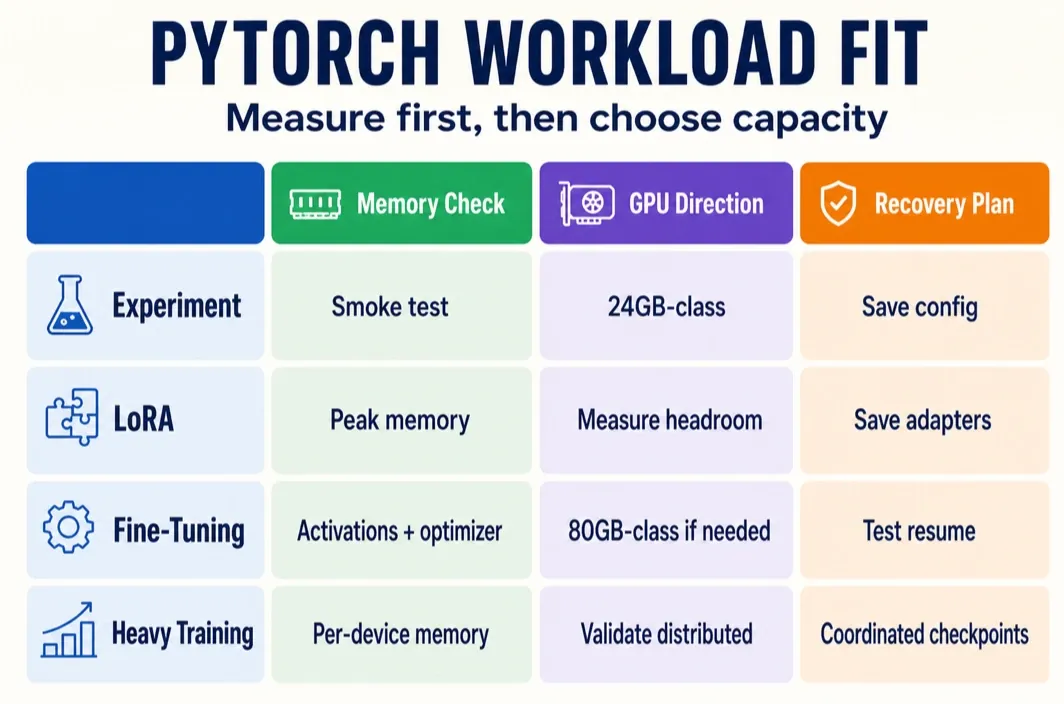
Use a short representative job to observe peak allocated memory, data-loading behavior, and seconds per training step. That evidence is more useful than a generic “X billion parameters needs Y GPU” rule because the same model can behave very differently across batch size, sequence length, precision, and optimizer choices.
| Workload | What to validate first | GPU direction | Storage and checkpoint strategy | Upgrade trigger |
|---|---|---|---|---|
| Experimentation or debugging | One batch completes; data loader is not stalling; memory has headroom | A 24GB-class GPU can be a practical starting point when the measured run fits | Keep small datasets local to the planned workspace; save a recoverable checkpoint before changing settings | Out-of-memory errors persist after reducing the test batch or changing the experiment |
| LoRA or parameter-efficient fine-tuning | Peak memory at target resolution/sequence length; optimizer and adapter state | Choose on measured headroom, not on the label “LoRA” | Version adapter/configuration with the run; retain base-model provenance and checkpoints separately | The target batch or context length cannot fit without unacceptable compromises |
| Medium fine-tuning | Activation memory, optimizer state, throughput, and restart time | An 80GB-class GPU may be appropriate when a 24GB trial cannot meet the intended batch or precision | Put checkpoints and run metadata on persistent storage; test resume from a newly written checkpoint | Optimization changes no longer make the training configuration viable |
| Heavier training or distributed work | Per-device memory, communication pattern, checkpoint format, and failure recovery | Assess multi-GPU only after measuring a one-device baseline and verifying the framework strategy | Plan coordinated checkpointing and restore testing before scaling | The model or target throughput exceeds one-device capacity and the distributed setup is validated |
Mixed precision and activation checkpointing belong before a hardware upgrade decision, not after it. PyTorch's AMP tools let suitable operations use lower precision, while activation checkpointing trades added recomputation for lower activation-memory use. Both can change the best GPU tier, and both should be validated with the actual model and training metrics. PyTorch AMP · PyTorch checkpointing
The decision is not “optimize forever” versus “buy the biggest GPU.” If the representative run remains memory-bound after sensible configuration changes, moving to a larger-memory tier is often safer than forcing an impractically small batch or a fragile training setup.
Common mistakes when moving PyTorch training to the cloud
The most common migration failures are operational, not mathematical. Treat each one as a check before the expensive run starts.
| Mistake | Typical symptom | Practical response |
|---|---|---|
| Environment drift | A run works locally but fails after launch, or results cannot be reproduced | Pin dependencies, record PyTorch/CUDA details, save the exact command and configuration, then rerun a small smoke test |
| Treating storage as an afterthought | GPU utilization drops while loading data, or checkpoints are scattered across temporary paths | Separate input, output, and checkpoint locations; test write and restore permissions before training |
| Checkpointing only model weights | A model loads but the optimizer/scheduler or training position is lost | Define the complete recovery payload for the training framework and test a resume from a fresh checkpoint |
| Leaving capacity running after work stops | Costs continue while no training or evaluation is active | Make an owner and a shutdown check part of the runbook; confirm persisted output before changing compute state |
| Scaling before measuring | A multi-GPU job adds complexity without fixing the actual bottleneck | Measure one-GPU memory, step time, data pipeline, and checkpoint behavior first |
“Stop and resume” is not a single portable guarantee. Different providers and instance actions can treat container storage, attached storage, and networked storage differently. Build the workflow around verified checkpoint persistence and a tested restore command; check the current product documentation before relying on any specific stop, restart, or termination behavior.
A practical PyTorch training workflow on RunC
After the workload and recovery requirements are clear, a RunC.ai GPU Pod can be evaluated as the execution environment. The useful product decision here is not a generic platform claim: it is whether a POD, a matching Network Volume, and the currently available environment meet the run's storage and reproducibility requirements.
RunC's Network Volume documentation describes shared storage for multiple GPU container instances. It is tied to a data center, currently mounts to POD instances rather than VM instances, and is not intended as a long-term backup destination. Those boundaries make it suitable to evaluate for active datasets, outputs, and checkpoints when the selected POD and volume are in the same data center—while keeping a separate backup plan. RunC Network Volume documentation
First-run path: validate the setup before a long training job
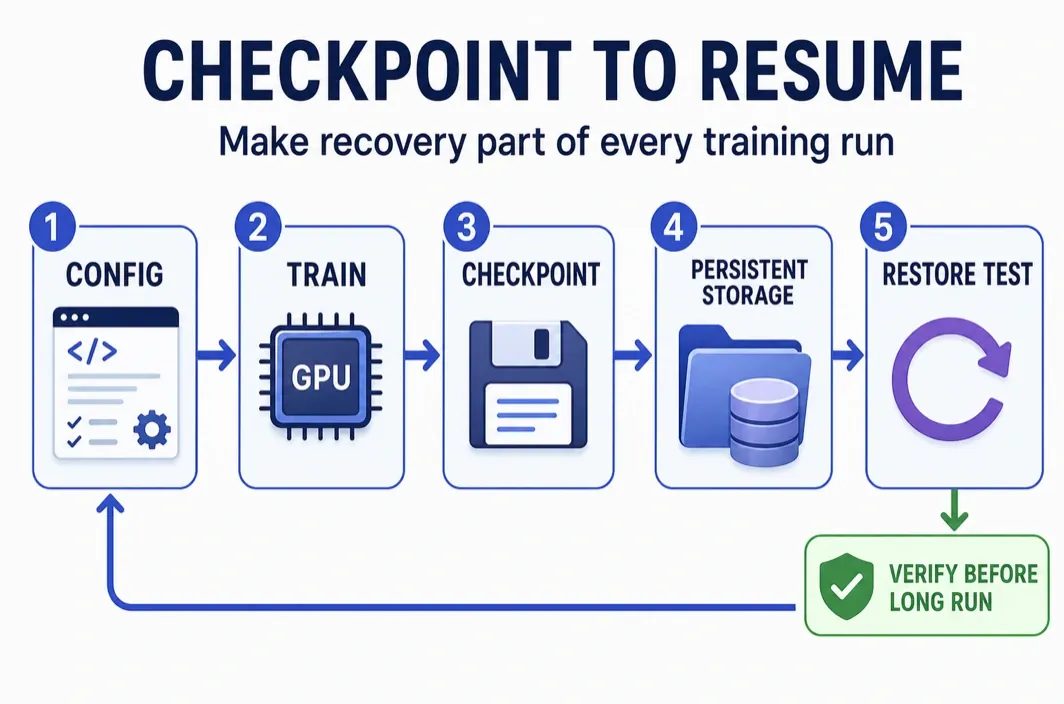
- Fix the image and environment. Choose the Pod image, then record the Python, PyTorch, CUDA, and dependency versions used by the training command. Confirm that the selected environment can see the intended GPU before downloading data or starting a long run.
- Attach and verify persistent storage. Create or select a Network Volume in the same data center as the Pod, attach it during deployment, and verify the mount from the terminal (for example, with
df -h). Define separate paths for datasets, checkpoints, logs, and final outputs. - Run a representative smoke test. Use a small but realistic sample of the intended data, batch size, precision mode, and training command. Record peak GPU memory, data-loading behavior, and time per step.
- Write one complete checkpoint. Save the model state and, when the job must resume training, the optimizer, scheduler, current step or epoch, configuration, and any project-specific state. Write it to the verified persistent path rather than relying only on the container layer.
- Prove that restore works. End the training process, start a clean resume command from the saved checkpoint, and confirm that the expected state, step count, and training behavior are restored.
- Make the long-run decision. Start the longer job only when the smoke test fits with memory headroom, the measured step time is acceptable, and the restore test succeeds. Otherwise, adjust the batch size, precision, checkpoint strategy, or GPU tier before committing more GPU hours.
Use this operating sequence:
- Choose capacity from the smoke test. Select the GPU tier only after recording peak memory and step time for representative data and batch settings.
- Confirm the current environment. Before launch, check the currently available image or template, PyTorch/CUDA compatibility, and access method. Do not assume a named template or version is available without checking the current console or official material.
- Match compute and persistent storage. If using a Network Volume, create or select it in the same data center as the POD, then mount it only after verifying the planned paths and permissions.
- Separate run inputs and recoverable outputs. Store code/configuration, data references, logs, and checkpoints in known locations. Avoid treating a container's local layer as the only copy of a valuable checkpoint.
- Run a smoke test and a restore test. Execute a short training segment, write a checkpoint, start a clean recovery path, and confirm the resumed state before scaling duration or batch size.
- Close the run deliberately. Once output is persisted and recoverability is verified, inspect current billing and instance controls. The exact effect of stopping, restarting, or terminating a Pod must be checked against current RunC documentation and console behavior at that time.
This workflow deliberately does not promise a particular template, availability, resume behavior, or cross-data-center mount. Those are deployment facts to verify on the day the run is launched.
4090 vs A100 for PyTorch training on RunC
The useful comparison starts with memory headroom and completed work, then considers public hourly pricing. Recheck RunC pricing before publication or launch.
| GPU tier | Public memory / price signal checked 2026-07-14 | Best fit when | Do not infer |
|---|---|---|---|
| RTX 4090 | 24GB; $0.42/h |
A measured experiment, LoRA job, or moderate fine-tuning run fits with safe headroom | That every LoRA or fine-tuning job fits in 24GB |
| A100 | 80GB; $1.60/h |
The intended batch, precision, or model state needs more memory than a 24GB trial can support | Current supply, exact form factor, multi-GPU topology, or a fixed speedup |
A simple planning formula makes the trade-off visible:
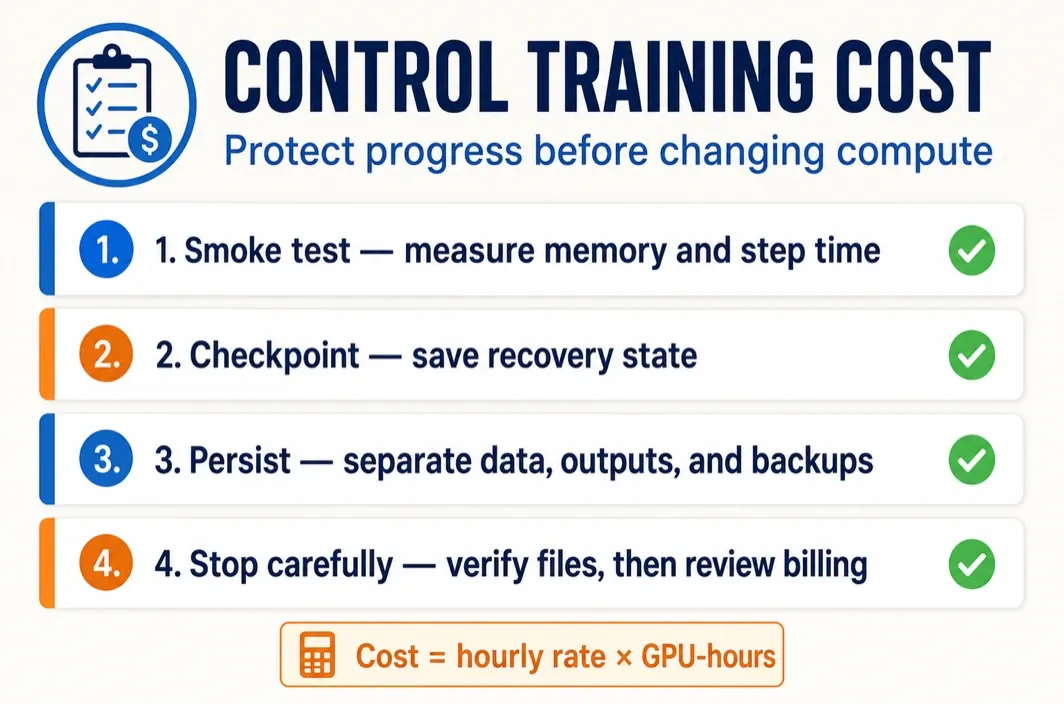
estimated compute cost = published hourly rate × measured or estimated GPU-hours
Then add storage, data-transfer, and rerun risk. A lower hourly rate is not automatically the lower-cost job if it forces a tiny batch, takes much longer, or causes repeated failed runs. Conversely, an expensive tier is not justified merely by prestige if the current workload already fits and trains efficiently on a cheaper option.
Cost controls that actually matter
Control costs through repeatable operating decisions. Measure a short run before reserving a long window; use that result to estimate GPU-hours. Keep checkpoint frequency proportional to the cost of losing work, not to an arbitrary timer. Verify that a checkpoint is recoverable before the job has accumulated many hours of compute.
Data layout also affects the bill. Repeated downloads, unclear output paths, and failed restarts consume paid GPU time without advancing training. Keep active inputs and checkpoints where the workload can access them intentionally, and keep independent backups for assets that must survive beyond the active training workspace.
Before changing compute state, confirm that the final checkpoint, configuration, logs, and output locations are present and recoverable. Then review the current billing and lifecycle controls for the selected Pod. That habit keeps cloud GPU for PyTorch training tied to completed, reproducible work rather than just rented time.
Frequently asked questions
How much GPU memory does PyTorch training need?
There is no reliable universal number. Measure the exact model, precision, batch size, sequence or image size, optimizer, and data path with a representative run. Leave headroom for temporary allocations and evaluation, then decide whether configuration changes or a larger-memory GPU are warranted.
Should I use activation checkpointing before renting a larger GPU?
Usually test it as one option, because it can reduce activation-memory use by recomputing work during backward passes. Whether it is worthwhile depends on the resulting runtime, numerical behavior, and whether the training configuration still meets the project deadline.
What must be saved to resume a PyTorch training run?
At minimum, save the model state required by the project. For a true training resume, also preserve the optimizer, scheduler, epoch or step, configuration, and other framework-specific state that affects continuity; then test a restore before relying on it.
When should I move from one GPU to multiple GPUs?
Move only when a measured one-GPU run cannot meet memory or time requirements after sensible optimization. Multi-GPU training adds communication, launch, checkpoint, and recovery complexity, so validate the chosen distributed strategy before scaling a production run.
Conclusion
The right cloud GPU for PyTorch training is the one that lets a measured workload finish reliably—not simply the one with the highest specification. Start with a representative smoke test, record peak memory and step time, verify that a fresh checkpoint can restore the run, and then choose the lowest GPU tier that leaves enough operational headroom.
If the validated workload calls for a Pod-based cloud setup, RunC.ai is a practical place to evaluate the required GPU capacity alongside a same-data-center Network Volume for active training data and checkpoints. Before launch, confirm current GPU availability, environment compatibility, storage-mount rules, lifecycle behavior, and live pricing in the provider console and documentation.
Member discussion: