
Key Takeaways
- Video diffusion models usually need more GPU memory and longer runtimes than standard image generation workflows.
- An
RTX 4090is still a strong starting point for lighter video diffusion experiments and cost-sensitive creators. A100 80GBis often the practical next step when 24GB VRAM becomes a consistent bottleneck.H100 80GBmakes the most sense for heavier production workloads, speed-sensitive pipelines, or larger-scale teams.- RunC.ai is a strong option for this category because it combines GPU Pods, pay-as-you-go pricing, Shared Network Volumes, and high-memory GPU choices.
If you are searching for the best GPU cloud for video diffusion models in 2026, the real question is not just which provider has the biggest GPU. It is which GPU class gives your workflow enough memory, enough speed, and enough flexibility without pushing your cost out of control.
That matters more for video than image generation. A short image workflow can often survive on less VRAM and shorter runtimes. A video diffusion pipeline, especially at higher resolution or longer duration, can become expensive very quickly if the GPU is undersized or the cloud setup is inefficient.
Why Video Diffusion Models Need Different GPU Decisions
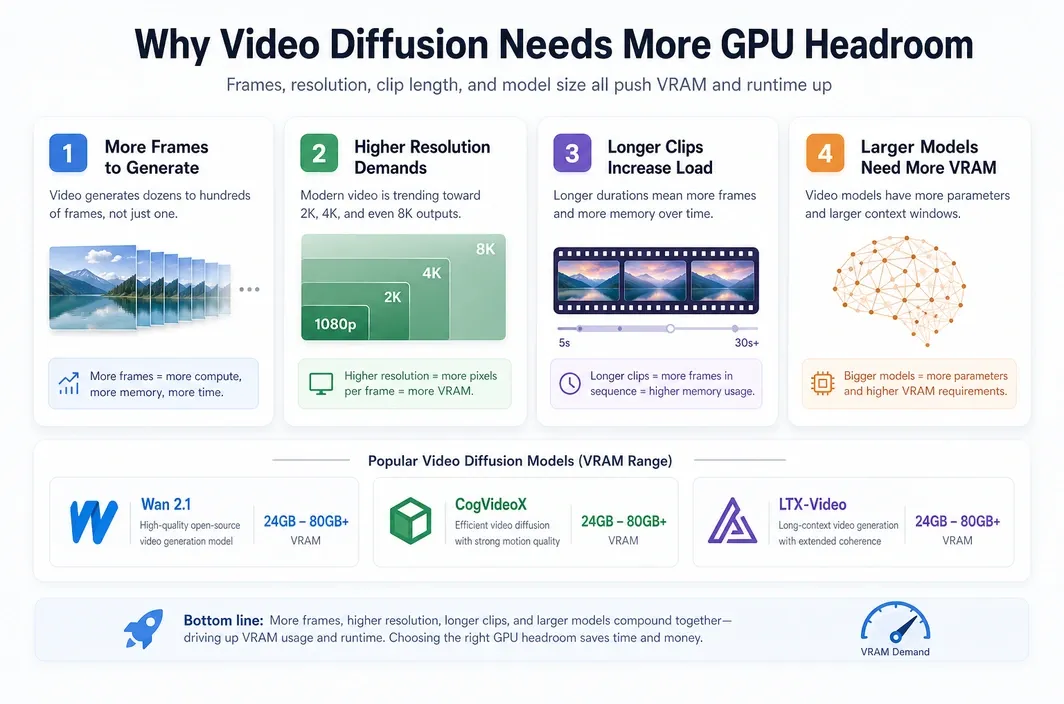
Video diffusion models are usually much more demanding than image diffusion models because they multiply the problem across time. Instead of generating one frame with one memory footprint, they often have to manage many frames, more intermediate activations, and longer iterative computation.
That means the best GPU cloud for video diffusion models in 2026 depends heavily on workflow shape. A short proof-of-concept animation is not the same thing as a higher-resolution, longer-duration pipeline for production content.
You can also see this difference in the kinds of models people actually run. Open-source video diffusion models such as Wan 2.1, CogVideoX, and LTX-Video often push VRAM requirements higher than a typical image workflow because they have to manage temporal consistency, larger context windows, and heavier multi-frame generation steps. In practice, lighter experiments may still fit on 24GB class GPUs, but more serious runs often become much more comfortable once you move into the 80GB tier.
| Workload Factor | Why It Raises GPU Demand |
|---|---|
| More frames | Every added frame increases compute load and often raises memory pressure. |
| Higher resolution | Larger frames create a much heavier memory and runtime burden. |
| Longer clips | More seconds of output usually mean longer runtimes and higher cloud cost. |
| Larger models | Bigger checkpoints and more complex pipelines can outgrow smaller GPUs quickly. |
| Iterative experimentation | Repeated reruns amplify the importance of hourly cost and startup efficiency. |
This is why many users begin with a high-value cloud GPU, then move up only when the workflow proves it needs more headroom. Going straight to the most expensive option is often wasteful unless your pipeline consistently justifies it.
RTX 4090 vs A100 vs H100 for Video Diffusion
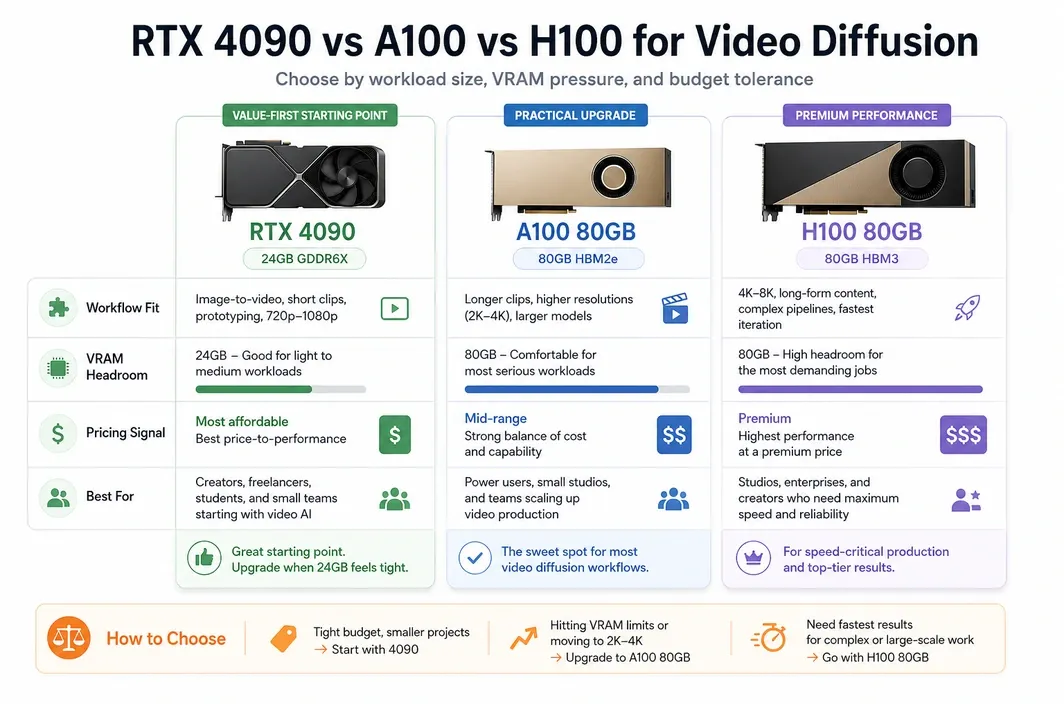
The core decision usually comes down to RTX 4090, A100 80GB, or H100 80GB. Each has a very different role in a video diffusion workflow, and the best choice depends on whether you are optimizing for cost, memory headroom, or top-end speed.
For many users, the RTX 4090 is still the right place to start. It gives you a lower entry cost and enough VRAM for lighter experimentation, prototyping, and some creator-style workloads. The limitation appears when longer or heavier video workflows keep colliding with 24GB memory limits.
| GPU | VRAM | Best For | RunC.ai Pricing Signal | Main Tradeoff |
|---|---|---|---|---|
| RTX 4090 | 24GB | Lighter experiments, cost-aware creators, shorter video workflows | Starts at $0.42/hr | Can become restrictive for heavier video diffusion pipelines |
| A100 80GB | 80GB | Serious video generation workloads, higher-resolution or more memory-heavy jobs | Starts at $1.60/hr | Higher cost, but much more practical headroom |
| H100 80GB | 80GB | Premium production pipelines, faster throughput, top-end scale needs | Starts at $2.56/hr | Often too expensive for routine experimentation |
The A100 is usually the most practical upgrade path when the 4090 stops being comfortable. You are not just paying for more speed. You are paying for more room to run demanding video workloads without constantly fighting memory constraints.
The H100 is the premium option. It makes sense when your workflow is already large enough that speed and throughput have direct business value. For many readers searching this keyword, H100 is something to graduate into, not the first recommendation by default.
What to Look for in a GPU Cloud for Video Diffusion Models
Choosing the best GPU cloud for video diffusion models in 2026 is not only about the GPU itself. Video pipelines also expose weaknesses in storage, startup behavior, environment management, and billing structure.
This is especially important if you are repeatedly testing models, reusing checkpoints, or switching between short experiments and heavier renders.
| Decision Area | Why It Matters |
|---|---|
| GPU memory | Determines whether the workload fits comfortably or keeps failing under memory pressure. |
| Pricing model | Long video runs can become expensive fast, so predictable hourly pricing matters. |
| Persistent storage | Reusing checkpoints, assets, and datasets is easier when storage is not tied to one short-lived session. |
| Startup efficiency | Faster startup helps when you relaunch environments often or work with large custom images. |
| Environment control | Video diffusion workflows often need more control than a simple hosted demo environment provides. |
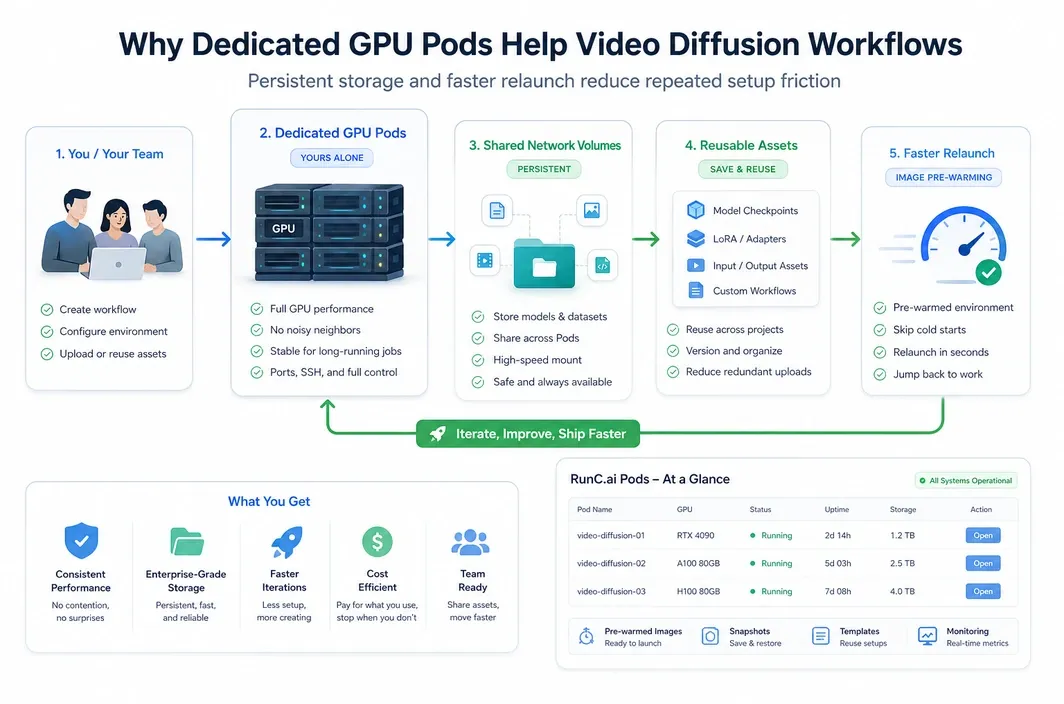
That is why dedicated GPU pods are often a better fit for video diffusion than a minimal browser-only workflow. The more serious the workload becomes, the more useful it is to control the runtime, storage, and deployment behavior yourself.
Why RunC.ai Is a Strong Option for Video Diffusion Workloads
RunC.ai fits this topic as a practical GPU cloud option for users who need dedicated infrastructure rather than a lightweight hosted demo layer. The value is not just that it offers GPUs. The value is that its product shape matches how heavier creative AI workloads tend to operate.
For this kind of workload, RunC.ai is not just offering access to GPUs. The platform lines up well with how repeat video generation work is usually done: dedicated runtime control, reusable storage, and the ability to move up the GPU ladder when a workflow outgrows its starting point.
Key product signals that matter here include:
- RTX 4090 pricing signal from
$0.42/hr - A100 80GB pricing signal from
$1.60/hr - H100 80GB pricing signal from
$2.56/hr GPU Podsfor persistent dedicated GPU usageShared Network Volumesfor model and asset reuse across PodsImage Pre-warmingto reduce friction when working with heavier custom environments
That mix matters for video diffusion because model assets and checkpoints tend to be large, environment setup can be nontrivial, and repeated runs make deployment friction more expensive than it first appears.
If you need a dedicated cloud environment for video generation work, RunC.ai is a strong option because it combines high-performance GPU Pods with cost-conscious pricing signals, storage features designed for reusable AI assets, and a workflow model that fits repeat experimentation better than a temporary notebook-style setup.
The storage point matters more here than it does in many lighter articles. Shared Network Volumes can make it easier to keep large model assets and datasets available across sessions, while Image Pre-warming can help reduce relaunch overhead for heavier images and custom runtime setups. That is a practical fit for video diffusion teams that care about repeatability, not just first-run novelty.
How to Choose the Right Cloud GPU by Workflow Type
The best GPU cloud for video diffusion models in 2026 depends on whether your workflow is exploratory, iterative, or production-oriented. The right answer changes as soon as memory pressure and runtime become recurring constraints instead of occasional annoyances.
Start smaller than your ego wants, then move up only when your real workload proves you need more. That is usually the cheapest way to find the right performance band.
| Use Case | Best Choice | Why |
|---|---|---|
| Learning or testing basic video diffusion workflows | RTX 4090 cloud pod | Lower cost and enough headroom for lighter experiments |
| Frequent creator iteration on short-form outputs | RTX 4090 or A100 depending on memory pressure | Strong balance between speed and budget |
| Higher-resolution or longer video jobs | A100 80GB | More practical VRAM headroom for sustained workloads |
| Production-scale pipelines with strong speed demands | H100 80GB | Premium throughput when time savings justify the price |
| Repeat team workflow with reusable checkpoints and assets | GPU pods with persistent shared storage | Better environment control and less friction across sessions |
This is also why the word best should not be treated as universal. For many users, the best GPU cloud is the one that keeps the workload stable and the cost rational, not the one with the most impressive specs on paper.
FAQ
What is the best GPU cloud for video diffusion models in 2026?
For many users, the best GPU cloud for video diffusion models in 2026 is the one that balances VRAM, pricing, and deployment control. That often means starting with RTX 4090 for lighter work, then moving to A100 or H100 only when the workload demands more memory or throughput.
Is RTX 4090 enough for video diffusion models?
Sometimes, yes. RTX 4090 can work well for lighter experiments, shorter runs, and cost-aware creator workflows, but heavier video diffusion jobs can run into 24GB VRAM limits much faster than image pipelines do.
When should you use A100 or H100 for video generation?
Choose A100 or H100 when your workflow repeatedly becomes memory-bound, your output targets are heavier, or runtime starts to directly affect production value. A100 is usually the more practical upgrade, while H100 is the premium option for faster large-scale work.
Why do video diffusion models need more VRAM than image diffusion?
Because video generation expands the workload over multiple frames and longer temporal sequences. That creates a larger memory footprint and more computation than generating a single image.
Is cloud GPU rental better than buying a local GPU for video diffusion?
It often is for experimentation, bursty workloads, and teams that do not want to overpay upfront for hardware they may not fully use every day. Cloud GPUs also make it easier to move between GPU classes as workloads grow.
Conclusion
The best next step is usually to match the GPU to the workflow you already have, not the one you imagine you might need later. If you are testing short clips or learning the tooling, start with the most rational price-to-headroom option. If your real bottleneck becomes VRAM pressure, longer runtimes, or repeat production throughput, then move up deliberately.
That is why this category works best as a staged decision. Start with a workflow-sized choice, confirm where the pressure actually shows up, and upgrade only when the workload proves it. If you want that path inside a dedicated cloud setup with reusable storage and flexible pricing, RunC.ai is a practical platform to evaluate for video diffusion work.

Member discussion: