
Key Takeaways
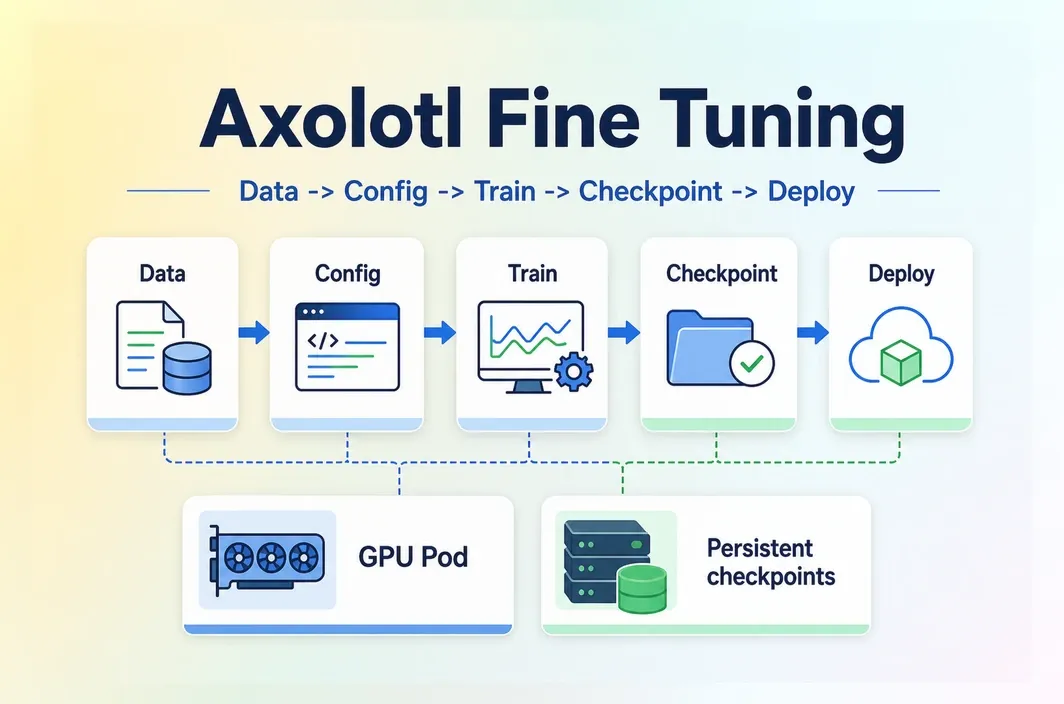
- A successful Axolotl fine tuning run starts with the base model, dataset format, GPU lane, YAML config, evaluation prompts, checkpoint policy, and deployment target planned together.
- Axolotl is a good fit when you need a repeatable LoRA or QLoRA workflow with control over datasets, configs, checkpoints, and model artifacts.
- A small smoke test can prove the dataset and config. A 7B QLoRA run usually belongs in a 24GB+ GPU planning lane, while larger models, longer context, full fine-tuning, or repeated team runs may need A100/H100-class planning.
- Training is not the finish line. You still need to evaluate the adapter, decide whether to merge weights, preserve metadata, and test the artifact in the serving stack.
Introduction
Many fine-tuning runs fail before the training command matters because the dataset shape, GPU memory, YAML config, checkpoint policy, and deployment target were never designed as one system. A JSONL file may look valid until the config expects another format. A GPU may look large enough until sequence length and batch settings collide. A checkpoint may be written successfully and still be hard to load in the serving stack.
The workflow decision is whether Axolotl can support the behavior change you need, what minimum setup is enough for the first smoke test, how to scale from a small run to a real checkpoint, and what must be preserved so the output can move into evaluation and deployment.
When Axolotl is the right fine-tuning path
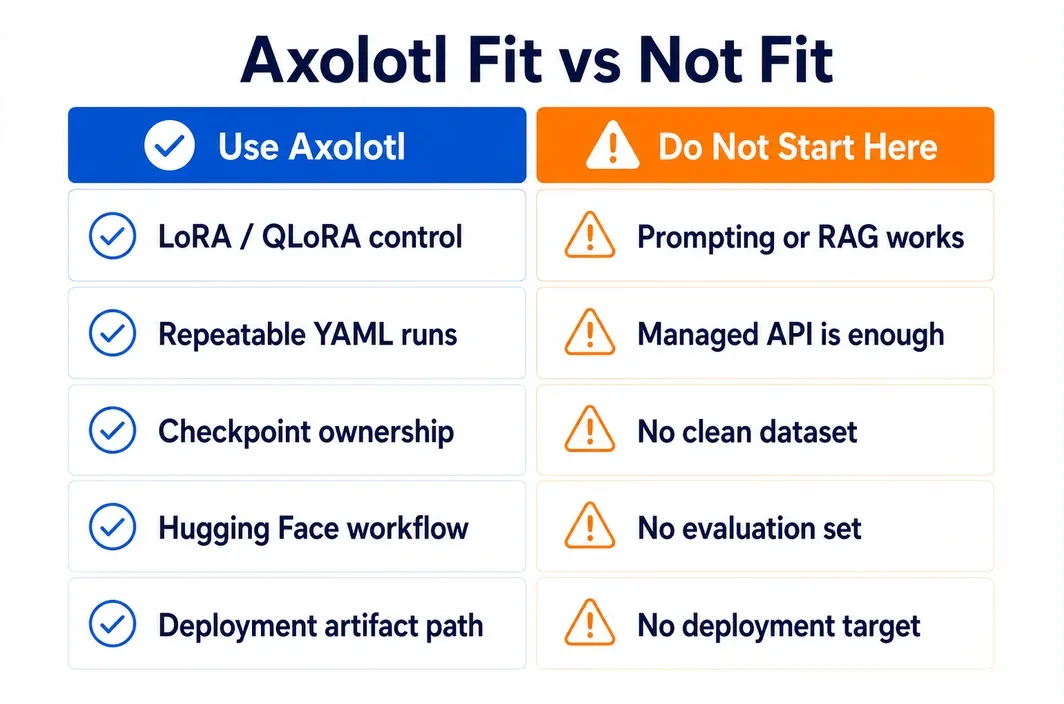
Axolotl is strongest when you need repeatable, inspectable fine-tuning runs. It is a better fit for teams that want to control the base model, training method, dataset format, YAML config, checkpoints, and evaluation loop than for teams that only need a quick managed API experiment.
Use Axolotl when the training job has a clear behavior target: a model should answer in a specific format, follow domain terminology, improve instruction-following on your examples, or adapt to a workflow that prompting and retrieval cannot handle cleanly. If the target behavior is vague, the tool choice will not fix the training plan.
| Use Axolotl when | Do not start with Axolotl when |
|---|---|
| You need LoRA, QLoRA, or another configurable Hugging Face training workflow | Prompting or RAG already solves the use case |
| You want a YAML-driven setup that can be rerun and reviewed | You only need a managed API fine-tuning path |
| You need control over dataset format, sequence length, adapter settings, and checkpoints | You do not have a clean dataset or evaluation set yet |
| You plan to compare multiple runs, configs, or model sizes | You want a theory overview rather than a training workflow |
| You need training output that can move into a serving environment later | You have not chosen the deployment target or artifact format |
The "not fit" side matters. Axolotl can make training more reproducible, but it cannot decide whether the dataset is worth training on. Before using GPU time, write down the behavior you want to change, the evaluation examples that prove it changed, and the serving path you expect after training.
Minimum viable setup: data, GPU, storage, and config
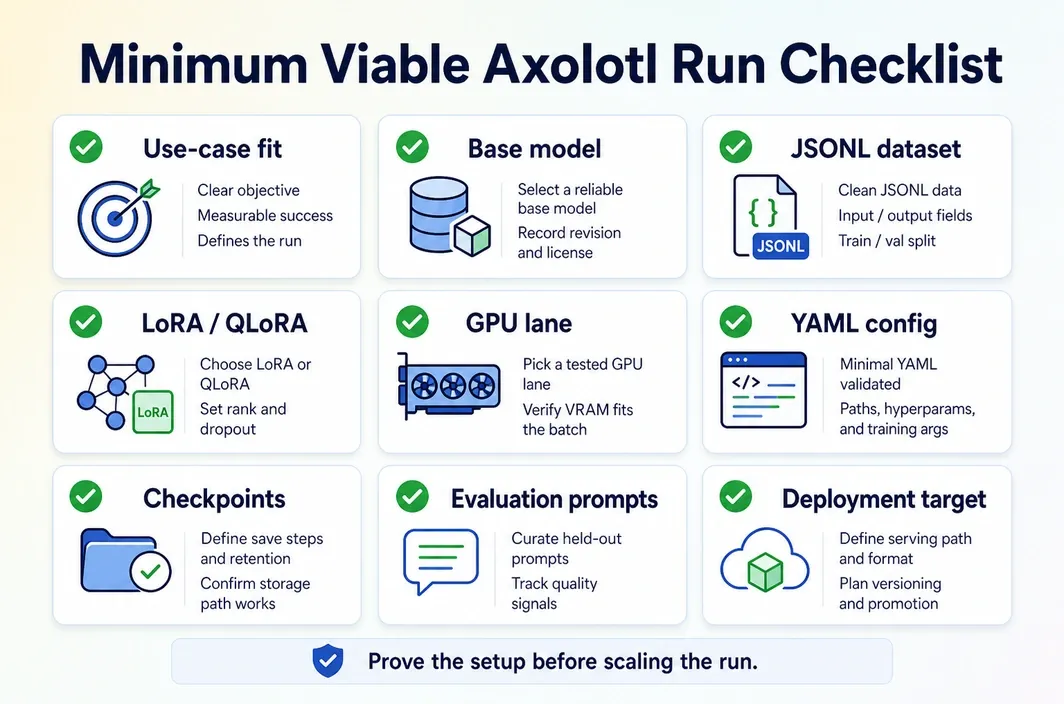
A minimum viable Axolotl run has four things ready before training starts: a valid dataset, a realistic GPU lane, a config file that matches the dataset and model, and a checkpoint plan. Skip any one of those and the first run turns into debugging.
For data, JSONL is the practical default. The exact fields depend on the dataset type you choose in Axolotl, but the principle is stable: the file must match the prompt/response or conversation format declared in the config. Keep a small smoke-test subset separate from the full dataset so you can catch schema and formatting errors quickly.
| Readiness item | Minimum viable answer before training |
|---|---|
| Use-case fit | A specific behavior change that prompting or RAG does not solve cleanly |
| Base model | A model size and license you can train, store, and serve |
| Dataset | JSONL in a supported Axolotl format, plus a small smoke-test subset |
| Method | LoRA or QLoRA for most first runs; full fine-tuning only with a strong reason |
| GPU lane | Small smoke test, 7B QLoRA planning lane, or larger A100/H100-class lane |
| Config | YAML naming model, adapter, dataset path/type, output directory, batch settings, and learning rate |
| Checkpoints | Output directory, resume policy, and adapter-vs-merged-model decision |
| Evaluation | Fixed prompts or held-out examples before deployment |
| Deployment target | Serving runtime and artifact format chosen before training begins |
Data volume does not have one universal number. A smoke test may only need enough examples to exercise the schema and confirm the loop runs. A first serious supervised fine-tuning run usually needs hundreds or thousands of high-quality examples that cover the behavior you want the model to learn. More data is not automatically better if it mixes formats, duplicates weak answers, or contains examples you cannot evaluate.
GPU planning should also be treated as a lane, not a guarantee. Small LoRA tests on small models can run on modest GPUs. A 7B QLoRA run usually belongs in a 24GB+ planning lane. Longer context, larger models, full fine-tuning, or repeated team runs should move toward 80GB GPUs such as A100 or H100, or a multi-GPU plan, depending on the model and batch settings.
When the run needs a stable cloud workspace, RunC.ai GPU Pods can provide a controlled training environment instead of a local workstation that changes between runs. Shared Network Volumes can keep datasets, base weights, configs, and checkpoints available across iterations, and SSH or JupyterLab-style access makes it easier to inspect failures while training is still fresh. The GPU choice still depends on the workload; RunC is the environment control layer, not the training method.
The YAML config is the contract between your data, model, and hardware. A first config should stay boring. Start from the official Axolotl examples, then change only the fields that must match your run:
base_model: meta-llama/Meta-Llama-3-8B
model_type: LlamaForCausalLM
tokenizer_type: AutoTokenizer

load_in_4bit: true
adapter: qlora

datasets:
  - path: ./data/train.jsonl
    type: alpaca

dataset_prepared_path: ./prepared-data
output_dir: ./outputs/axolotl-first-run

sequence_len: 2048
micro_batch_size: 1
gradient_accumulation_steps: 8
learning_rate: 0.0002
num_epochs: 3
Treat that as a shape, not a copy-paste guarantee. The base model, dataset type, sequence length, and training settings must match the actual model, data, and GPU memory available.
The Axolotl workflow: dataset -> config -> train -> checkpoint
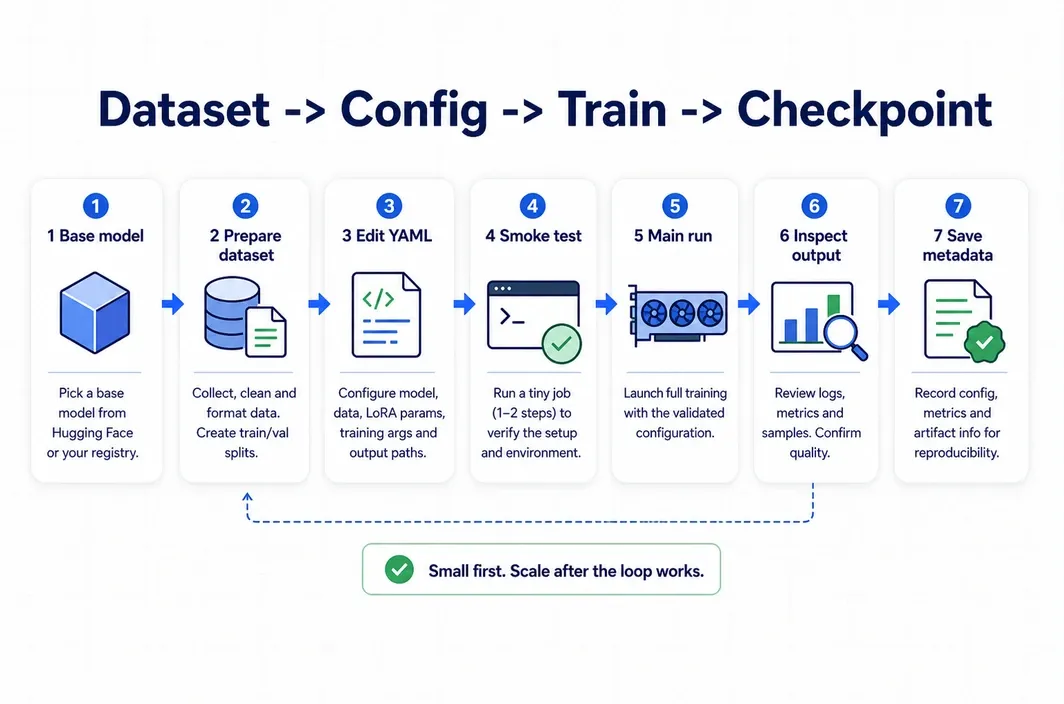
The fastest reliable path is to make the first run small on purpose. Prove that the dataset loads, the tokenizer works, the config points to the right files, and a checkpoint is written. Then scale the run.
- Choose the base model and training method. Decide whether the first run is LoRA, QLoRA, or full fine-tuning. For most teams, LoRA or QLoRA is the first practical step because it keeps the training artifact smaller and lowers the compute barrier.
- Prepare the dataset. Keep one file for training and one small validation or held-out prompt set. Validate field names, role labels, and response formatting before you start the GPU job.
- Start from an example YAML. Change the model, dataset path, dataset type, output directory, sequence length, batch settings, and learning rate. Avoid changing many advanced settings in the first pass.
- Run a smoke test. Use a small subset, short run, and conservative sequence length. The goal is not quality yet. The goal is to prove the environment, data, and config agree.
- Launch the main run. Watch memory use, loss behavior, checkpoint output, and validation behavior. If the run fails, keep the failed config and logs instead of overwriting them.
- Inspect the output directory. Confirm whether you produced adapter weights, intermediate checkpoints, logs, and config snapshots. Do not assume the final folder is ready for serving.
- Save the run metadata. Record base model version, dataset version, config file, Axolotl version, GPU lane, output directory, and evaluation prompts together.
That final metadata step is easy to skip, but it is what makes the run reproducible. Without it, a promising checkpoint becomes hard to compare with the next run, and deployment teams cannot tell what artifact they are testing.
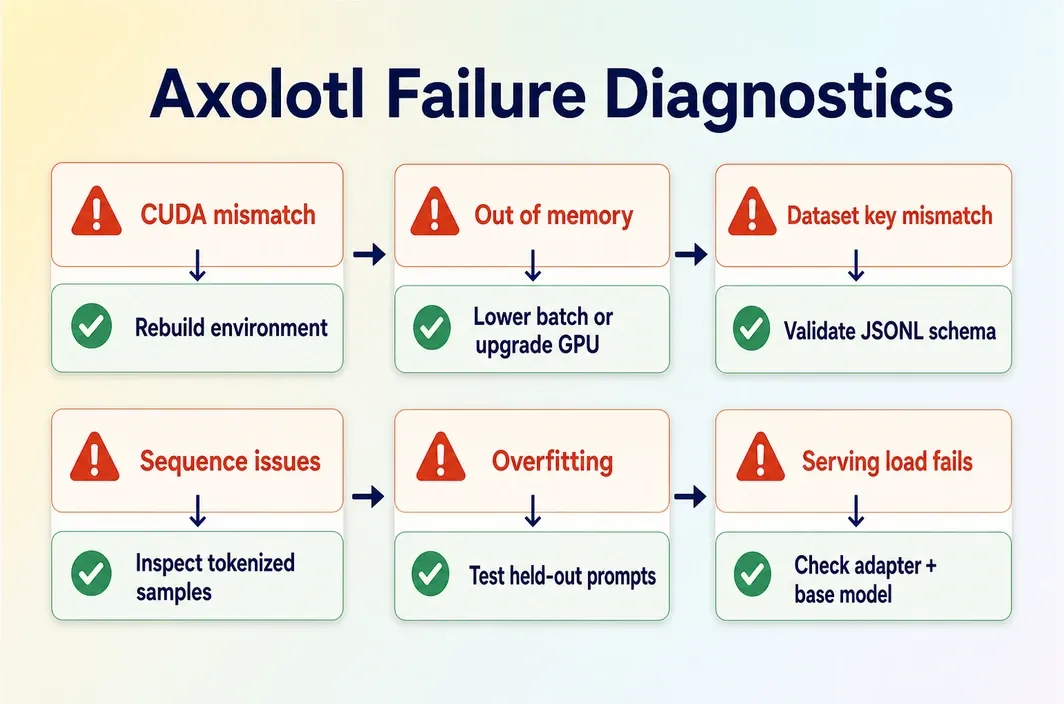
Checkpointing, iteration, and common failures
Checkpoint handling is part of the training plan, not cleanup after the run. Decide whether the output will stay as an adapter, be merged into the base model, or be exported for a specific serving stack. That decision affects storage, evaluation, and deployment.
Adapter checkpoints are often easier to store and compare across runs. Merged models can simplify some serving paths but take more space and need clearer version control. Either way, do not delete the YAML config, dataset reference, or evaluation prompts that produced the checkpoint.
| Problem | What it usually means | Recommended action |
|---|---|---|
| CUDA or PyTorch mismatch | The environment does not match the installed training stack | Rebuild from a known-good image or template, then rerun the smoke test |
| Out-of-memory error | Model size, sequence length, batch size, or precision is too aggressive | Lower sequence length or micro batch size, use QLoRA, or move to a larger GPU lane |
| Dataset key mismatch | The JSONL fields do not match the declared dataset type | Validate a few examples manually and align the config dataset type |
| Packing or sequence-length problems | Examples are being truncated or packed in a way that changes training behavior | Inspect tokenized examples and reduce complexity for the first run |
| Loss improves but outputs get worse | The model may be overfitting or learning weak examples | Test on held-out prompts and review dataset quality before another long run |
| Checkpoint will not load in serving | Adapter, base model, merge state, or runtime format is inconsistent | Preserve base model metadata and test the artifact before production rollout |
Repeated Axolotl runs benefit from a stable environment. With RunC, teams can keep datasets, configs, checkpoints, and GPU choice organized across iterations. If a team reruns experiments weekly, persistent storage and controlled GPU Pods reduce the friction of rebuilding the same training workspace.
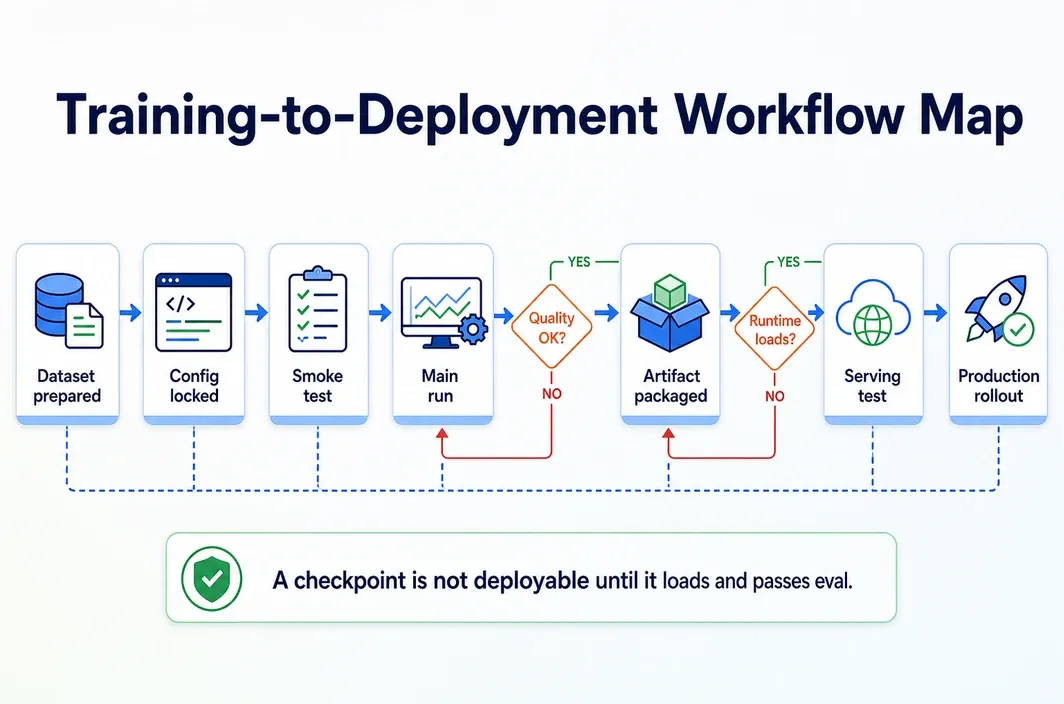
From Axolotl output to a deployable model path
Training ends when the artifact can be evaluated and moved into a serving plan, not when the last epoch finishes. The deployment path should be visible before the main run starts.
Use this workflow map:
| Stage | Output | Decision before moving on |
|---|---|---|
| Dataset prepared | JSONL training file and held-out examples | Does the data match the target behavior and declared format? |
| Config locked | YAML plus environment notes | Can another engineer rerun this job? |
| Smoke test complete | Small checkpoint or adapter output | Did the data load, train, and write output correctly? |
| Main run complete | Adapter weights or model checkpoint | Does evaluation show the behavior improved? |
| Artifact packaged | Adapter or merged model with metadata | Will the serving runtime load this format? |
| Serving test | Local, pod-based, or staging inference test | Are latency, quality, and rollback behavior acceptable? |
| Production rollout | Versioned model release | Is monitoring and rollback ready? |
For many LoRA or QLoRA workflows, the first deployable artifact is an adapter plus a base model reference. In other cases, you may merge weights before serving. The right choice depends on your runtime, update frequency, and whether you need to serve multiple adapters from the same base model.
If you train on a GPU Pod, the same controlled environment can also be used for evaluation and packaging. You can test prompts against the adapter, confirm the output format, then prepare the artifact for a serving runtime such as vLLM or another compatible inference stack. Keep that step separate from the training claim: a successful Axolotl run means the checkpoint exists; a deployable model means the artifact loads and behaves correctly in the intended serving path.
FAQ
Is Axolotl only for LoRA and QLoRA?
No. Axolotl supports multiple fine-tuning paths, but LoRA and QLoRA are often the most practical starting point because they reduce the memory and storage burden compared with full fine-tuning. Choose the method based on the model size, target behavior, and serving plan.
How much data do I need before using Axolotl?
Use a small validated subset for the smoke test, then move to a larger set only after the schema and config work. For a first serious SFT run, hundreds or thousands of high-quality examples are often more useful than a large noisy dataset.
What GPU do I need for Axolotl fine tuning?
It depends on model size, sequence length, precision, adapter method, and batch settings. Small tests can run on modest GPUs, 7B QLoRA usually belongs in a 24GB+ planning lane, and larger or longer-context work often needs A100/H100-class memory planning.
What is the difference between an adapter checkpoint and a merged model?
An adapter checkpoint stores the fine-tuned delta separately from the base model. A merged model combines the adapter with the base weights, which can simplify some serving paths but creates a larger artifact that needs clear version control.
Can I deploy a model directly after Axolotl training?
Not safely without evaluation and packaging. First test the checkpoint or adapter with held-out prompts, decide whether to serve adapters or merged weights, and confirm that the target runtime can load the artifact.
Conclusion
The safest Axolotl fine tuning path is small first, reproducible second, and scalable only after the dataset, config, and checkpoint loop works. Start with a smoke test, keep the YAML and dataset version tied to each run, evaluate before merging or exporting, and choose the GPU lane based on the actual model and sequence length.
If local hardware keeps slowing the loop, RunC.ai can provide GPU Pods, larger GPU options, and persistent storage for datasets and checkpoints so your training workflow is easier to rerun and hand off. Start with the smallest validated run, then scale the environment once the artifact path is proven.

Member discussion: