
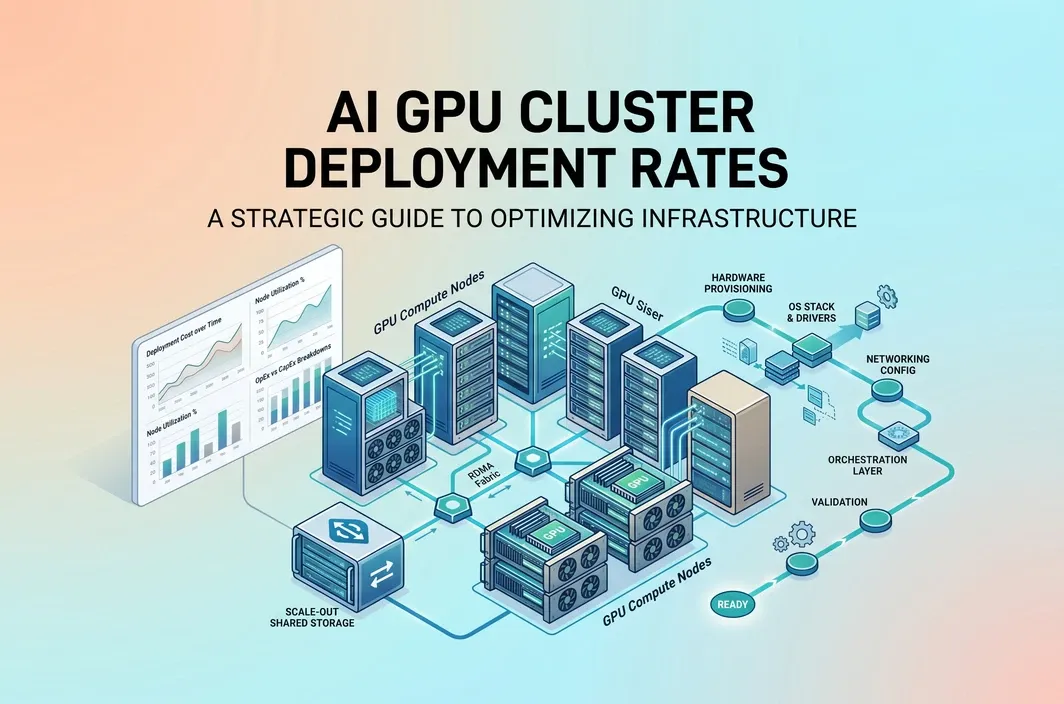
Key Takeaways
- AI GPU cluster deployment rates are driven by more than the GPU hourly price. Storage, networking, utilization, cluster size, and deployment model all change the final bill.
- On-demand single-GPU pricing is only the starting point. Real cluster costs scale with card count, runtime, attached storage, and how efficiently jobs are scheduled.
- RTX 4090-class nodes can be attractive for cost-sensitive inference and lighter model work, while A100 and H100 clusters make more sense when memory, throughput, or scaling requirements increase.
- Dedicated GPU Pods are usually easier to budget for iterative development and persistent inference clusters than fully managed stacks with opaque pricing.
- RunC.ai is relevant here because its public pricing signals, per-second billing model, Shared Network Volumes, and image pre-warming features map directly to how cluster deployment costs behave in practice.
If you are searching for ai gpu cluster deployment rates, you probably are not looking for a vague cloud pricing overview. You are trying to answer a more practical question: what does it actually cost to deploy and run an AI GPU cluster once you move past a single test instance?
That question matters because cluster pricing gets misunderstood quickly. Teams often compare only the hourly cost of one GPU, then get surprised by the total monthly bill after adding multiple nodes, persistent storage, container images, networking, idle time, or underutilized infrastructure. A useful cost model has to include all of those pieces.
This guide breaks down how AI GPU cluster deployment rates work in 2026, what cost components matter most, when different GPU classes make financial sense, and how to think about a platform like RunC.ai for cluster-style workloads.
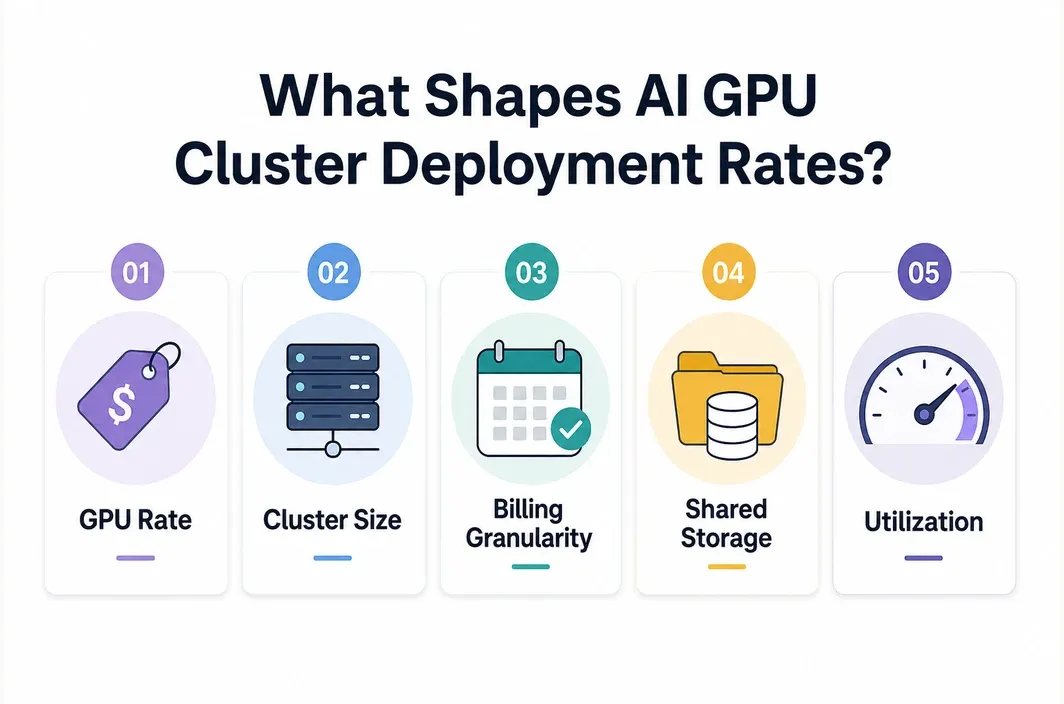
What "AI GPU Cluster Deployment Rates" Really Means
In practice, AI GPU cluster deployment rates are not a single universal number. They are the combined operating cost of compute, storage, and runtime behavior for a multi-node or multi-GPU environment.
At minimum, your effective rate includes:
| Cost Component | Why It Matters |
|---|---|
| GPU hourly rate | The base cost of each GPU instance or Pod |
| Number of GPUs | Cluster size multiplies the compute rate immediately |
| Billing granularity | Per-second or coarse hourly billing changes waste significantly |
| Storage | Model weights, datasets, checkpoints, and shared artifacts add recurring cost |
| Runtime utilization | Idle nodes can destroy the economics of a cluster |
| Startup behavior | Slow image pulls and environment setup increase paid but non-productive time |
| Networking and architecture | Distributed training and inference clusters may need shared data access and low-latency coordination |
That is why two clusters built with the same nominal GPU can end up with very different effective deployment rates. One team may run tightly scheduled jobs on reusable images and shared storage. Another may leave nodes idle, re-download models repeatedly, and pay for infrastructure that is technically online but not productive.
So when someone asks about AI GPU cluster deployment rates, the real answer is usually: it depends on the workload pattern, not just the card type.
The Starting Point: Compute Pricing by GPU Tier
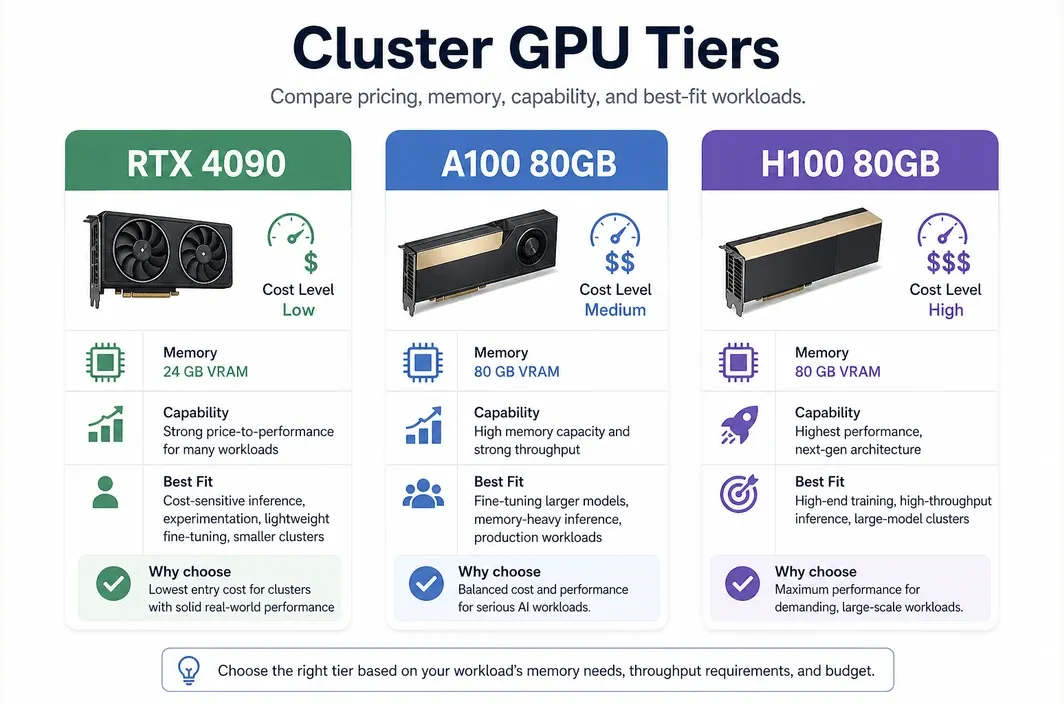
The easiest place to start is still the base GPU price, because that anchors everything else. On the current RunC.ai public pricing page, the visible rate signals are:
RTX 4090:$0.42/hrA100 80GB:$1.60/hrH100 80GB:$2.56/hr
Those numbers are not the whole story, but they are useful benchmarks because they show how dramatically deployment rates can change as you move up the GPU ladder.
| GPU Tier | Public RunC.ai Pricing Signal | Best Fit |
|---|---|---|
| RTX 4090 | $0.42/hr | Cost-sensitive inference, experimentation, lighter fine-tuning, smaller serving clusters |
| A100 80GB | $1.60/hr | Memory-heavy inference, serious fine-tuning, larger production model workloads |
| H100 80GB | $2.56/hr | High-end training, high-throughput inference, performance-critical large-model deployments |
Even at this stage, cluster math changes quickly.
| Example Cluster | Approx. Base Compute Rate |
|---|---|
| 4x RTX 4090 | $1.68/hr |
| 8x RTX 4090 | $3.36/hr |
| 4x A100 80GB | $6.40/hr |
| 8x A100 80GB | $12.80/hr |
| 8x H100 80GB | $20.48/hr |
This is why GPU selection is a budget decision before it is a performance decision. A team that casually jumps from 4090-class hardware to an H100-class cluster can multiply its compute rate many times over before storage and orchestration are even considered.
Why Storage and Billing Model Matter More Than Teams Expect
Many teams underestimate how much non-compute infrastructure affects AI GPU cluster deployment rates.
RunC.ai's pricing documentation is especially useful here because it breaks out more than just compute. Its current docs state that billing duration is accurate to the second and settled hourly. The same pricing reference also lists storage pricing items, including:
- excess system/container storage pricing after free quota
- volume disk pricing
Network Volumepricing at$0.002/GB/day- image volume pricing
That matters for cluster economics because AI environments are heavy. Model checkpoints, tokenizer assets, embedding indexes, and Docker images all compound once you move from one test machine to a repeatable cluster deployment.
| Hidden Cost Driver | What Happens If You Ignore It |
|---|---|
| Repeated model downloads | You pay in time and engineering friction on every new node |
| No shared storage layer | Each node becomes more expensive to initialize and maintain |
| Coarse billing | Short-lived experiments create billing waste |
| Large custom images without pre-warming | Startup delay becomes part of your paid runtime |
| Idle persistent nodes | Effective rate becomes much higher than headline hourly price |
This is why platform features can materially change your real deployment rate even if the base GPU price looks similar across providers.
What Makes a Cluster Expensive in Practice
The most expensive AI GPU clusters are not always the ones with the highest list price. They are often the ones with the weakest utilization discipline after the base infrastructure is already in place.
A cluster becomes financially inefficient when:
- nodes sit idle between jobs
- model assets are copied repeatedly instead of shared
- GPU memory requirements force overbuying high-end cards for smaller workloads
- startup times are long enough that every deployment spends paid time waiting
- the team chooses a managed abstraction that hides rate details until the invoice arrives
This usually shows up after the obvious pricing math is already done. Teams may choose the right GPU tier on paper, then still overspend because they keep too much idle headroom, duplicate model assets across nodes, or rebuild the same runtime over and over.
That pattern is common in both inference and training environments. Inference clusters often stay overprovisioned for safety, while training and fine-tuning clusters often look efficient until repeated setup work starts consuming paid time before useful jobs even begin.
So the right question is not only "What is the GPU rate?" It is also "How much of the billed runtime becomes productive model work?"
Choosing the Right GPU Tier for Cluster Economics
The cheapest cluster is not always the best-value cluster. The right deployment rate depends on whether the workload is bottlenecked by memory, throughput, or simply cost sensitivity.
| Workload Type | Often the Better Starting Tier | Why |
|---|---|---|
| Small to mid-size inference APIs | RTX 4090 | Strong price-to-performance if memory limits are acceptable |
| Iterative model serving and experimentation | RTX 4090 or A100 | Depends on VRAM and concurrency needs |
| Fine-tuning larger models | A100 80GB | 80GB VRAM can prevent wasted engineering time around memory limits |
| Production LLM inference with larger contexts or higher concurrency | A100 or H100 | Higher memory and throughput may reduce total cost per useful output |
| Performance-critical large-model workloads | H100 80GB | Expensive per hour, but sometimes cheaper per job completed |
This is an important distinction. A cheaper hourly rate can still be a worse economic choice if it forces slower throughput, more job fragmentation, or repeated OOM-related failures. Conversely, the highest-end GPU is not automatically better if the workload never uses the additional capability.
That is why cluster pricing has to be evaluated as a cost-per-useful-result problem, not just a cost-per-hour problem.
Why RunC.ai Is a Practical Fit for Cost-Conscious Cluster Deployments
If you are evaluating RunC.ai for cluster-style workloads, the useful angle is not "cloud GPU" in the abstract. The real question is whether the platform helps control the specific cost drivers that make AI GPU clusters expensive in practice.
The most relevant points are straightforward:
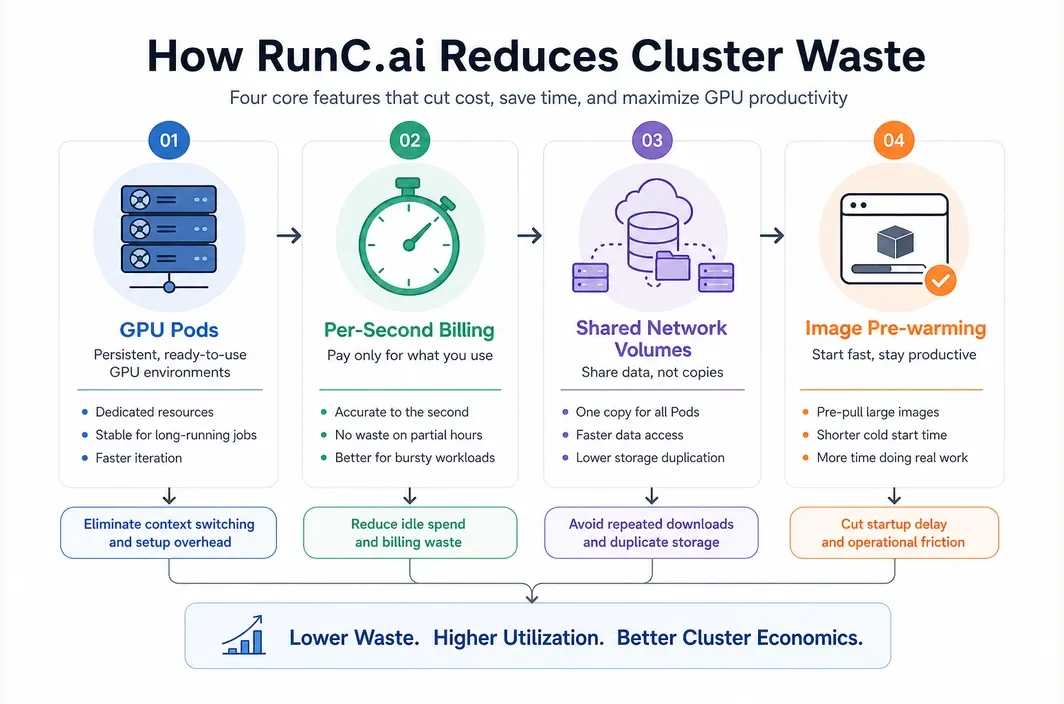
GPU Podsare designed for persistent workloads and iterative development- billing is granular, with documentation stating duration is accurate to the second
Shared Network Volumeslet multiple Pods access shared datasets and modelsImage Pre-warmingis explicitly positioned to reduce startup delay for large custom images- the public site still shows a clear spread between RTX 4090, A100 80GB, and H100 80GB pricing
These details matter because they affect effective deployment rates, not just marketing language.
For example, shared storage is useful when multiple inference or training nodes need access to the same model assets without duplicating everything per Pod. Image pre-warming matters when your cluster depends on large custom containers and you do not want every launch cycle to spend paid minutes pulling the same environment.
That is why RunC.ai is most relevant here as a practical deployment option whose billing and storage behavior lines up with the economics people are actually trying to control.
If your team wants dedicated control over AI infrastructure without immediately committing to hyperscaler pricing or highly abstract managed platforms, RunC.ai is a strong option to evaluate for GPU cluster deployment.
FAQ
What are typical AI GPU cluster deployment rates in 2026?
There is no single standard rate. In practice, rates depend on GPU type, number of nodes, storage, billing model, and utilization. A cluster built on RTX 4090 nodes can start much lower than an A100 or H100 cluster, but the right choice depends on memory and throughput requirements.
How do you calculate AI GPU cluster deployment cost?
Start with GPU hourly cost multiplied by runtime and card count, then add storage, image and environment overhead, and expected idle time. Real cluster pricing is always more than the per-GPU headline rate.
Is per-second billing important for AI GPU clusters?
Yes. Granular billing reduces waste for iterative workloads, testing cycles, bursty inference, and jobs that do not use exact hour blocks efficiently.
When should you choose A100 or H100 instead of RTX 4090?
Choose A100 or H100 when your workload is memory-heavy, throughput-sensitive, or large enough that a cheaper GPU becomes inefficient in practice. The more your workload depends on larger VRAM and higher sustained performance, the more these tiers can make sense.
Why do shared volumes matter for AI GPU cluster pricing?
Shared volumes help multiple nodes reuse the same models and datasets. That reduces repeated setup work, lowers operational friction, and improves cluster efficiency.
Conclusion
The most useful way to think about ai gpu cluster deployment rates is not as a single market price, but as a deployment economics problem. GPU price matters, but so do billing granularity, storage design, startup behavior, and utilization discipline.
For cost-sensitive teams, RTX 4090-class infrastructure can be an efficient starting point. For heavier model serving, fine-tuning, and large-scale workloads, A100 and H100 clusters may justify their higher hourly rates. The right answer depends on the workload, not the prestige of the hardware.
If you want a cluster deployment model that keeps pricing legible while supporting shared storage, fast startup, and dedicated GPU control, RunC.ai is a practical platform to evaluate. A sensible next step is to start with the smallest dedicated setup that fits your real workload, measure utilization, and then scale GPU tier and node count from actual usage instead of list-price assumptions alone. You can explore GPU Pods and current pricing signals on RunC.ai before committing to a larger cluster architecture.

Member discussion: