
Key Takeaways
- RTX 5090 is the stronger local card for ComfyUI Wan because it adds 32GB GDDR7 memory, higher bandwidth, and more local headroom than RTX 4090.
- RTX 4090 is still a practical value choice for smaller Wan2.2 paths such as TI2V-5B, optimized workflows, and occasional short clips.
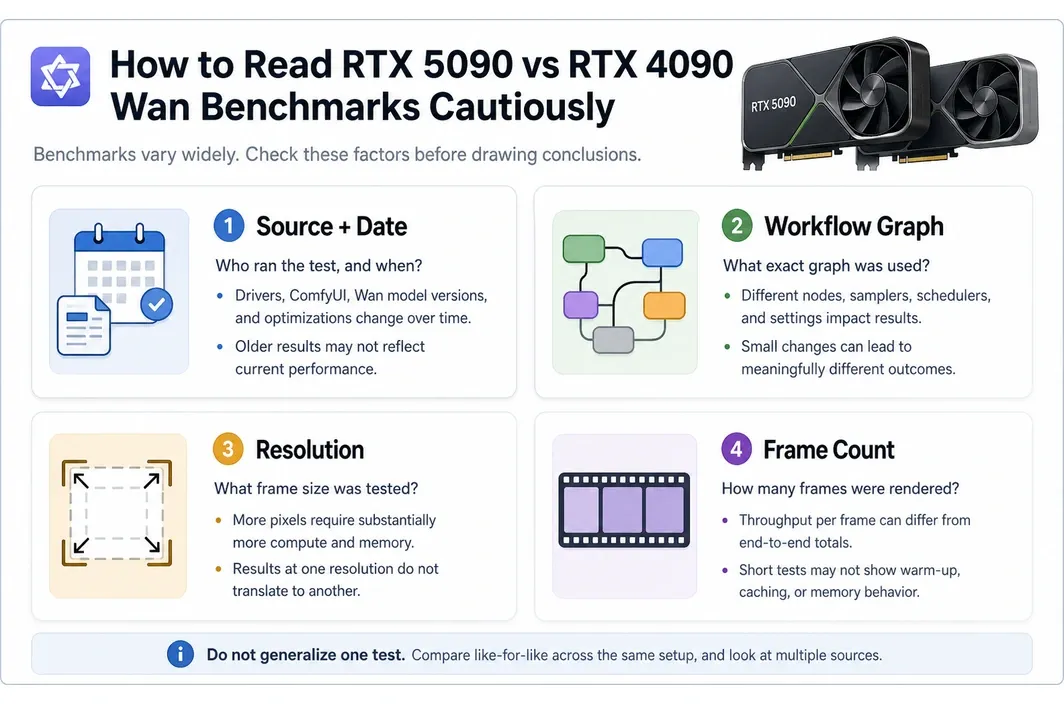
- Published benchmark numbers need source/date/workflow/resolution/frame-count caveats. A 5090 speed lead in one Wan or image-to-video test is not a universal result for every ComfyUI graph.
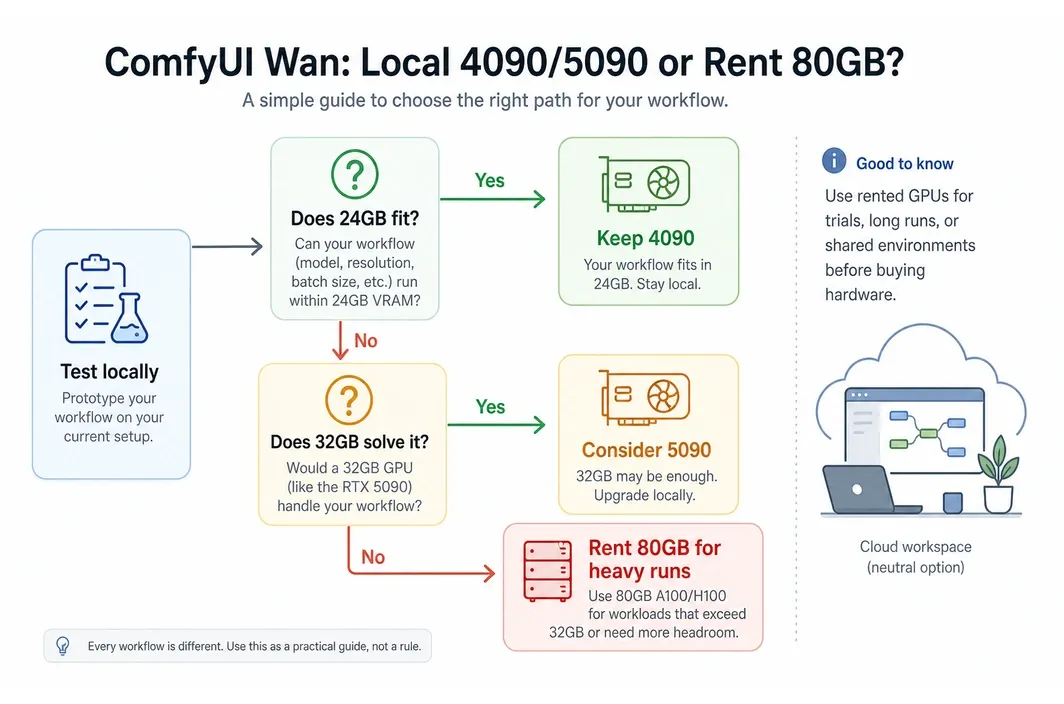
- The real decision is not only 4090 vs 5090. It is whether your target Wan workflow fits inside 24GB or 32GB, or whether it needs an 80GB cloud GPU.
- For heavier 14B, 720p, long-clip, or repeated batch work, A100/H100 80GB cloud runs can be more practical than buying more consumer GPU headroom.
Introduction
Searching for 5090 vs 4090 comfyui wan usually means one of three things: you already have a 4090 and want to know if the 5090 upgrade is worth it, you are buying a local GPU for Wan video generation, or you have hit memory errors in ComfyUI.
The answer depends less on a generic GPU ranking and more on the exact Wan workflow. A smaller public Wan2.2 path such as TI2V-5B behaves very differently from a heavier Wan2.2 A14B workflow with longer clips, larger model files, and less tolerance for offloading. Benchmarks help, but only when the model, precision, resolution, clip length, frame count, graph, and driver setup are clear.
Use the 4090 when the work fits and local iteration is the point. Consider the 5090 when 24GB is the measured limiter and 32GB is enough for the target graph. Move to 80GB cloud GPU capacity when the workflow keeps pushing past consumer-card comfort.
Quick Benchmark Verdict: 5090 Is Faster, but Wan Workflow Settings Decide the Real Gap
RTX 5090 is generally the faster local card for AI video workloads, but ComfyUI Wan results are too workflow-sensitive for one clean percentage. The fair version of the benchmark answer is: 5090 improves local throughput and memory headroom, while 4090 remains a good value for lighter paths that already fit.
| Source checked | Workflow and resolution | Reported result | Frame-count caveat | How to use it |
|---|---|---|---|---|
| Wan2.2 official GitHub, checked 2026-06-30 | Wan2.2-TI2V-5B at 1280x704, RTX 4090-class 24GB route | Official repo says the single-GPU TI2V-5B command can run on at least 24GB VRAM, such as RTX 4090, with offload and memory-saving flags | Support guidance, not a universal throughput result | Confirms a public Wan2.2 5B path still fits the 4090 branch |
| Valdi blog, checked 2026-06-26 | Third-party image-to-video inference comparison, 5090 vs 4090 | 5090 around 7 minutes vs 4090 around 12.7 minutes, described as nearly 45% faster | Use the source workflow settings; not a universal Wan frame-count result | Useful speed signal, not a purchasing rule by itself |
| Salad blog, checked 2026-06-26 | WAN2.1 480p cloud benchmark | Single 5090 reported around 25 five-second clips/hour, roughly twice a 4090 | 480p, five-second clip throughput; not a 720p or 14B guarantee | Useful for batch 480p planning |
| Wan2.2 official GitHub, checked 2026-06-30 | Wan2.2-T2V-A14B or I2V-A14B at 720P single-GPU inference | Official repo says the 720P single-GPU A14B commands need at least 80GB VRAM | Single-GPU support guidance, not a blanket rule for every quantized graph | Supports the 80GB cloud planning branch with an official Wan2.2 source |
This is why raw benchmark tables can mislead. A 5090 can be much faster in a specific image-to-video or 480p Wan test, but ComfyUI graphs change quickly. Model size, quantization, resolution, frame count, and memory offload choices can move the bottleneck from compute to VRAM or system memory.
For an upgrade decision, benchmark your target graph. If 24GB is too tight but 32GB is enough, the 5090 has a clean local argument. If the graph points toward 60GB or more, it may only postpone the cloud decision.
The Specs That Matter for ComfyUI Wan: VRAM, Bandwidth, Power, and NVLink Absence
The spec comparison matters only when it maps to Wan behavior. Gaming FPS, raster performance, and generic creator scores are secondary for this search. ComfyUI Wan cares about memory capacity, memory bandwidth, precision choices, power draw, and whether the workflow can stay on one card without painful offloading.
Official NVIDIA pages checked on 2026-06-26 list RTX 4090 with 24GB GDDR6X memory, a 384-bit interface, 450W total graphics power, and no NVLink. The RTX 5090 page lists 32GB GDDR7 memory, a 512-bit interface, 575W total graphics power, and no NVLink.
| Spec | RTX 4090 | RTX 5090 | ComfyUI Wan consequence |
|---|---|---|---|
| VRAM | 24GB GDDR6X | 32GB GDDR7 | 5090 gives 8GB more local room, useful for larger graphs or fewer compromises |
| Memory interface | 384-bit | 512-bit | 5090 has more bandwidth headroom for memory-heavy generation paths |
| Power | 450W TGP | 575W TGP | 5090 can be faster but raises local power, cooling, and PSU demands |
| NVLink | Not supported | Not supported | Neither card should be treated as a clean multi-GPU scaling answer |
| Best local role | Value local card | Higher-headroom local card | The choice depends on whether your target graph fits in 24GB or needs closer to 32GB |
The 5090's extra VRAM is meaningful. In ComfyUI, 8GB can be the difference between running a graph comfortably and fighting memory pressure. It can also reduce the need to fall back to smaller files or aggressive offloading.
But 32GB is not the same as 80GB. If your target Wan workflow is built around larger models, 720p output, longer clips, or fewer memory-saving compromises, the 5090 may still leave you managing memory rather than producing video.
The VRAM Reality: Why 24GB and 32GB Can Both Be Too Small for Heavier Wan Runs
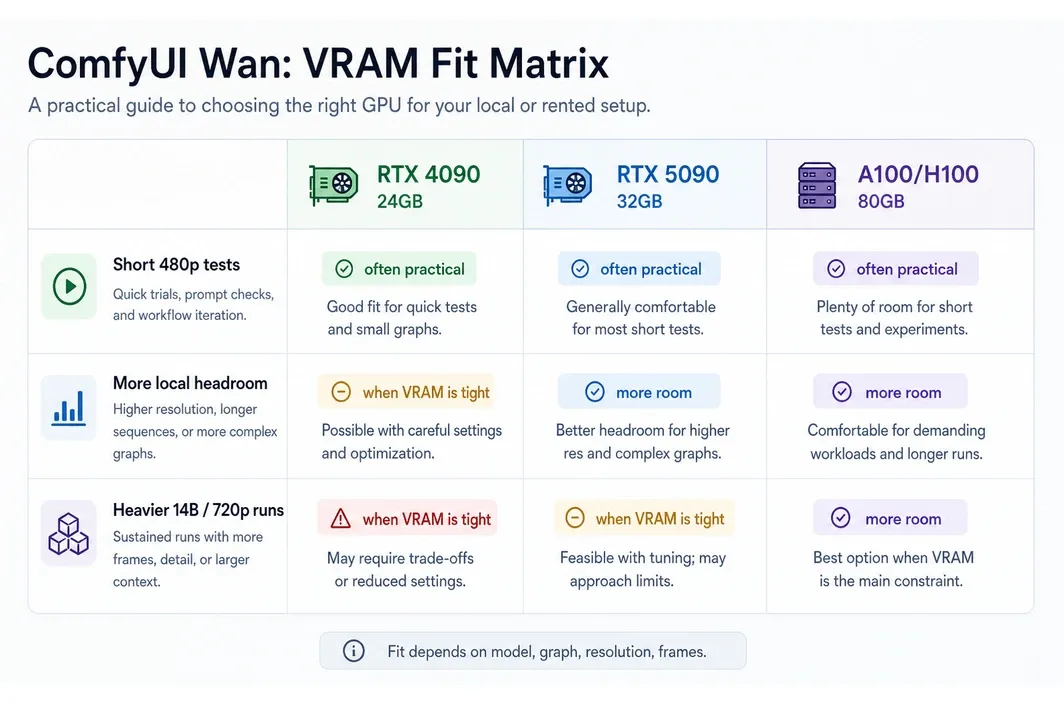
Official sources show that Wan is not one workload. As of 2026-06-30, Wan's official product pages already market newer hosted releases, while the public open-source and ComfyUI-deployable line is still centered on Wan2.2. Inside that public branch, the official Wan2.2 repository says TI2V-5B at 1280x704 can run on at least 24GB VRAM, such as RTX 4090, if you keep the memory-saving flags in place. The same official repository says the 720P single-GPU Wan2.2 A14B commands need at least 80GB VRAM. That is the practical split behind this decision.
The official ComfyUI Wan examples also matter. The examples use 16-bit files, note that FP8 files can be used when there is not enough memory, and describe the 720p image-to-video model as good if you have the hardware and patience. That is a polite way of saying that the larger paths are not simply "any modern GPU will do."
| Wan workflow shape | Likely local fit | Main caveat | Better path when it breaks |
|---|---|---|---|
| Wan2.2-TI2V-5B, optimized 24GB route | 4090 can be practical | Official path depends on offload and memory-saving flags, not a no-compromise local setup | Stay local unless runtime is unacceptable |
| FP8 or optimized ComfyUI paths | 4090 or 5090 can work | Precision and model-file choices affect output, memory, and speed tradeoffs | Test exact graph before buying |
| Larger local attempts that exceed 24GB but fit under 32GB | 5090 is the stronger local choice | 32GB is still a ceiling | Upgrade only if the target graph is known to fit |
| 14B, 720p, longer clips, fewer compromises | Often poor fit for 24GB/32GB | Provider guidance points toward 65-80GB for heavy paths, but exact needs vary | Use 80GB cloud GPU capacity |
| Repeated production batches | Depends on graph and tolerance for waiting | Power, heat, queue time, and failed runs become real costs | Rent high-VRAM capacity for final runs |
Do not read one 4090 benchmark as proof that every Wan graph is easy on 24GB. Also do not read one 5090 result as proof that 32GB solves every video workflow. The practical test is whether your exact model files, precision, resolution, clip length, frame count, and nodes fit without constant workarounds.
For local creators, this creates a sensible split. Use local hardware for prompt exploration, rough motion tests, shorter clips, and learning the workflow. Save larger runs for the moment when the graph is stable enough that more VRAM will actually save time.
When Local Makes Sense vs When to Stop Buying More Consumer GPU Headroom
The local card decision should start with your actual constraint. If your 4090 is idle between experiments and only struggles on rare final renders, buying a 5090 may be overkill. If you run ComfyUI Wan every day and 24GB is the recurring limit, the 5090 may be justified.
| Signal in your workflow | Best next move | Caveat |
|---|---|---|
| You mostly test prompts, motion, and short 480P clips | Keep or rent 4090-class capacity | Do not overbuild for occasional final renders |
| Your graph almost fits in 24GB but needs a little more room | Consider 5090 | Confirm the final graph fits inside 32GB before buying |
| Your target path is 14B, 720p, long clips, or repeated batches | Use 80GB cloud GPU capacity | Treat provider VRAM claims as guidance, then validate with your graph |
| You need short bursts of heavy capacity | Rent instead of buying | Current pricing and availability must be checked before each run |
| You want a permanent local workstation for daily video generation | 5090 may make sense | Include power, cooling, PSU, and opportunity cost in the budget |
The wrong move is treating 5090 as the automatic answer to every 4090 limitation. Sometimes it is the right upgrade. Sometimes it is just a more expensive way to remain under the memory requirement of the workflow you actually want.
A practical hybrid pattern works well: keep prompt exploration and rough tests local, then move final high-VRAM runs to cloud once the workflow is stable. That keeps the local workstation useful without turning every high-memory need into a hardware purchase.
At that stage, the practical question is no longer "which consumer GPU is nicer to own?" It is "where can this graph run cleanly without turning setup, cooling, and memory workarounds into the real project?"
Running ComfyUI Wan on Cloud A100/H100 After Local VRAM Becomes the Bottleneck
Once local 24GB or 32GB constraints become the problem, a cloud A100/H100 run is the practical next step. On RunC.ai, that path makes sense for heavier ComfyUI Wan jobs where local memory, cooling, runtime, or setup friction has become the blocker.
As of 2026-06-26, RunC publicly showed 4090, A100, and H100 GPU Pod pricing that can be used as a dated buying reference for this workflow. Re-check live pricing and availability before launch.
| RunC GPU Pod tier | VRAM | Public price checked 2026-06-26 | Fit for ComfyUI Wan |
|---|---|---|---|
| 1x RTX 4090 | 24GB | $0.42/h | Remote 4090-class testing or known small workflows |
| 1x A100 | 80GB | $1.60/h | Heavier memory-bound Wan runs where 24GB/32GB is too tight |
| 1x H100 | 80GB | $2.56/h | Higher-end repeated runs when runtime matters enough to pay more |
For this use case, the more relevant part is the operating model: RunC positions the path around on-demand GPU Pods, ComfyUI template support, SSH or JupyterLab access, and Shared Network Volumes so datasets and model files do not need to be rebuilt from scratch each time.
There are important boundaries. Public RunC pages checked on 2026-06-26 did not show a 5090 GPU Pod tier, so plan around the verified 4090, A100, and H100 options. Wan-specific one-click workflow support should also be rechecked before publication; the safer claim is ComfyUI template support plus manual Wan setup as needed.
The clean workflow is simple: test locally until the prompt, model files, resolution, and frame target are stable; then start an A100 or H100 Pod for the memory-heavy run. This keeps cloud spend tied to the bottleneck instead of turning cloud into a vague replacement for your local workstation.
FAQ
Can RTX 4090 run Wan in ComfyUI?
Yes, for some workflows. The official Wan2.2 repository, checked 2026-06-30, says the TI2V-5B single-GPU path at 1280x704 can run on at least 24GB VRAM, such as RTX 4090, when the memory-saving flags stay in place. That does not mean every A14B, 720P, long-clip, or custom ComfyUI graph will fit in 24GB.
Is RTX 5090 worth it over RTX 4090 for ComfyUI Wan?
It can be worth it if your current blocker is 24GB VRAM or local throughput and your target workflow fits inside 32GB. It is less convincing if your target path points toward 60GB or more, because a 5090 still remains a consumer-card memory ceiling.
How much VRAM does Wan need?
There is no single number for every Wan workflow. The public Wan2.2 TI2V-5B route can fit the 24GB branch, while the official 720P single-GPU Wan2.2 A14B routes point to at least 80GB VRAM. Always check model size, precision, resolution, clip length, frame count, and ComfyUI graph before treating any number as final.
Should I rent A100 or H100 for ComfyUI Wan?
Use A100 80GB when memory headroom is the main issue and the workload does not justify the higher H100 rate. Use H100 80GB when repeated runs or runtime pressure matter enough to pay more. Current pricing and GPU availability should be rechecked before launching a large batch.
Is a 5090 tier part of the RunC path here?
Not in the public pricing pages checked on 2026-06-26. Plan this workflow around the verified RTX 4090, A100 80GB, and H100 80GB GPU Pod options, with A100/H100 used after local 24GB/32GB constraints become the problem.
Conclusion
The 5090 vs 4090 ComfyUI Wan decision is really a workflow-fit decision. Keep the 4090 when the graph fits and local iteration matters. Consider the 5090 when 24GB is the measured bottleneck and 32GB is enough for your target settings. Move heavier, longer, or repeated Wan runs to 80GB cloud GPU capacity when consumer-card headroom stops being the real answer.
Before buying hardware or launching a large rented run, re-check current benchmark sources, model files, ComfyUI workflow requirements, and cloud GPU pricing. For memory-bound ComfyUI Wan jobs, the best setup is often a split workflow: local for fast iteration, cloud A100/H100 for the runs that actually need 80GB. If that is your branch, RunC.ai pricing gives you a dated starting point before you launch the next test.

Member discussion: